6 best LinkedIn inbox tools for recruiters (2026)
LinkedIn inbox tools for recruiters compared: Bokka, LinkedIn Recruiter, Recruiter Lite, Narrow, Kondo and Kanbox, by job, with prices from their own pages.
By Amardeep Anand, founder of Bokka · Published · 3 min read
On this page
- 1. Bokka: best for candidate pipelines in LinkedIn messages
- 2. LinkedIn Recruiter: best for sourcing at scale
- 3. LinkedIn Recruiter Lite: best for a solo recruiter's search
- 4. Narrow: best on price
- 5. Kondo: best when candidates also use WhatsApp
- 6. Kanbox: for importing candidates and automated follow-ups
- The tools side by side
- Which should you pick?
- Bokka pricing
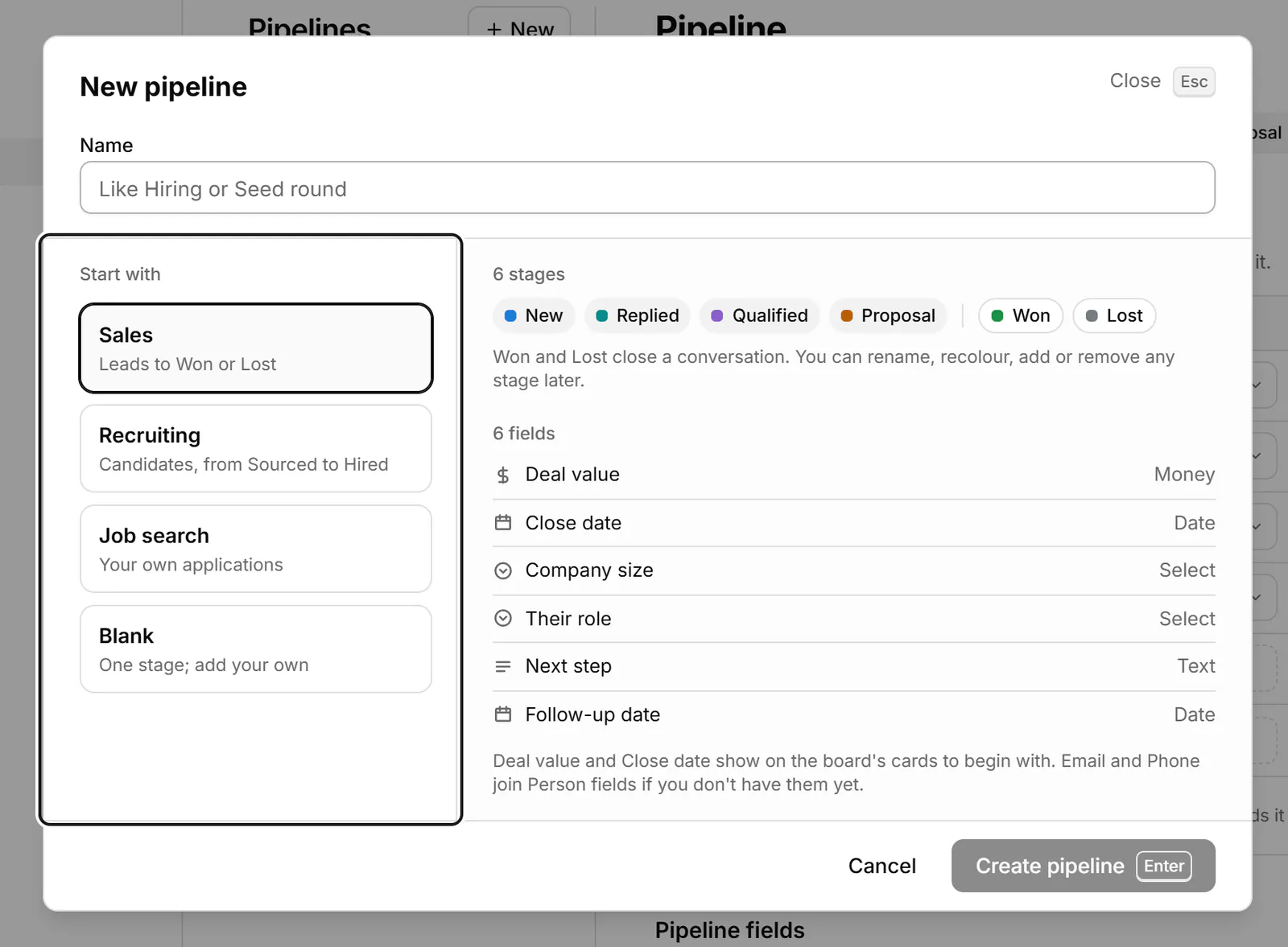
The best LinkedIn inbox tool for a recruiter depends on where candidates answer: in LinkedIn Recruiter's own inbox, or in your regular LinkedIn messages. Recruiter and Recruiter Lite cover the first; inbox tools such as Bokka, Narrow and Kondo cover the second, with labels, reminders and stages on the conversations.
A LinkedIn inbox tool adds labels, reminders and stages to your LinkedIn messages. A sourcing tool finds new candidates. An ATS keeps applications and hiring decisions. Bokka is an AI-first CRM for your LinkedIn inbox.
- Candidate conversations: can you see who's waiting on you, and follow up on time?
- Pipeline: stages per candidate, labels per role, notes.
- Reach: search, InMail and lead import.
- Fit with the rest of hiring: ATS, sheets and CRM.
- How it treats your account: does it automate?
1. Bokka: best for candidate pipelines in LinkedIn messages
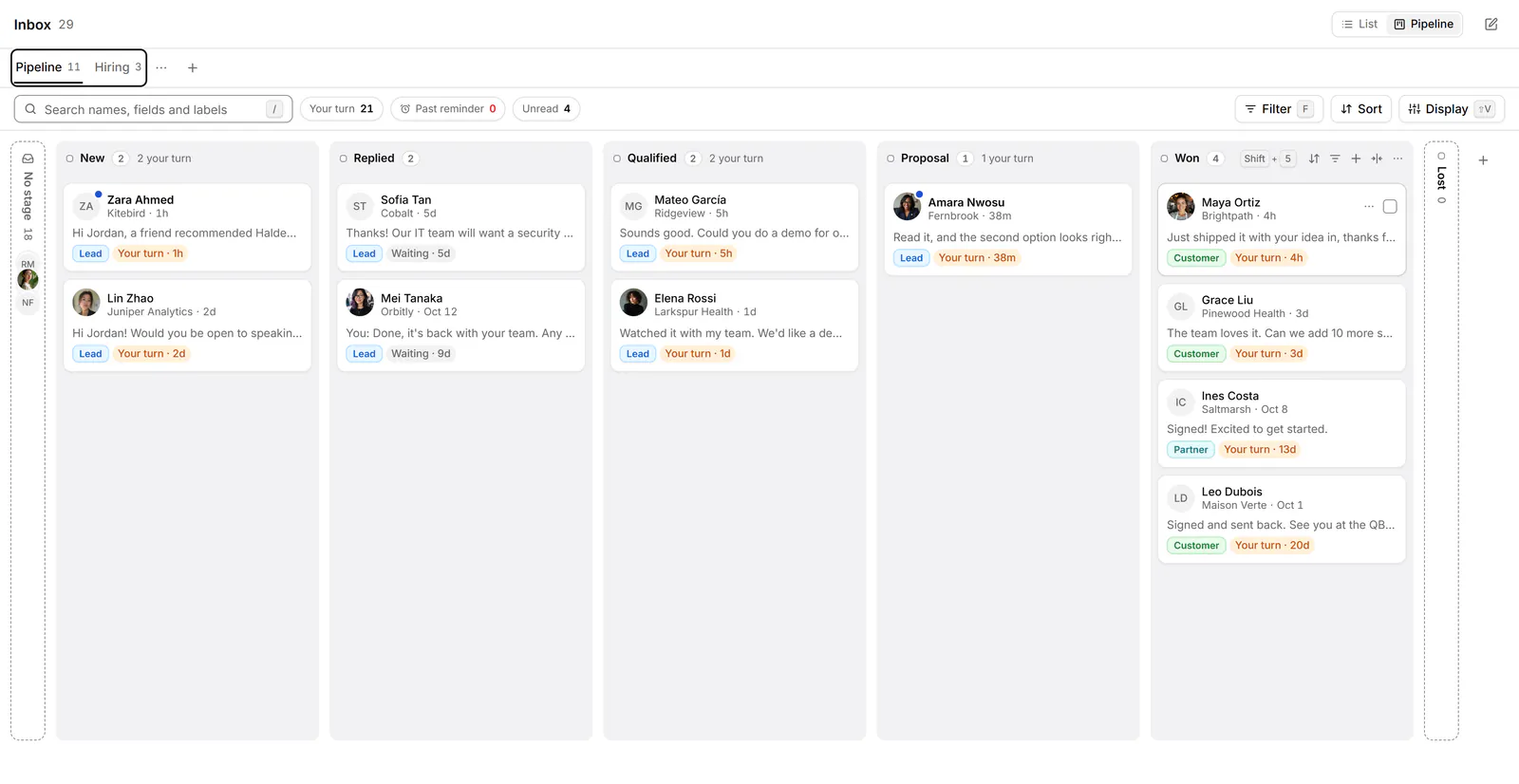
Bokka puts candidate conversations on a Recruiting pipeline from Sourced to Hired or Declined, with labels per role, notes, snippets with {{first_name}}, and reminders that cancel when the candidate replies. Waiting on you shows who you owe a reply. Message selected sends a shortlist one personalised copy each, with one Enter per person. On Pro, AI drafts replies in your voice, and integrations send a role's candidates to a Google sheet with message text left out. It doesn't source candidates, sync to an ATS or bring in Recruiter's inbox. Starts at $25 per user a month, after a free 14-day trial. See the recruiter playbook.
2. LinkedIn Recruiter: best for sourcing at scale
LinkedIn's own hiring platform: 40+ search filters, up to 150 InMails a month per seat, Projects you share with your team, and integration with your ATS, CRM and email. It has AI-assisted messages and search, built-in messaging, and Hiring Assistant as an add-on. Pricing varies by organisation (LinkedIn Recruiter's product page, retrieved November 1, 2026). If your team sources from Recruiter, its inbox is where candidates answer.
3. LinkedIn Recruiter Lite: best for a solo recruiter's search
The lighter version for people hiring less often: 30 InMail credits a month with saved templates, 20+ filters, saved search alerts and daily candidate recommendations, across your 1st, 2nd and 3rd-degree network (Recruiter Lite's product page, retrieved November 1, 2026). Unused credits build up to 120 (LinkedIn Help: InMail credits, retrieved November 1, 2026). The page offers a free trial; it doesn't list ATS integration or shared projects for Lite.
4. Narrow: best on price
A local-first LinkedIn inbox that says it helps you track candidates, follow-ups and sourcing conversations, while you keep your CRM or ATS as the system of record. It has labels such as candidate, reminders, stages and snippets, and shows Sales Navigator conversations beside your regular inbox (Narrow's home page, retrieved November 1, 2026). Starts at $15 a month billed yearly ($19 month to month); Super Pro, at $22 billed yearly ($29 monthly), adds an AI screener and MCP (Narrow's pricing page, retrieved November 1, 2026).
5. Kondo: best when candidates also use WhatsApp
A DM inbox for LinkedIn, WhatsApp and iMessage, with labels, reminders, snippets with placeholders, keyboard shortcuts and voice note transcripts. It lists recruiters among its users and syncs chats, notes and labels to HubSpot, Salesforce, Attio, Notion, Google Sheets and webhooks (Kondo's home page, retrieved November 1, 2026). Starts at $28 per user a month billed yearly; Business, at $36, adds the Sales Navigator inbox, CRM integrations and MCP (Kondo's pricing page, retrieved November 1, 2026).
6. Kanbox: for importing candidates and automated follow-ups
Kanbox imports candidates from LinkedIn Recruiter projects (Lite and Corporate), tracks them on a recruitment kanban board, tags conversations by position and shares templates across a team. It also automates follow-ups over 6+ steps across connection requests, messages, InMail and email, and exports to CSV or Zapier (Kanbox's recruitment page, retrieved November 1, 2026). LinkedIn says it doesn't permit tools that automate activity on its site (LinkedIn Help: prohibited software and extensions, retrieved November 1, 2026), so weigh that first. Starts at $12 a month billed yearly (Kanbox's pricing page, retrieved November 1, 2026). See Bokka vs Kanbox.
The tools side by side
| Tool | Best for | Starts at | Automates | Replaces an ATS |
|---|---|---|---|---|
| Bokka | Pipelines in LinkedIn messages | $25 per user a month | No | No |
| LinkedIn Recruiter | Sourcing at scale | Varies | Not covered here | Integrates with one |
| Recruiter Lite | Solo search and InMail | Free trial; price not listed | Not covered here | No |
| Narrow | Lowest price | $15 a month billed yearly, $19 monthly | None listed | No |
| Kondo | LinkedIn and WhatsApp | $28 per user a month, yearly | None listed | No |
| Kanbox | Importing and campaigns | $12 a month, yearly | Yes | No |
Which should you pick?
Start with where candidates answer. If they reply in Recruiter, stay with Recruiter or Recruiter Lite and add an inbox tool only for your regular messages. If they reply in regular LinkedIn messages, pick an inbox tool: Bokka for a recruiting pipeline and AI drafts, Narrow to spend the least, Kondo if half your candidates are on WhatsApp. For a working routine, see run a candidate pipeline in LinkedIn messages.
Bokka pricing
Bokka starts with a free 14-day trial, AI included and no credit card. After it, Starter is $25 and Pro is $35 per user a month ($19 and $30 for your first month). Team, at $50, is coming soon.
Frequently asked questions
What is the best LinkedIn tool for recruiters?
For sourcing, LinkedIn Recruiter. For keeping up with candidates who answer in regular LinkedIn messages, an inbox tool: Bokka for pipelines and AI drafts, Narrow on price, Kondo with WhatsApp.
Is Recruiter Lite worth it?
It suits a recruiter who needs better search and some InMail: 30 credits a month, 20+ filters and candidate recommendations. LinkedIn's page doesn't list ATS integration or shared projects for Lite.
Can a LinkedIn inbox tool replace an ATS?
Not the ones listed here. They track conversations; an ATS tracks applications, interviews and offers. Narrow says to keep your ATS as the system of record.
Which recruiter tools automate LinkedIn messages?
Of this list, Kanbox's pages describe automated follow-ups. Bokka never sends on its own, and Narrow's and Kondo's pages list no automated sending.
Sources
Other products' prices and features were read on their own pages on November 1, 2026. They change; check each page before you buy.
Join the waitlist for early access to Bokka. Your first 14 days are free, AI included, with no credit card. It runs in Chrome, Edge, Brave and Arc on a desktop or laptop.
Join the waitlistAbout the author
Amardeep Anand founded Bokka, the AI-first CRM for your LinkedIn inbox, and runs it from Deoghar, India. Questions or corrections: support@gobokka.com.