Bokka vs Kanbox: LinkedIn inbox CRM or automation suite?
Bokka vs Kanbox compared: inbox, pipelines, AI, automation, lead import, multi-account and price, from each product's own pages, with who should pick which.
By Amardeep Anand, founder of Bokka · Published · 3 min read
On this page
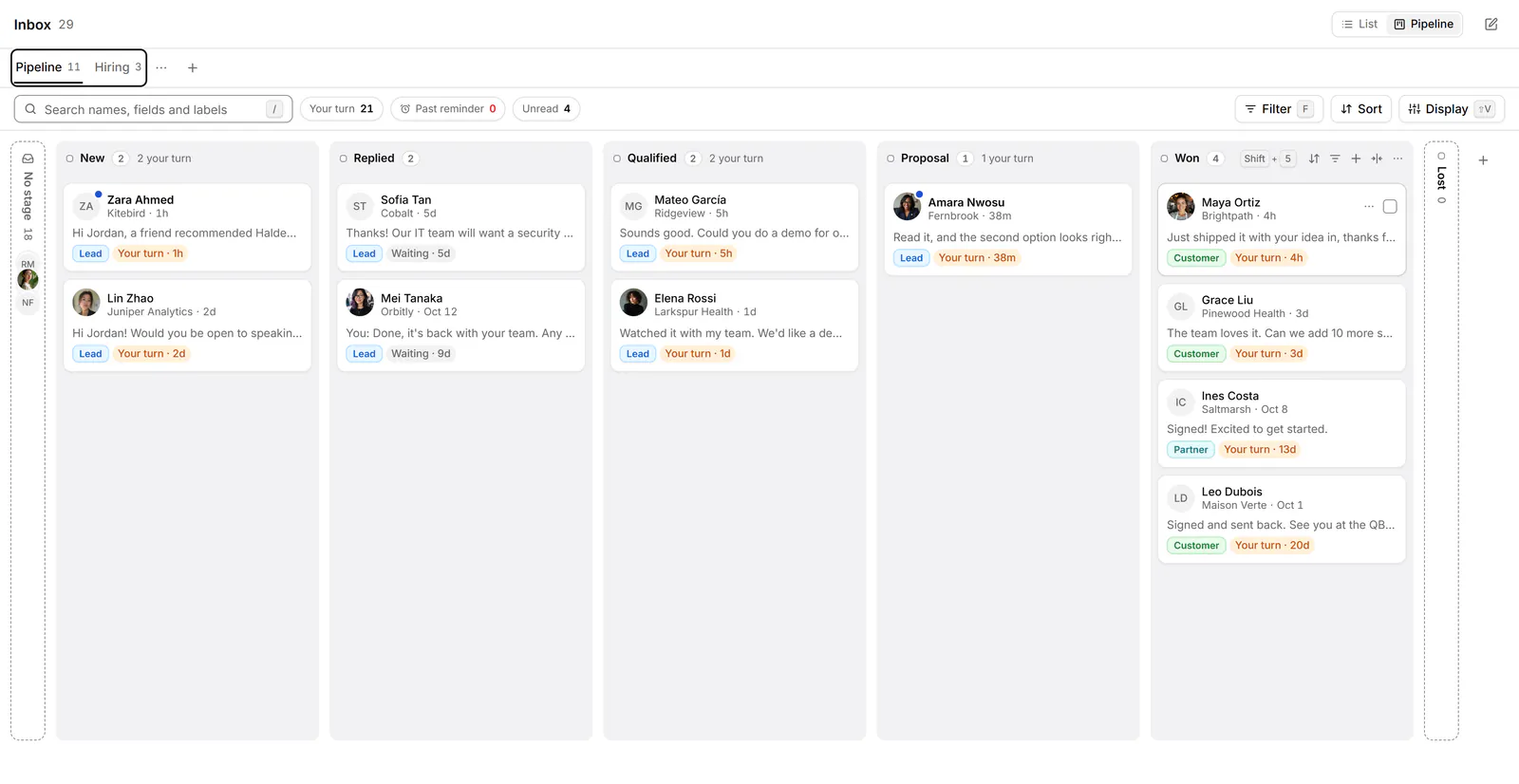
Kanbox and Bokka both put your LinkedIn messages in an inbox with labels and a kanban pipeline, but they're built for different jobs. Kanbox imports leads and runs automated outreach campaigns; Bokka helps you read, organise and reply to your own messages, and never sends anything on its own.
Kanbox describes itself as a LinkedIn automation tool for prospecting, with a smart inbox and kanban pipelines (Kanbox's home page, retrieved November 1, 2026). Bokka is an AI-first CRM for your LinkedIn inbox. Outreach automation is software that sends LinkedIn invitations and messages on a schedule.
Bokka vs Kanbox at a glance
| Bokka | Kanbox | |
|---|---|---|
| What it is | LinkedIn inbox CRM | LinkedIn automation and prospecting suite |
| Price | Starter $25, Pro $35 per user a month | From $12 a month billed yearly, $20 monthly |
| Free trial | 14 days, no card | 15 days, no card |
| Labels, filters and reminders | Yes | Yes: tags, filters and a reminders view |
| Kanban pipeline | Yes, with CRM fields | Yes, with notes and reminders on cards |
| Templates with variables | Yes, with fallbacks | Yes, with fallbacks |
| AI reply drafts you approve | Yes (trial and Pro) | AI messages and an AI response agent |
| Automated campaigns | No | Yes, up to 6 follow-ups |
| Lead import from searches | No | Yes, from LinkedIn, Sales Navigator and Recruiter |
| Several LinkedIn accounts | One per browser profile | Yes, switch in one click |
| Keyboard shortcuts | A key for every action | Not listed |
| Where messages are kept | In your browser | Cloud-based |
| Integrations | Notion, Google Sheets, webhooks, MCP (Pro) | Webhooks and API (Pro and Agency) |
Kanbox's details are from its pricing page, retrieved November 1, 2026, its inbox page, retrieved November 1, 2026 and its pipelines page, retrieved November 1, 2026.
Which organises your inbox better?
Close. Kanbox's inbox lets you tag conversations by category, priority or status, filter by All, Unread, Last message sent by member, Last message sent by me and Never answered, and keep reminders in a view of their own. Its kanban cards hold notes and reminders, and its templates handle variables and fallbacks (Kanbox's inbox page, retrieved November 1, 2026, pipelines page, retrieved November 1, 2026).
Bokka has the same building blocks, plus Waiting on you and Waiting on them grouped by how long each has waited, reminders that cancel themselves when they reply, and pipelines with fields such as deal value on the cards. Every action has a key: J and K to move, E to archive, H for a reminder, L to label.
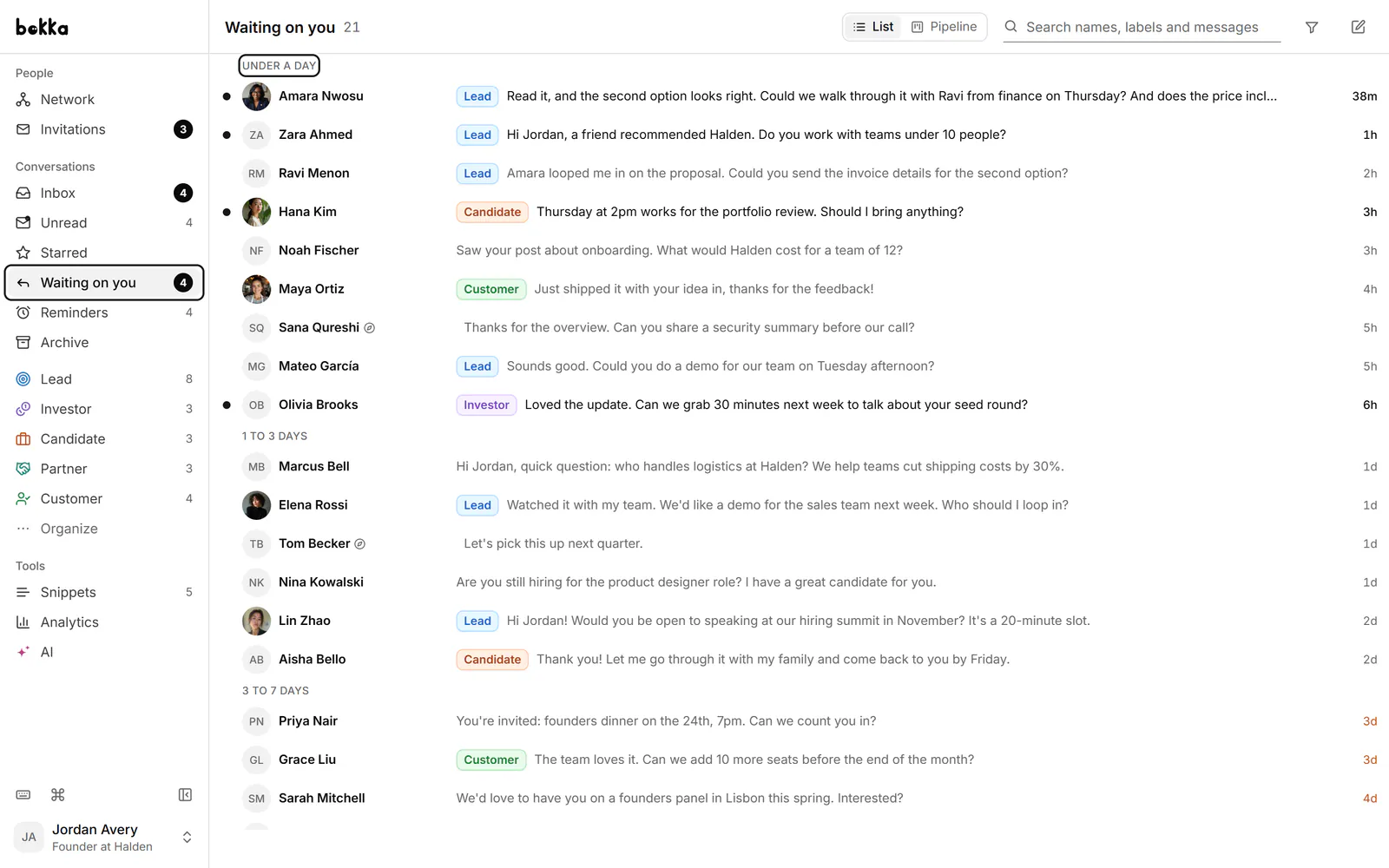
Verdict: a tie on the basics; Bokka if you work from the keyboard.
Which finds and contacts more people?
Kanbox wins, because Bokka doesn't try. Kanbox imports leads from LinkedIn and Sales Navigator searches, LinkedIn Recruiter projects, event attendees and post contributors, up to 75,000 a month on Pro. It runs campaign sequences that visit profiles, follow, like, send connection requests and messages, with up to 6 follow-ups, and an email finder adds work emails (Kanbox's pricing page, retrieved November 1, 2026).
Bokka does none of this. It works with the conversations already in your inbox, and every message goes out on your own Enter or click.
How do they treat your LinkedIn account?
Kanbox says it's designed to respect LinkedIn's limits, using randomized delays and daily action limits (Kanbox's home page, retrieved November 1, 2026). LinkedIn, for its part, says it doesn't permit third-party software or browser extensions that scrape, modify the appearance of, or automate activity on its website. It adds that accounts using them risk being restricted or shut down (LinkedIn Help: prohibited software and extensions, retrieved November 1, 2026).
Bokka doesn't automate. Here's how it works with your account:
- Your messages are loaded into your browser and stay there, on your device. Bokka's servers keep how you organise them (labels, stages, fields, notes, reminders, snippets) and a list of your conversations without their messages.
- Bokka never sees your LinkedIn password. A small browser extension works inside the LinkedIn session you already have, and Bokka's servers never connect to LinkedIn.
- Requests go from your own browser at a measured pace, only while Bokka is open in a tab. There is no background syncing while you're away.
- No automation: no sequences, auto-replies, scheduled or bulk campaigns, and nothing is sent unless you send it. AI, and any assistant you connect over MCP, drafts only.
Which has better AI?
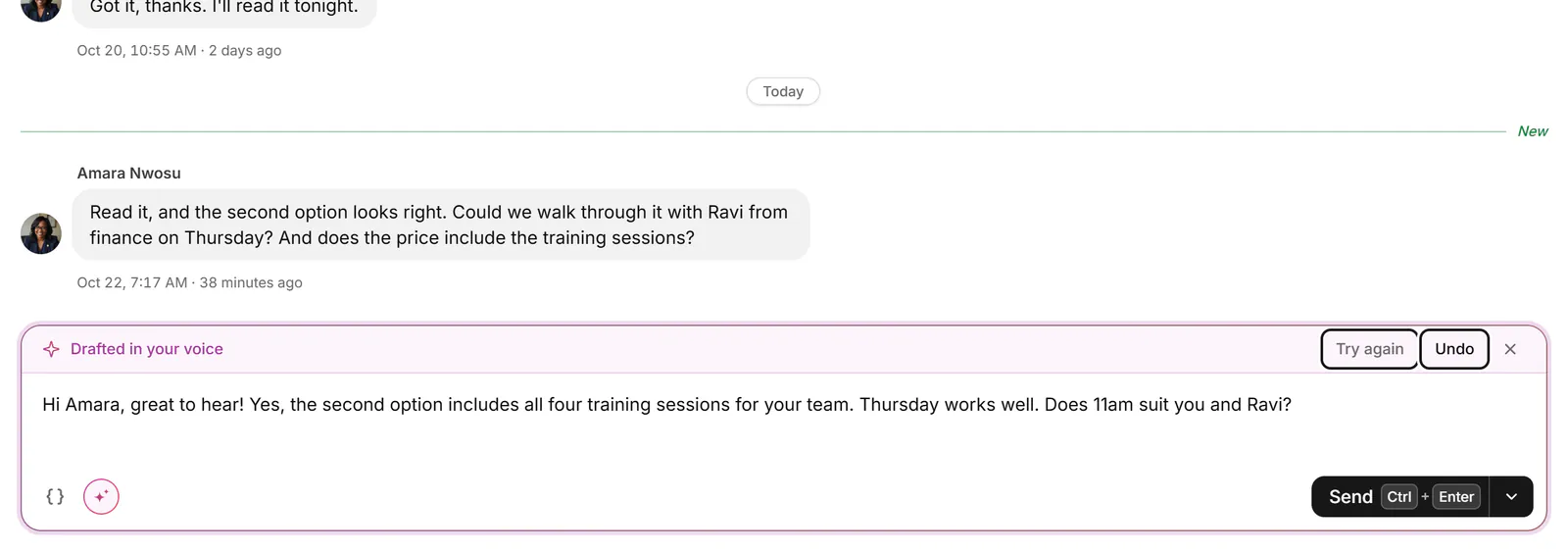
They aim AI at different jobs. Kanbox's AI writes personalised outreach from prompts, scores leads against your ideal customer profile, and has an AI response agent that handles auto-responses (Kanbox's home page, retrieved November 1, 2026). Bokka's AI drafts a reply in your voice for you to edit and send, summarises long threads, and suggests labels and reminders you approve. It never sends a message.
Which suits agencies and teams?
Kanbox. It lets you switch between LinkedIn accounts in one click, with a unified inbox and separate campaigns, and its Essential and Pro plans include team and multi-account features with unlimited account managers. Agency plans cover 5 to 10 accounts and up (Kanbox's pricing page, retrieved November 1, 2026). Bokka works with one LinkedIn account per browser profile, and Team is coming soon.
Pricing compared
| Plan | Monthly | Billed yearly | Basis |
|---|---|---|---|
| Kanbox Starter | $20 | $12 a month | Per month |
| Kanbox Essential | $45 | $30 a month | Per LinkedIn account |
| Kanbox Pro | $80 | $50 a month | Per LinkedIn account |
| Kanbox Agency 10 | $399 | $279 a month | 5 to 10 LinkedIn accounts |
| Bokka Starter | $25 | Per user | |
| Bokka Pro | $35 | Per user |
Kanbox's US-dollar prices are from its pricing page, retrieved November 1, 2026; the page shows local currency in some countries. Its 15-day trial includes Starter features and 30 email credits. Bokka starts with a free 14-day trial, AI included and no credit card. After it, Starter is $25 and Pro is $35 per user a month ($19 and $30 for your first month). Team, at $50, is coming soon.
Who should choose which?
- You need lists of new leads and automated campaigns: Kanbox, after reading LinkedIn's rules on automation.
- You run several LinkedIn accounts for clients: Kanbox.
- Your work is replying to people who already write to you, and keeping track of them: Bokka.
- You want AI drafts you edit and send yourself, and messages kept in your browser: Bokka.
Comparing more tools? See Bokka vs Waalaxy for another automation tool, and the best LinkedIn inbox tools.
The verdict
| Category | Winner |
|---|---|
| Inbox organising | Tie |
| Keyboard speed | Bokka |
| Finding and contacting new leads | Kanbox |
| AI drafts you approve | Bokka |
| Several accounts | Kanbox |
| Messages on your device | Bokka |
| Entry price | Kanbox |
Frequently asked questions
Is Bokka a Kanbox alternative?
For the inbox and pipeline, yes. Bokka doesn't import leads or run campaigns, which are a large part of Kanbox.
Does Kanbox automate LinkedIn?
Yes. Kanbox's pages describe automated campaign sequences that visit profiles, send connection requests and messages, with up to 6 follow-ups.
How much does Kanbox cost?
Kanbox's pricing page lists Starter at $20 a month or $12 billed yearly, Essential at $45 or $30 and Pro at $80 or $50 per LinkedIn account, as read on November 1, 2026.
Does Bokka send messages automatically?
No. There are no sequences, auto-replies or scheduled messages. You send every message yourself.
Sources
Other products' prices and features were read on their own pages on November 1, 2026. They change; check each page before you buy.
Join the waitlist for early access to Bokka. Your first 14 days are free, AI included, with no credit card. It runs in Chrome, Edge, Brave and Arc on a desktop or laptop.
Join the waitlistAbout the author
Amardeep Anand founded Bokka, the AI-first CRM for your LinkedIn inbox, and runs it from Deoghar, India. Questions or corrections: support@gobokka.com.
Related

8 best LinkedIn inbox and CRM tools in 2026, compared
3 min read

Bokka vs Waalaxy: LinkedIn inbox CRM or automation tool?
2 min read

Why Bokka doesn't automate LinkedIn, and what it does instead
2 min read

5 best Kanbox alternatives for your LinkedIn inbox (2026)
3 min read