5 best Narrow alternatives for your LinkedIn inbox (2026)
Looking for a Narrow alternative? Bokka, Kondo, LeadDelta, Breakcold and Kanbox compared on AI drafting, pipelines, Sales Navigator, MCP and price.
By Amardeep Anand, founder of Bokka · Published · 4 min read
On this page
- Why people look beyond Narrow
- 1. Bokka: best for AI drafts and integrations in your LinkedIn inbox
- 2. Kondo: best if you also answer on WhatsApp
- 3. LeadDelta: best for teams that prospect together
- 4. Breakcold: best for email and LinkedIn together
- 5. Kanbox: best for outreach campaigns with an inbox
- Also considered: Dex
- Which Narrow alternative is right for you?
- Bokka pricing
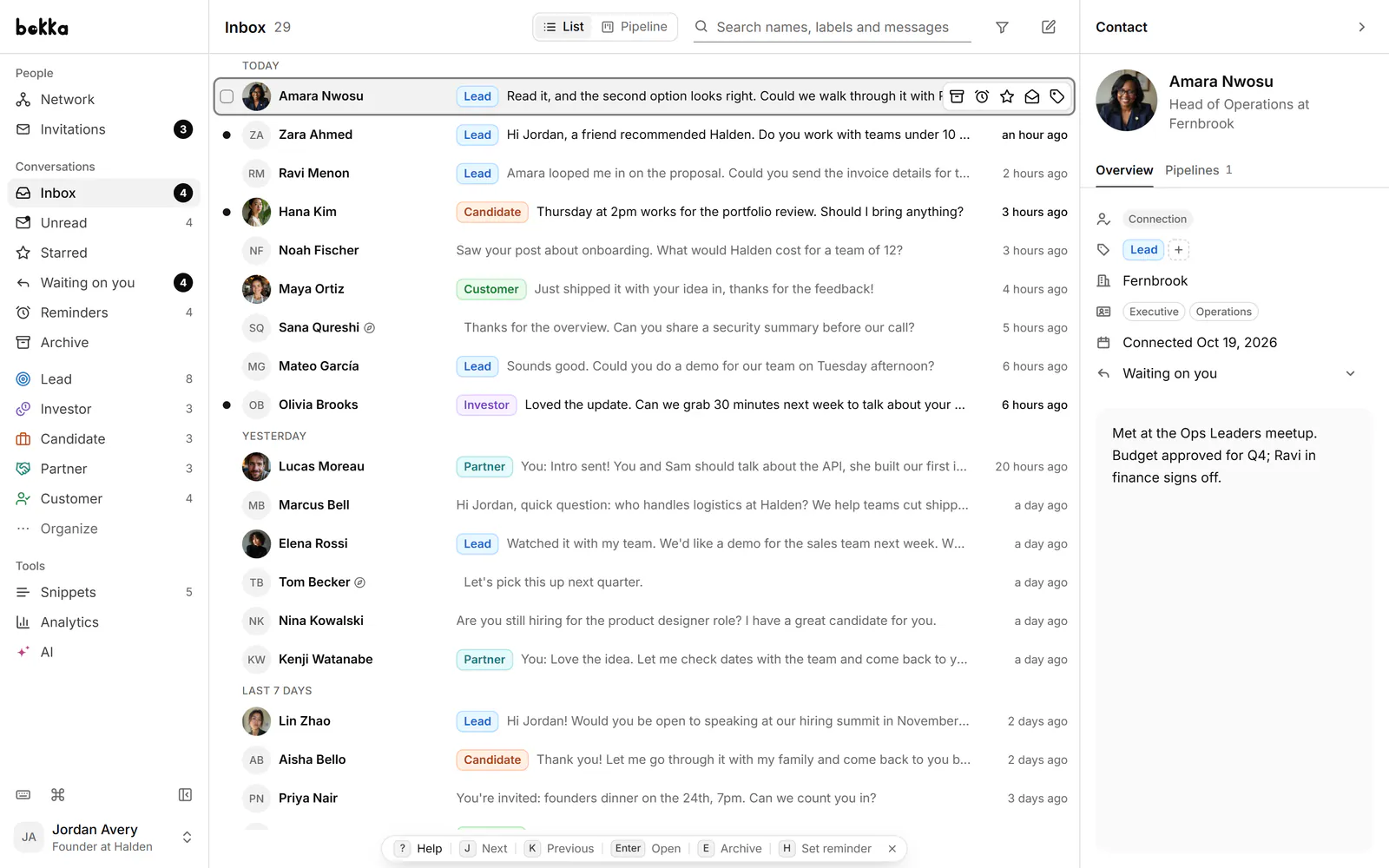
The best Narrow alternative depends on what Narrow doesn't do for you. Bokka suits people who want AI reply drafts and integrations in a LinkedIn inbox that works like Narrow's, Kondo suits people who answer on WhatsApp as well as LinkedIn, LeadDelta suits teams that prospect together, Breakcold suits deals that run across email and LinkedIn, and Kanbox suits teams that want outreach campaigns next to their inbox.
| Tool | Price | AI reply drafting | Pipeline | Sales Navigator inbox | MCP | Free trial |
|---|---|---|---|---|---|---|
| Narrow (for comparison) | $15 a month billed yearly, $19 monthly | Not listed; Screener sorts incoming (Super Pro) | Yes, a kanban board | Yes; plan not stated | Super Pro ($22 billed yearly) | Free to start, no card |
| Bokka | Starter $25, Pro $35 per user a month | Built in (Pro) | Yes (Starter) | Pro | Pro | 14 days, no card |
| Kondo | $28 per user a month billed yearly | Through MCP (Business) | Not listed | Business ($36) | Business ($36) | No; 14-day money-back guarantee |
| LeadDelta | $69.30 per user a month billed yearly | Yes, in your voice | Tags, notes and tasks | Not listed | Yes | 7 days, no card |
| Breakcold | $49 per seat a month | Yes, on every channel | Yes | Not listed | Every plan | 14 days, card required |
| Kanbox | $12 a month billed yearly, $20 monthly | AI prompts and templates (Pro) | Yes, kanban | Yes, in its unified inbox | Not listed | 15 days, no card |
Each row is from that product's own pricing and product pages, linked in its section below, retrieved November 10, 2026. "Not listed" means those pages don't mention it.
Narrow is a local-first LinkedIn inbox CRM with labels, reminders, a kanban board and snippets. Bokka is an AI-first CRM for your LinkedIn inbox. A Narrow alternative here means a tool you could answer your LinkedIn messages in instead.
Why people look beyond Narrow
Narrow does the core job well and costs little. Pro is $15 a month billed yearly ($19 month to month) with labels, follow-up reminders, a kanban board, snippets and fast search. Super Pro, $22 billed yearly ($29 month to month), adds audio and video messages, MCP for your AI tools, priority support and AI lead screening with 24,000 Screener credits a year (Narrow's pricing, retrieved November 10, 2026). Its home page says it is local-first, works with Sales Navigator, and starts free with no credit card (Narrow's home page, retrieved November 10, 2026).
People look elsewhere when they want something those pages don't list:
- AI that drafts replies. Narrow's Screener classifies incoming messages; its pages don't mention reply drafting or summaries.
- Integrations. Asked whether it replaces your CRM or ATS, Narrow answers no: it manages the conversation layer, and your CRM or ATS stays the system of record. It names no Notion, Sheets or webhook connections.
- A published shortcut list. Narrow mentions fast search and snippets inserted with an @ shortcut, but no list of keys.
- Another browser or another channel. Narrow's setup step is to install its Chrome extension, and its pages name LinkedIn and Sales Navigator only.
1. Bokka: best for AI drafts and integrations in your LinkedIn inbox
Bokka works the way Narrow does: a browser extension connects your LinkedIn account, your messages stay in your browser on your device, and nothing is sent unless you send it. It has labels, reminders, snippets with fill-in gaps and a pipeline board on Starter, and it adds:
- AI on Pro: replies drafted in your voice, sorting into labels and reminders you approve, summaries and voice note transcripts.
- Integrations on Pro: send the conversations you choose to Notion, Google Sheets or a webhook, and connect Claude, ChatGPT, Cursor or another assistant over MCP.
- The keyboard: J and K to move, E to archive, H for a reminder, L to label, ⌘K or Ctrl+K for every action, and ? for the full list.
- Also on Pro: your Sales Navigator inbox and analytics. Voice messages and videos go from the reply box on Starter and Pro.
- Browsers: Chrome, Edge, Brave and Arc.
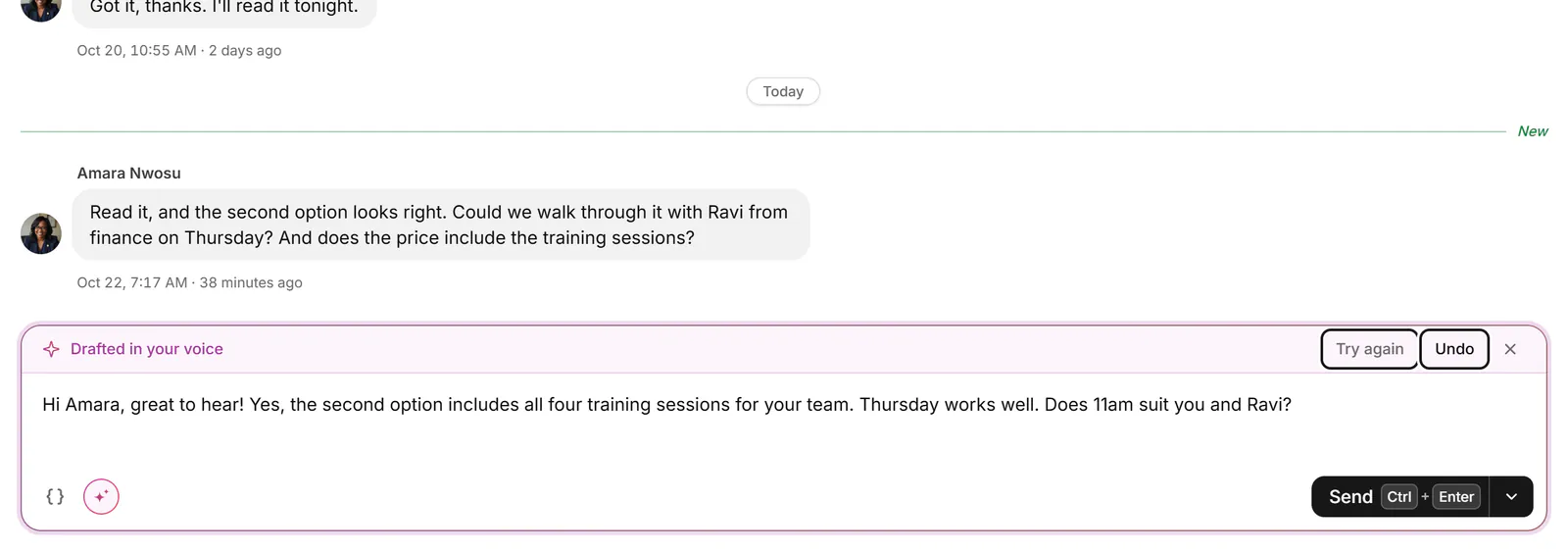
Best for: founders, recruiters and sales people who answer many LinkedIn messages a week and want help writing them. Not for you if you want the lowest price, need WhatsApp, a mobile app or team seats today. Price: Starter $25, Pro $35 per user a month, after a free 14-day trial with no card, so it costs more than Narrow at each step. Full comparison: Bokka vs Narrow.
2. Kondo: best if you also answer on WhatsApp
Kondo is a keyboard-first inbox for LinkedIn and WhatsApp, and every plan covers both (Kondo's pricing, retrieved November 10, 2026). Its home page says your inbox stays on your computer, that Kondo does not automate, and that Claude, ChatGPT, Cursor or another assistant connected over MCP can search chats, add labels and notes, set reminders and write drafts that you then send (Kondo's home page, retrieved November 10, 2026). It installs as a desktop app for Mac, Windows or Linux (Kondo's llms.txt, retrieved November 10, 2026).
Kondo's pricing page lists no AI drafting of its own: drafts come from an assistant you connect, and MCP is on Business. Best for: people whose deals run on WhatsApp as well as LinkedIn. Price: Basic $28 and Business $36 per user a month billed yearly; Business adds the Sales Navigator inbox, CRM integrations, analytics and MCP. There is no free trial; instead there is a 14-day money-back guarantee. That makes Kondo dearer than Narrow at every level. More: Kondo alternatives and Bokka vs Kondo.
3. LeadDelta: best for teams that prospect together
LeadDelta calls itself a LinkedIn CRM with an AI inbox. Its pricing page lists an AI inbox that sorts, labels and prioritises replies, and its FAQ says that inbox drafts replies in your voice. It also lists unlimited LinkedIn and email sequences, a people database with an email and phone finder, a CRM of your connections with tags, notes and tasks, shared team networks, and MCP and API access for Claude, ChatGPT, HubSpot and Zapier (LeadDelta's pricing, retrieved November 10, 2026).
It is a bigger tool than Narrow, with campaigns as well as an inbox, and priced to match. Best for: sales teams that pool their LinkedIn networks and run outreach. Price: $69.30 per user a month billed yearly ($831.60 a year), after a 7-day free trial with no card. Full comparison: Bokka vs LeadDelta.
4. Breakcold: best for email and LinkedIn together
Breakcold is a multichannel sales CRM. Each seat connects 2 accounts, from LinkedIn, WhatsApp, Telegram, Gmail and Outlook, into one inbox. Every plan has pipelines that update themselves, reply drafts on every channel, unlimited contacts and fields, and Claude, ChatGPT and MCP access; plans differ only by how much AI work each seat gets (Breakcold's pricing, retrieved November 10, 2026).
Best for: sellers whose deals move between email, LinkedIn and chat apps. Price: X1 $49, X5 $99 and X20 $199 per seat a month, after a 14-day free trial that needs a card. Full comparison: Bokka vs Breakcold.
5. Kanbox: best for outreach campaigns with an inbox
Kanbox is an automation tool with an inbox. Its home page calls it a LinkedIn automation tool that combines scraping, automated sequences, a smart inbox and kanban pipelines, with leads imported from Sales Navigator and LinkedIn Recruiter searches (Kanbox's home page, retrieved November 10, 2026). Its inbox handles InMail replies, connection messages and regular messages, with labels, reminders, filters and kanban boards (Kanbox's inbox page, retrieved November 10, 2026). Pro adds unlimited AI prompts and templates, and its plan table lists an AI Response Agent that replies after a lead responds (Kanbox's pricing, retrieved November 10, 2026).
That is the plain difference from Narrow: Narrow says every message is written and sent by you, and Kanbox is built to send on its own. Its pages don't mention MCP or a Sales Navigator inbox. Best for: teams and agencies that want prospecting campaigns and replies in one tool. Price: Starter $12 a month billed yearly or $20 monthly; Essential $30 or $45 and Pro $50 or $80 per LinkedIn account, after a 15-day free trial with no card. Full comparison: Bokka vs Kanbox.
Also considered: Dex
Dex appears on lists like this one, but it is a personal CRM: it syncs your LinkedIn network, keeps your contacts up to date and connects to AI assistants over MCP (Dex's home page, retrieved November 10, 2026). Its pages describe syncing connections, not answering LinkedIn messages, so it doesn't replace Narrow's inbox. See Bokka vs Dex if that is what you need.
Which Narrow alternative is right for you?
- You want AI reply drafts, integrations and a key for everything: Bokka.
- You answer on WhatsApp as well as LinkedIn: Kondo.
- Your team prospects together and shares its network: LeadDelta.
- Your deals move between email, LinkedIn and chat apps: Breakcold.
- You want campaign sequences next to the inbox: Kanbox.
- You only need labels, stages and reminders at the lowest price: stay with Narrow.
Bokka pricing
Bokka starts with a free 14-day trial, AI included and no credit card. After it, Starter is $25 and Pro is $35 per user a month ($19 and $30 for your first month). Team, at $50, is coming soon.
For a wider view, see the best LinkedIn inbox tools.
Frequently asked questions
What is the best Narrow alternative?
For LinkedIn messages, Bokka is the closest match: a local-first inbox with labels, reminders and a pipeline, plus AI reply drafts and integrations on Pro. Kondo also covers WhatsApp, LeadDelta suits team prospecting, and Breakcold covers email too.
Is there a free Narrow alternative?
Not one we found among these. Narrow itself is free to start with no credit card. Bokka has a free 14-day trial with AI included and no card, Kanbox a 15-day trial and LeadDelta a 7-day trial without a card, and Breakcold a 14-day trial that needs one.
Narrow vs Kondo: which is better?
Narrow is cheaper, at $15 a month billed yearly against Kondo's $28 per user, and has a kanban board. Kondo covers WhatsApp as well as LinkedIn on every plan and runs as a desktop app. Both keep your inbox on your device and neither automates.
Which Narrow alternative has AI?
Bokka drafts replies in your voice, sorts and summarises on Pro. LeadDelta and Breakcold list reply drafts too. Kondo drafts through an assistant you connect over MCP. Narrow's Super Pro has an AI Screener that classifies incoming messages.
Is Narrow cheaper than its alternatives?
Mostly. Narrow's Pro is $15 a month billed yearly or $19 monthly, against Bokka's Starter at $25, Kondo's Basic at $28 billed yearly and Breakcold's $49 a seat, as of November 10, 2026. Kanbox's Starter costs less, at $12 billed yearly, but it is an automation tool.
Sources
Other products' prices and features were read on their own pages on November 10, 2026. They change; check each page before you buy.
Join the waitlist for early access to Bokka. Your first 14 days are free, AI included, with no credit card. It runs in Chrome, Edge, Brave and Arc on a desktop or laptop.
Join the waitlistAbout the author
Amardeep Anand founded Bokka, the AI-first CRM for your LinkedIn inbox, and runs it from Deoghar, India. Questions or corrections: support@gobokka.com.
Related

Bokka vs Narrow: two local-first LinkedIn CRMs (2026)
3 min read

6 best Kondo alternatives for your LinkedIn inbox (2026)
3 min read

8 best LinkedIn inbox and CRM tools in 2026, compared
3 min read

Bokka vs Kanbox: LinkedIn inbox CRM or automation suite?
3 min read