Bokka vs Kondo: AI, pipelines and price compared (2026)
Bokka vs Kondo, two keyboard-first LinkedIn inboxes, compared on AI, pipelines, Sales Navigator, integrations, privacy and price in 2026.
By Amardeep Anand, founder of Bokka · Published
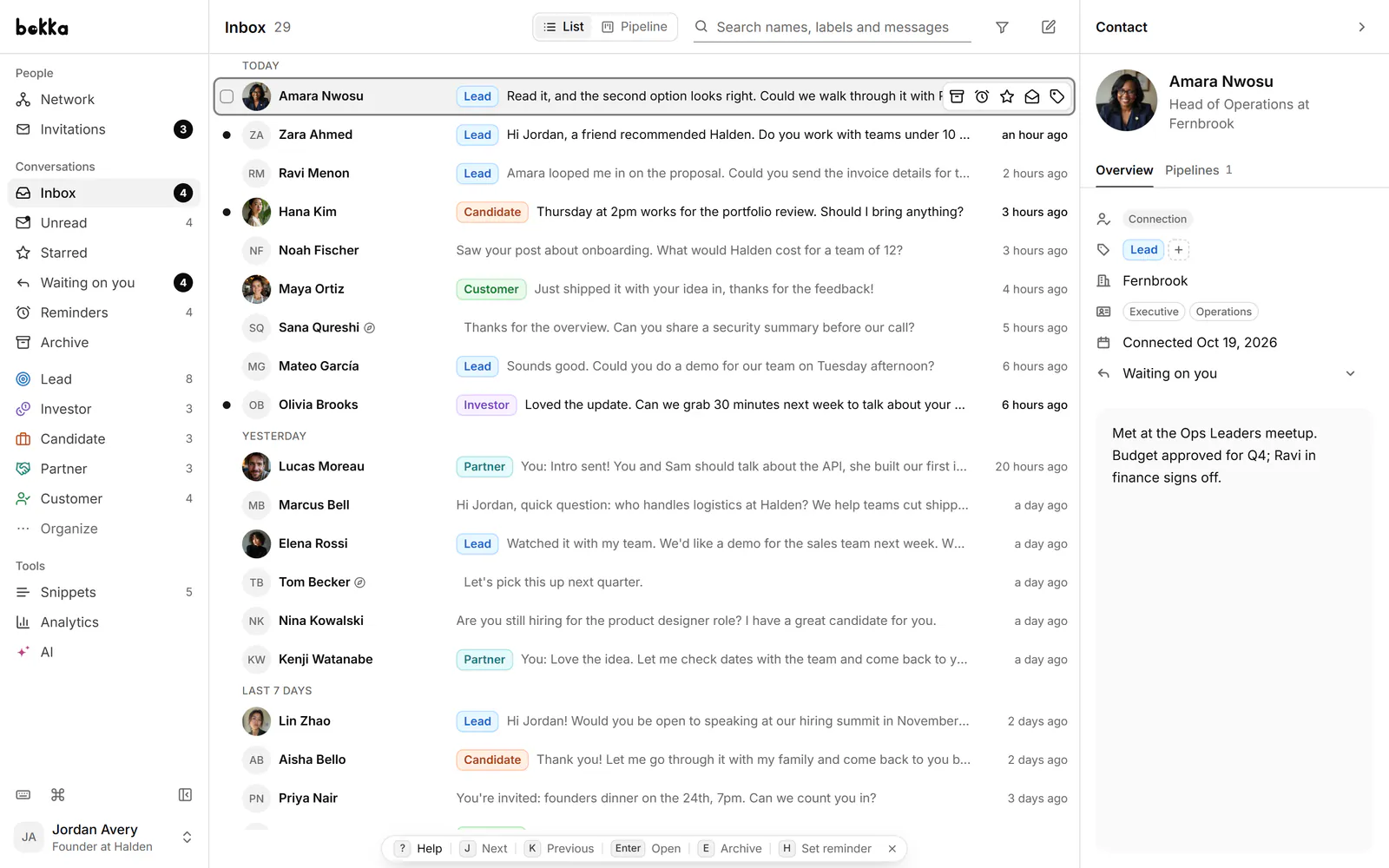
Kondo made the idea of LinkedIn inbox zero popular: treat messages like email, clear them daily, never reach for the mouse. In 2026 it added WhatsApp and an MCP server for AI assistants. Bokka takes the same keyboard-first inbox and builds a CRM and AI into it. The real choice is between breadth across channels and depth on LinkedIn.
Bokka is an AI-first CRM for your LinkedIn inbox. Kondo is a keyboard-first inbox for LinkedIn and WhatsApp. MCP (Model Context Protocol) is an open standard that lets AI assistants such as Claude and ChatGPT use another app's tools.
Bokka vs Kondo at a glance
| Bokka | Kondo | |
|---|---|---|
| Best for | LinkedIn-first work with AI and a pipeline | LinkedIn and WhatsApp in one app |
| Entry plan | Starter, $25 per user a month | Basic, $28 per user a month, billed yearly |
| Middle plan | Pro, $35 per user a month | Business, $36 per user a month, billed yearly |
| Team plan | Team, $50 per user a month (coming soon) | Enterprise, $52 per user a month, billed yearly |
| Try first | 14-day free trial, no card | 14-day money-back guarantee |
| Keyboard shortcuts and command palette | Yes | Yes |
| Labels, reminders, snippets, notes | Every plan | Every plan |
| Pipelines, board and CRM fields | Starter | Not listed |
| Built-in AI reply drafts and sorting | Pro | Not listed; AI works through MCP |
| Voice note transcripts | Pro | Yes |
| Sales Navigator inbox | Pro | Business |
| Native HubSpot and Salesforce sync | No; webhook | Business |
| No | Yes, desktop app | |
| Where your messages live | In your browser, on your device | On your computer |
Kondo's prices are from Kondo's pricing page, retrieved 24 October 2026, which shows yearly billing. Bokka's are from its own pricing and are billed monthly.
Which inbox is faster to work through?
It's a tie: both are built around the keyboard. In Bokka, J and K move through conversations, Enter opens one, E archives, H sets a reminder, L applies a label and ⌘K or Ctrl+K opens a command palette for everything else; ? lists every shortcut. Your messages are already in your browser, so a conversation opens the moment you press a key.
Kondo offers the same model, with "Search, undo and move through the inbox without the mouse" on its home page and a printable shortcut sheet in its docs. Kondo also has a Clean up my inbox command for clearing an old backlog in one pass; Bokka has bulk actions on selected conversations instead.
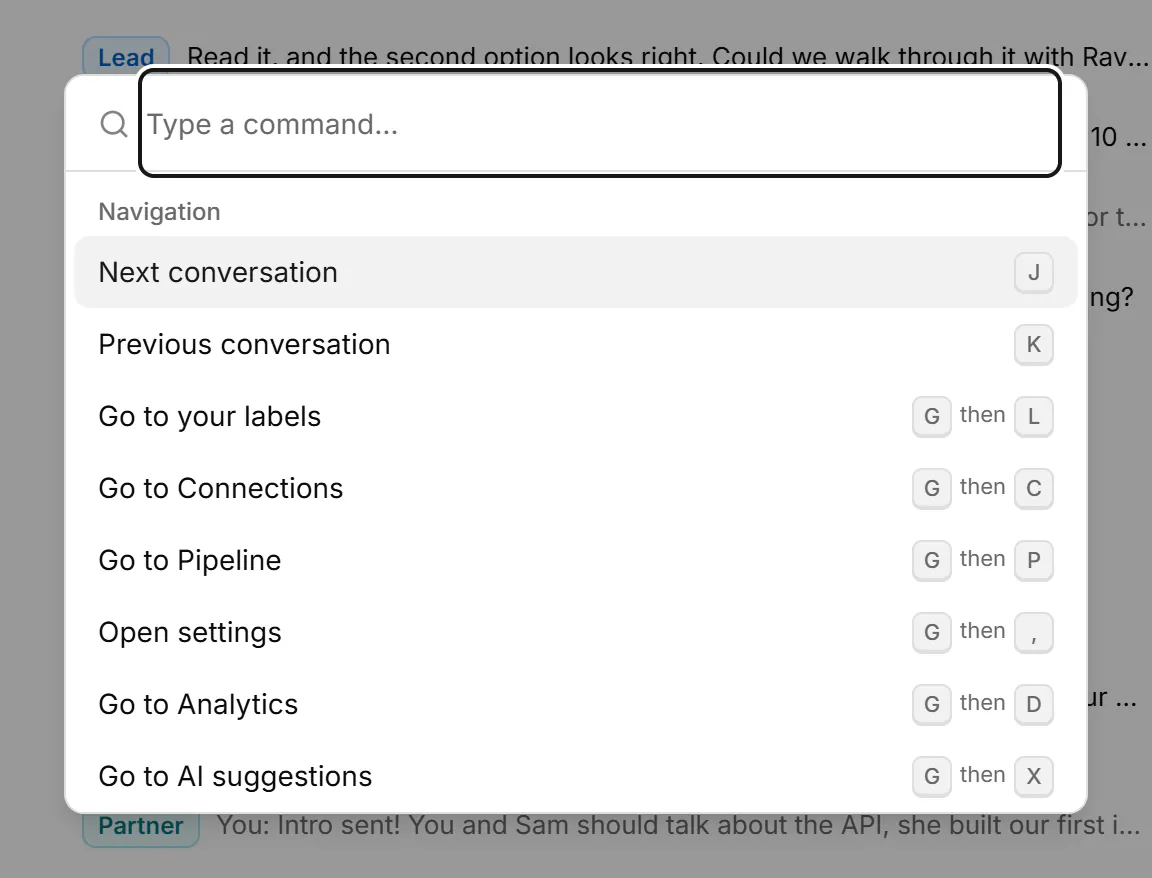
Verdict: a tie. Pick on the features below, not on speed.
Which has better AI?
Bokka wins on built-in AI. On Pro, Bokka drafts replies in your voice from the conversation, sorts the conversations you choose into labels and reminders for you to approve, summarises long threads with what you owe next, and transcribes voice notes. AI reads only the conversations you ask it to, and it never sends.
Kondo's AI runs mainly through MCP: you connect Claude, ChatGPT or Cursor, and your assistant searches chats, drafts replies, adds labels and sets reminders inside Kondo (Kondo's home page, retrieved 24 October 2026). It also transcribes voice notes on every platform. Its pricing page doesn't list built-in reply drafting or AI sorting. Bokka has MCP too, on Pro, so an assistant can work in it the same way.
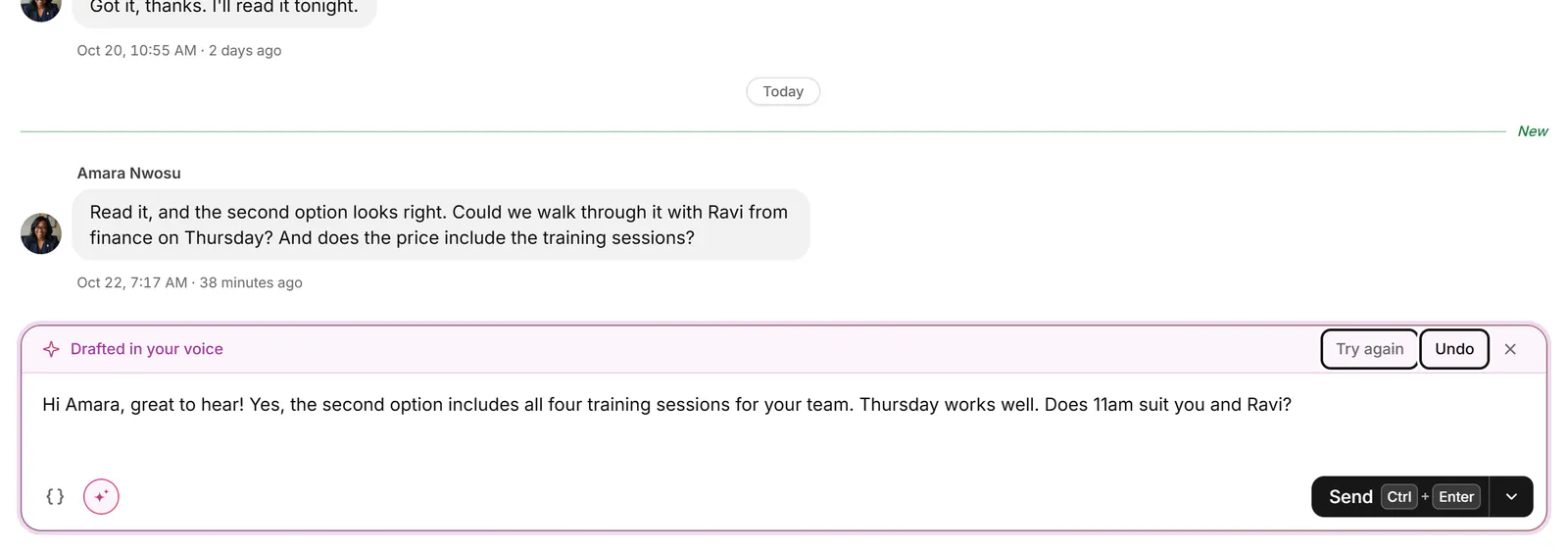
Verdict: Bokka, if you want AI inside the inbox. If you already do everything through an assistant, Kondo's MCP covers much of it.
Which is better for tracking deals?
Bokka wins, because pipelines are part of the entry plan. Bokka's Starter plan includes pipelines: stages for each deal, a board you can work from the keyboard, and CRM fields such as deal value. A conversation carries a label and a stage at once, so the inbox is also your pipeline. The Waiting on you and Waiting on them views show whose turn it is.
Kondo organises with labels shown as split inboxes, plus reminders and notes. Its pricing and home pages don't list pipeline stages or a board. Many Kondo users get the same effect by naming labels after stages, which works until you want a board view or deal fields.
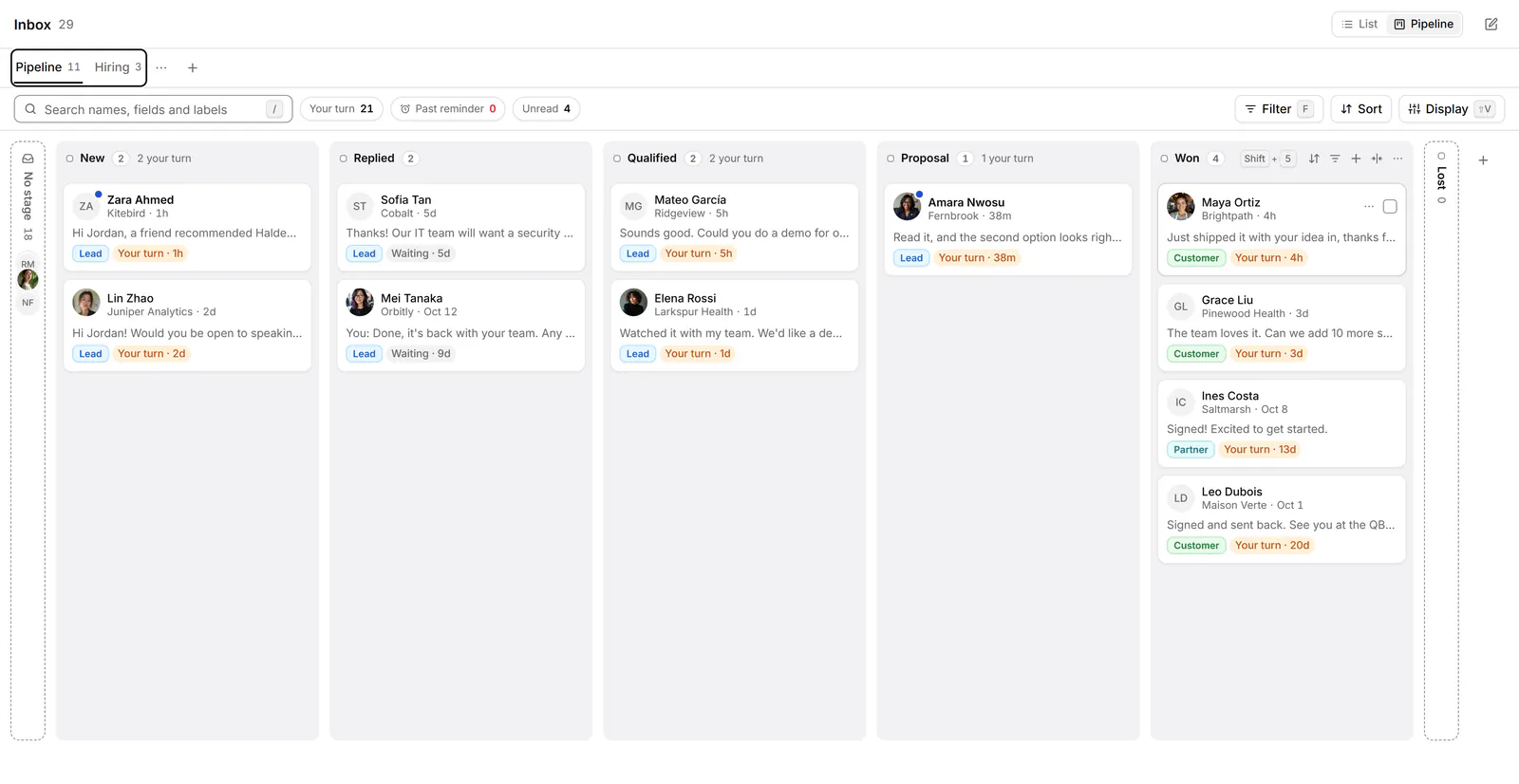
Verdict: Bokka for anyone running deals, hires or a raise out of LinkedIn messages.
Which connects better to your other tools?
Kondo wins on CRM integrations. Kondo connects natively to HubSpot, Salesforce, Attio, Clarify and Notion, plus Google Sheets and webhooks, and lets you choose which chats sync (Kondo's home page, retrieved 24 October 2026). These start on its Business plan.
Bokka sends the conversations you choose to Notion, Google Sheets or a webhook on Pro, and message text stays in your browser unless you turn it on. HubSpot or Salesforce means pointing a webhook at your own automation. Bokka's MCP server lets an assistant read, organise and draft, but never send.
Verdict: Kondo, if a native HubSpot or Salesforce sync is a must.
Which covers more channels?
Kondo wins: it adds WhatsApp. Kondo's desktop app puts WhatsApp in the same account, with the same labels and snippets, and its home page lists more channels in progress. Bokka is for LinkedIn only, including your Sales Navigator inbox on Pro, and adds lists of your connections, followers and invitations.
Verdict: Kondo for several channels; Bokka for depth on LinkedIn.
How do they treat your messages and your LinkedIn account?
A tie: both keep your messages on your computer and send nothing on their own. Here is how Bokka works:
- Your messages are loaded into your browser and stay there, on your device. Bokka's servers keep how you organise them (labels, stages, fields, notes, reminders, snippets) and a list of your conversations without their messages.
- Bokka never sees your LinkedIn password. A small browser extension works inside the LinkedIn session you already have, and Bokka's servers never connect to LinkedIn.
- Requests go from your own browser at a measured pace, only while Bokka is open in a tab. There is no background syncing while you're away.
- No automation: no sequences, auto-replies, scheduled or bulk campaigns, and nothing is sent unless you send it. AI, and any assistant you connect over MCP, drafts only.
Kondo says much the same: it reads your chats on your computer, never sees your password, and its servers keep how you organise them (Kondo's home page, retrieved 24 October 2026). No tool can promise anything about how LinkedIn treats your account; what you can choose is a tool that behaves the way you would. Read more in where your LinkedIn messages go in Bokka.
Which is better for teams?
Kondo wins today. Kondo has team seats, shared snippets, team analytics and SSO on Enterprise. Bokka's Team plan, with shared labels, snippets and pipelines, roles and assistants who draft for your approval, is coming soon at $50 per user a month.
Pricing compared
For one person, Bokka costs less at each step. Bokka starts with a free 14-day trial, AI included and no credit card. After it, Starter is $25 and Pro is $35 per user a month ($19 and $30 for your first month). Team, at $50, is coming soon.
| Plan | Bokka | Kondo |
|---|---|---|
| Try first | 14-day free trial, AI included, no card | 14-day money-back guarantee |
| Entry | Starter $25: labels, reminders, snippets, pipelines, your whole history | Basic $28: LinkedIn and WhatsApp, labels, snippets, voice notes |
| Middle | Pro $35: adds AI, analytics, integrations, MCP, Sales Navigator | Business $36: adds Sales Navigator, CRM integrations, analytics, MCP |
| Team | Team $50, coming soon | Enterprise $52: adds sync setup help, SSO, VIP support |
Per user a month in US dollars; Kondo's figures are yearly billing from Kondo's pricing page, retrieved 24 October 2026. Kondo's page doesn't list monthly prices. Verdict: Bokka on price, with AI included in Pro.
Who should choose which?
- Founders doing their own sales, or raising: Bokka. AI drafts and a pipeline on the same conversations save the most time.
- Recruiters working candidates in LinkedIn messages: Bokka, for labels per stage, reminders and drafts in your voice.
- Teams that live in WhatsApp as well as LinkedIn: Kondo.
- Sales teams whose source of truth is HubSpot or Salesforce: Kondo, for the native sync.
Switching from Kondo takes a few minutes: install Bokka's extension, sign in, and your LinkedIn inbox loads. Labels don't carry over, but AI sorting can label a backlog for you to approve. Start with the quick start, or see the wider list of Kondo alternatives.
The verdict
| Category | Winner |
|---|---|
| Inbox speed | Tie |
| AI | Bokka |
| Deal tracking | Bokka |
| CRM integrations | Kondo |
| Channels | Kondo |
| Privacy | Tie |
| Teams | Kondo |
| Price | Bokka |
| Overall | Bokka for LinkedIn-first work; Kondo for WhatsApp or a native CRM sync |
Frequently asked questions
Is Bokka better than Kondo?
For LinkedIn-only work, Bokka does more for less: built-in AI drafting and sorting, pipelines on the entry plan, and lower prices. Kondo is the better pick if you need WhatsApp, a native HubSpot or Salesforce sync, or team seats today.
Is Bokka cheaper than Kondo?
Yes. Bokka's Starter is $25 and Pro $35 per user a month. Kondo's Basic is $28 and Business $36 per user a month on a yearly plan, according to its pricing page on 24 October 2026.
Can I move from Kondo to Bokka?
Yes. Both read your inbox from LinkedIn, so Bokka loads your conversations as soon as you install its extension and sign in. Kondo's labels don't transfer; Bokka's AI sorting can label a backlog for you to approve.
Does Bokka support WhatsApp like Kondo?
No. Bokka is for LinkedIn messages, including your Sales Navigator inbox on Pro. Kondo adds WhatsApp through its desktop app.
Do Bokka and Kondo automate LinkedIn messages?
No. Neither sends sequences, auto-replies or scheduled messages. You send every message yourself; AI only drafts.
Sources
Other products' prices and features were read on their own pages on 24 October 2026. They change; check each page before you buy.
Try Bokka free for 14 days, AI included, with no credit card. It runs in Chrome, Edge, Brave and Arc on a desktop or laptop.
Start your free trialAbout the author
Amardeep Anand founded Bokka, the AI-first CRM for your LinkedIn inbox, and runs it from Deoghar, India. Questions or corrections: support@gobokka.com.
Related
- 5 best Kondo alternatives for your LinkedIn inbox (2026)Looking for a Kondo alternative? Bokka, Narrow, Breakcold, Dex and LeadDelta compared on AI, pipelines, Sales Navigator and price, with who each suits.
- 7 best LinkedIn inbox and CRM tools in 2026, comparedThe best tools for managing LinkedIn messages in 2026: Bokka, Kondo, Narrow, Breakcold, Dex, LeadDelta and Waalaxy, plus Sales Navigator, by job.
- Bokka vs Narrow: two local-first LinkedIn CRMs (2026)Bokka vs Narrow compared: AI drafting, keyboard speed, pipelines, Sales Navigator, integrations and price for two local-first LinkedIn inbox CRMs.