Inbox
Act on many conversations at once
Select several conversations, then label, stage, archive, snooze, star or mute them together, or write to them all.
- Select conversations: press X on one, Shift+J or Shift+K to add the next one down or up, or Ctrl+A for the whole list. With the mouse, tick a row's checkbox, tick a day's heading to select that day, Shift+click to select a run, or drag down the checkboxes.
- The selection toolbar takes the place of the list header, starting with the count ("3 selected").
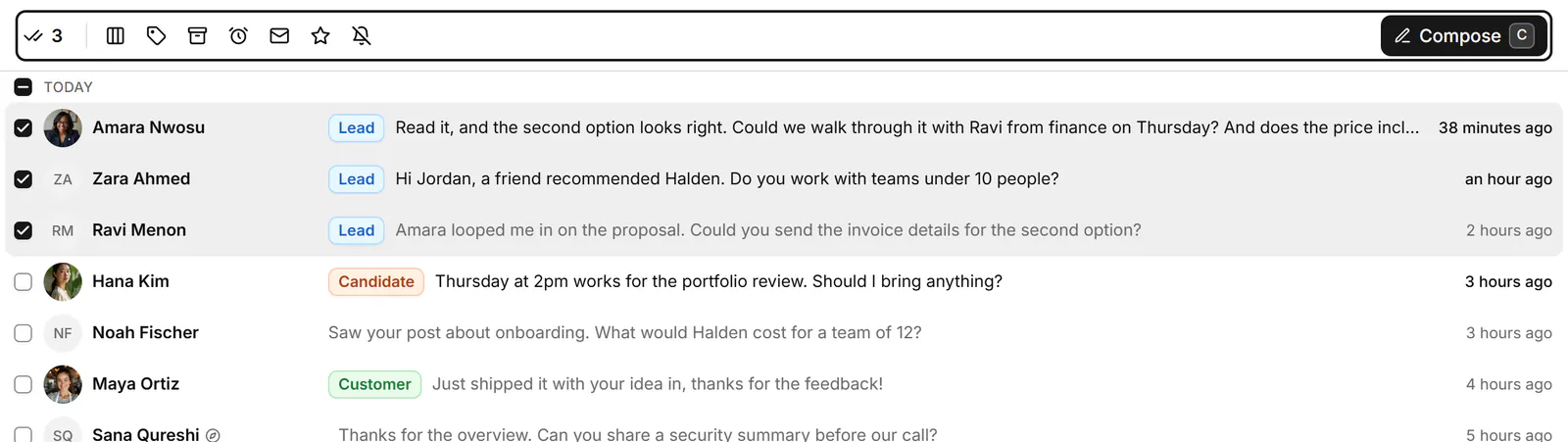
- Choose Set stage…, Apply labels, Archive (Move to inbox in Archive), Snooze or remind me…, Mark as unread, Star, Mute or Compose. The keys work on the selection too: L, E, H, U, S and M.
- Press Esc, or click the count, to clear the selection.
What each action does
- Apply labels (L) opens "Apply labels to 3 selected". Pick labels and press Ctrl+Enter. See Label conversations.
- Snooze or remind me… (H) sets the same snooze or reminder on all of them ("Snoozed 3 conversations").
- Set stage… puts them all in a pipeline stage. See Track deals in a pipeline.
- Archive, Star, Mute and Mark as unread change in Bokka at once, then on LinkedIn one conversation at a time. The message at the bottom shows how far it got ("Archiving 2 of 9 on LinkedIn…"), then "Archived 9 conversations".
- Compose writes one message to each of them. See Send one message to several people.
Up to 50 conversations go to LinkedIn per click. With more selected, the message says the others changed in Bokka only and offers Send the rest. Labels, reminders and stages stay in Bokka: LinkedIn doesn't see them. Every action offers Undo (Z).
If something goes wrong
- "LinkedIn didn't take 2 of them": click Retry the rest. Until then they're changed in Bokka only.
- "Archived 3 in Bokka only" (or starred, muted, marked): the change was made in Bokka, not on LinkedIn.
- Sales Navigator conversations are left out of archive, star and mute.
Related
- Clear your inboxWork through your inbox from the keyboard: archive what's done, snooze what can wait, and star, mute or mark as read.
- Send one message to several peopleWrite one message, personalised with each person's name or company, and send it to up to 10 conversations, approving each send.
- Label conversationsTag conversations and people with labels, work each label as its own list, and manage your labels in Settings.
- Track deals in a pipelineMove conversations through stages on a board to track deals, candidates or job applications, with fields for each.
Still stuck? Email support@gobokka.com and say what you were trying to do.