Inbox
Find a conversation
Search conversations by name, label or message text, search inside one conversation, and narrow the list with filters.
Search the list
- Press /, or click the search field above the list (Search names, labels and messages).
- Type. Every word has to match a name, a headline, a label or the text of a message. Case and accents don't matter.

- A conversation found through one of its messages shows that message in the list. Press ↓ or Enter to move into the results.
- Press Esc to clear the search, and Esc again to leave the field.
Search covers the conversations and messages in Bokka on this device. If it says "Nothing in Inbox matches …", the conversation may be older than what's loaded: scroll to the end of the list or click Load more conversations, then search again.
Search inside a conversation
With a conversation open, press /, or choose More actions → Search this conversation. The bar counts the matches, such as "1 of 5", starting from the newest. Enter or ↑ goes to an older match, Shift+Enter or ↓ to a newer one, and Esc closes the bar.
Filter the list
- Press F, or click Filter above the list.
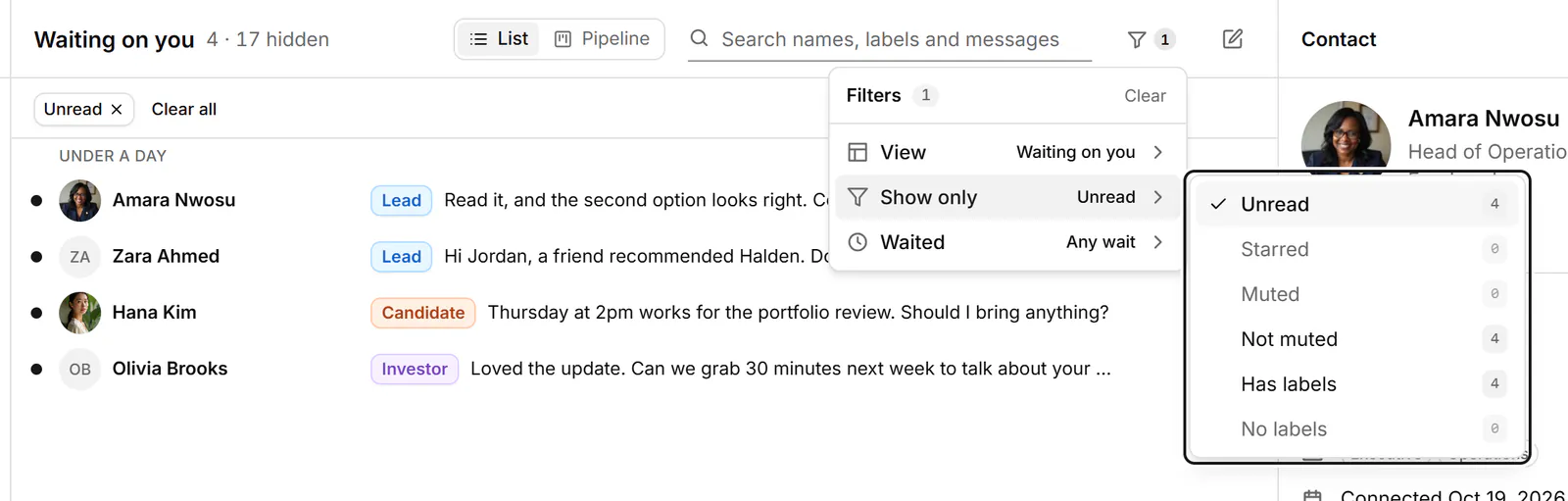
- Under View, pick another view.
- Under Show only, turn on what you want to see, such as Unread, Starred, Has labels, Waiting on you, Follow up or No reply needed. Each shows how many conversations it matches. The choices depend on the view.
- In Waiting on you and Waiting on them, Waited keeps only conversations that have waited 3 or 7 days or more ("Waited 3+ days", "Waited 7+ days").
Each filter you turn on shows as a chip above the list, and the header says how many conversations it hides ("· 4 hidden"). Click a chip, or press Backspace on it, to remove it. Clear all removes every filter. Filters last until you close the tab.
Related
- Use the inbox viewsSee what each inbox view holds and which key opens it, and choose the views your sidebar shows.
- Label conversationsTag conversations and people with labels, work each label as its own list, and manage your labels in Settings.
- Find the right peopleNarrow your connections, followers or following with search, field searches like company = apple, and filters.
- Keyboard shortcutsEvery keyboard shortcut in Bokka: moving through the inbox, acting on conversations, labels, reminders, the pipeline board and more.
Still stuck? Email support@gobokka.com and say what you were trying to do.