Where your LinkedIn messages go when you use Bokka
Bokka's privacy and security in plain words: what stays on your device, what our servers keep, what the extension can do, and what AI sees.
By Amardeep Anand, founder of Bokka · Published
An inbox tool sees some of your most sensitive conversations: deals, hires, investors, friends. So before you connect one to LinkedIn, you should know exactly where those messages go. This page explains how Bokka handles them, in plain words, and points to the privacy policy for the full detail.
Bokka is an AI-first CRM for your LinkedIn inbox. The extension is the small browser add-on that lets Bokka work inside your own LinkedIn session. Zero data retention means the AI provider and its model hosts don't store the text sent to them.
What stays on your device?
Your messages never leave your browser to be stored anywhere else. When Bokka reads your LinkedIn inbox, it keeps the messages, their attachments and the profiles of the people in your conversations in your browser's own storage. That storage is on the computer you use. They are never written to Bokka's database, logs, analytics or emails. That's why a conversation opens the moment you press a key, and why search works across every message instantly.
Signing out on a device, clearing the app's data in Settings, or removing the extension deletes them from that device. On another computer, Bokka reads your inbox from LinkedIn again.
What do our servers keep?
How you organise your inbox, so it follows you to any computer, and nothing you wrote to anyone. Specifically:
- Your account: your email and name, and your Google account id and picture if you sign in with Google.
- Your LinkedIn account's id and name, to tie your workspace to it.
- A list of your conversations without their messages: who is in each one, their headline, when it was last active, who wrote last, and whether it's read, archived or snoozed.
- What you create: labels, pipelines and stages, notes, CRM fields and their values, reminders, snippets, saved views and settings.
- Numbers for your analytics, as daily totals, not people.
- Billing status. Your card details stay with our payment provider; we never see them.
For example, a note you write about a person is kept on our servers, so you see it on any computer; the message that person sent you is not. One more detail worth knowing: if you use Sales Navigator and have Email, Phone or Link fields, the email address, phone number and website a contact shares with you there are added to those fields and kept like anything you type.
What can the browser extension do?
Only make the requests the app asks for, in your own LinkedIn session, while Bokka is open. The extension is how the web app reads and sends your own messages from your own computer. It doesn't add anything to LinkedIn's pages or read them, and there's no background syncing when you're away.
- It reaches www.linkedin.com only, one request at a time, at a measured pace.
- It uses LinkedIn's security token inside the extension only. It is never shown to the page, logged or sent to us.
- It never reads your LinkedIn sign-in cookie, and never sees your password.
- It runs no code fetched from the internet; it ships as reviewed in the browser's extension store.
- What it fetches goes to the Bokka tab on your computer, not to our servers.
What does AI see?
Only what you ask it to read, and nothing is kept. When you use an AI feature, the text it needs goes to our AI provider to produce the answer: a conversation's recent messages, a voice message to transcribe, or your snippets. Our AI provider routes requests to model hosts in the United States and the European Union under zero data retention: neither it nor they keep what was sent, and it is never used to train a model.
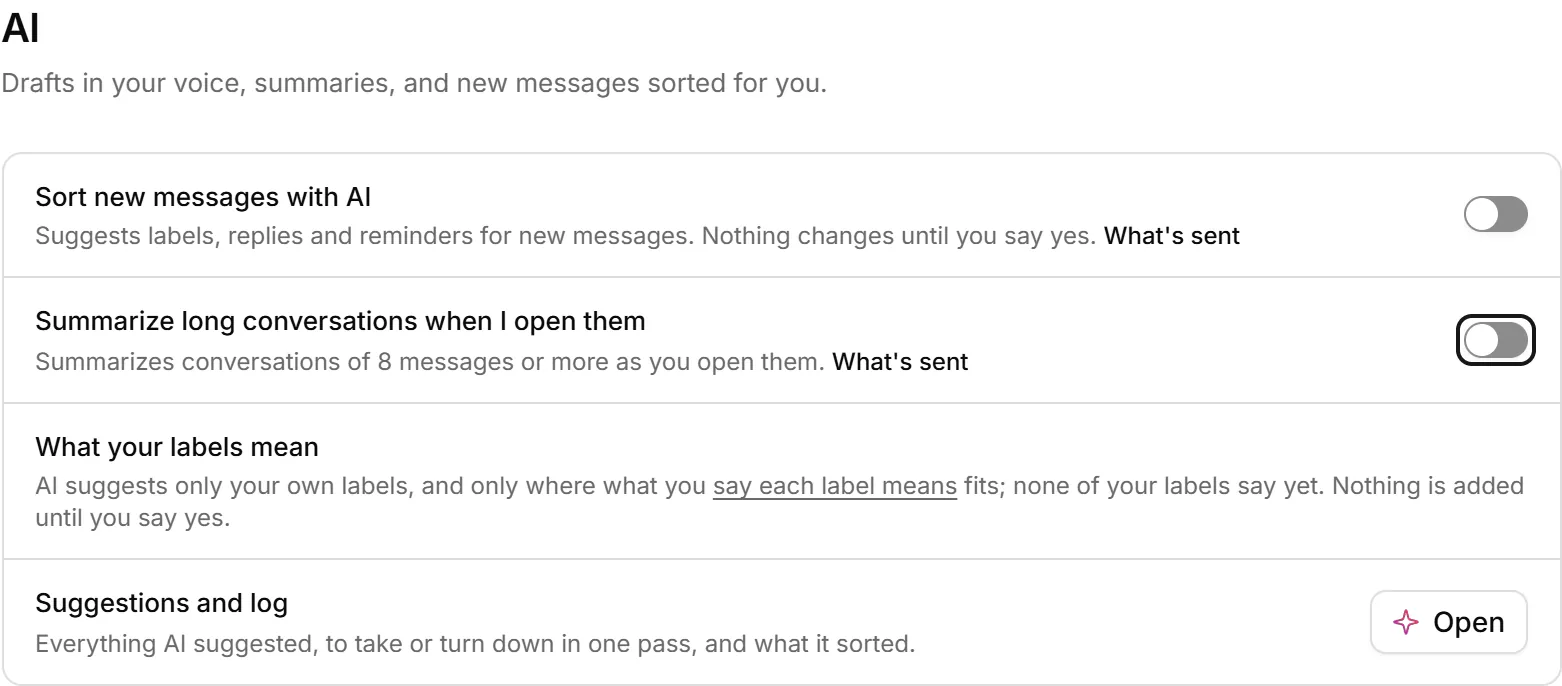
Drafts, summaries and transcripts stay in your browser. Sorting new messages and summarising when you open a conversation run without a click only if you turn them on in Settings, and each switch shows what's sent. AI never sends, archives or changes anything on LinkedIn by itself.
What about AI assistants and integrations?
They get only what you allow, and we keep none of it. If you connect Claude, ChatGPT or another assistant over MCP, it can ask for conversations only after you choose Allow and only while Bokka is open. Your browser answers; the answer passes through our servers in memory, encrypted, and isn't kept or logged. Assistants can read, organise and draft, never send.
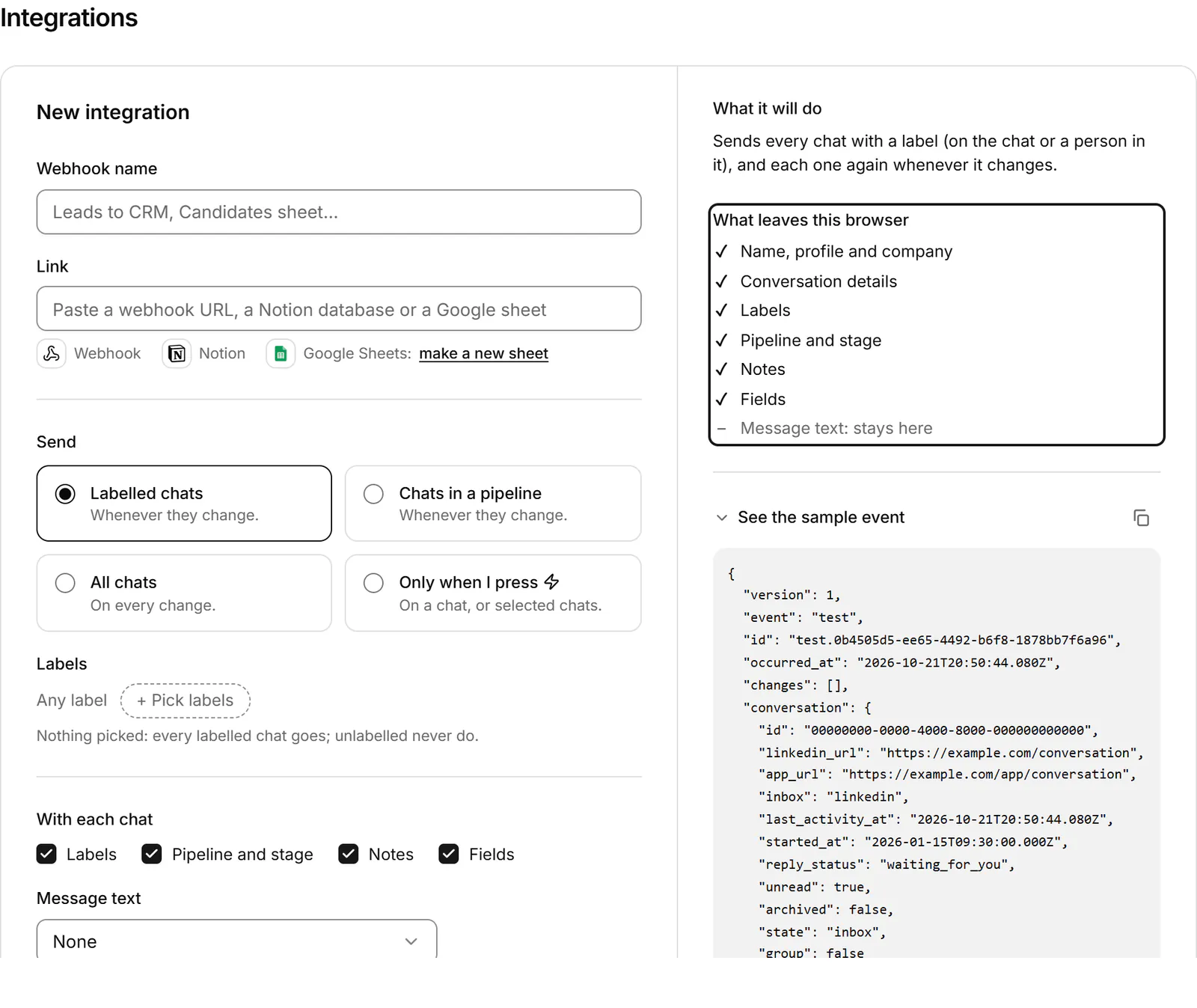
Integrations work the same way. When you send conversations to Notion, Google Sheets or a webhook, your browser builds what's sent, with only the fields that destination allows, and message text is off unless you turn it on. We keep whether a delivery worked, never what it carried.
How is the service itself secured?
- Sign-in without passwords: Google, or a one-time code sent to your email, with repeated attempts limited.
- Sessions in secure cookies that the page's scripts can't read, never in browser storage.
- Every workspace walled off in the database, so one account can never read another's data.
- No message content, names or emails in our logs, error reports or product analytics.
- Keys to other services stay on our servers, never in the app or the extension.
Can using Bokka affect my LinkedIn account?
No tool can honestly promise anything about how LinkedIn treats your account, and we won't. LinkedIn's help centre says it doesn't permit third-party software that scrapes, changes the look of, or automates activity on its website (LinkedIn Help, retrieved 24 October 2026). Bokka is designed to do none of those things: it reads your own inbox through your own session, from your own browser, only while you're using it, adds nothing to LinkedIn's pages, and sends only what you send. It's an independent product, not affiliated with or endorsed by LinkedIn. Read why Bokka doesn't automate for the detail.
What control do you have?
- Delete the messages on a device from Settings, Data and privacy, at any time.
- Disconnect any assistant or integration in Settings.
- Delete your account, and everything we keep for it, from Settings; see delete your account.
- Ask us anything at support@gobokka.com.
One honest limit: messages kept in your browser are as private as that browser profile. Anyone who can use your unlocked computer and browser profile can open them, just as they could open LinkedIn there.
Pricing
Bokka starts with a free 14-day trial, AI included and no credit card. After it, Starter is $25 and Pro is $35 per user a month ($19 and $30 for your first month). Team, at $50, is coming soon.
Frequently asked questions
Does Bokka store my LinkedIn messages?
Only in your own browser, on your device. Bokka's servers keep how you organise your conversations and a list of them without their messages, never message text.
Does Bokka need my LinkedIn password?
No. You sign in to LinkedIn yourself in your browser, and Bokka's extension works inside that session. Your password never reaches Bokka.
Is my data used to train AI?
No. AI requests go to model hosts in the United States and the European Union under zero data retention, and are never used to train a model.
Do Bokka's servers connect to LinkedIn?
No. Every request to LinkedIn goes from your own browser, through the extension, only while Bokka is open in a tab.
How do I delete my data from Bokka?
Clear the messages on a device from Settings, Data and privacy, or delete your account from Settings to remove everything Bokka keeps for it.
Sources
Other products' prices and features were read on their own pages on 24 October 2026. They change; check each page before you buy.
Try Bokka free for 14 days, AI included, with no credit card. It runs in Chrome, Edge, Brave and Arc on a desktop or laptop.
Start your free trialAbout the author
Amardeep Anand founded Bokka, the AI-first CRM for your LinkedIn inbox, and runs it from Deoghar, India. Questions or corrections: support@gobokka.com.
Related
- Why Bokka doesn't automate LinkedIn, and what it does insteadBokka sends nothing on its own: no sequences, auto-replies, scheduled or bulk messages. What that means, why we chose it, and how you still move fast.
- 5 best Kondo alternatives for your LinkedIn inbox (2026)Looking for a Kondo alternative? Bokka, Narrow, Breakcold, Dex and LeadDelta compared on AI, pipelines, Sales Navigator and price, with who each suits.
- 7 best LinkedIn inbox and CRM tools in 2026, comparedThe best tools for managing LinkedIn messages in 2026: Bokka, Kondo, Narrow, Breakcold, Dex, LeadDelta and Waalaxy, plus Sales Navigator, by job.