Why Bokka doesn't automate LinkedIn, and what it does instead
Bokka sends nothing on its own: no sequences, auto-replies, scheduled or bulk messages. What that means, why we chose it, and how you still move fast.
By Amardeep Anand, founder of Bokka · Published
Most LinkedIn tools that promise to save you time do it by sending for you: connection campaigns, follow-up sequences, auto-replies. Bokka does the opposite. It will never send anything you didn't send yourself. This page explains what that means in practice, why we chose it, and how Bokka still gets you through your inbox quickly.
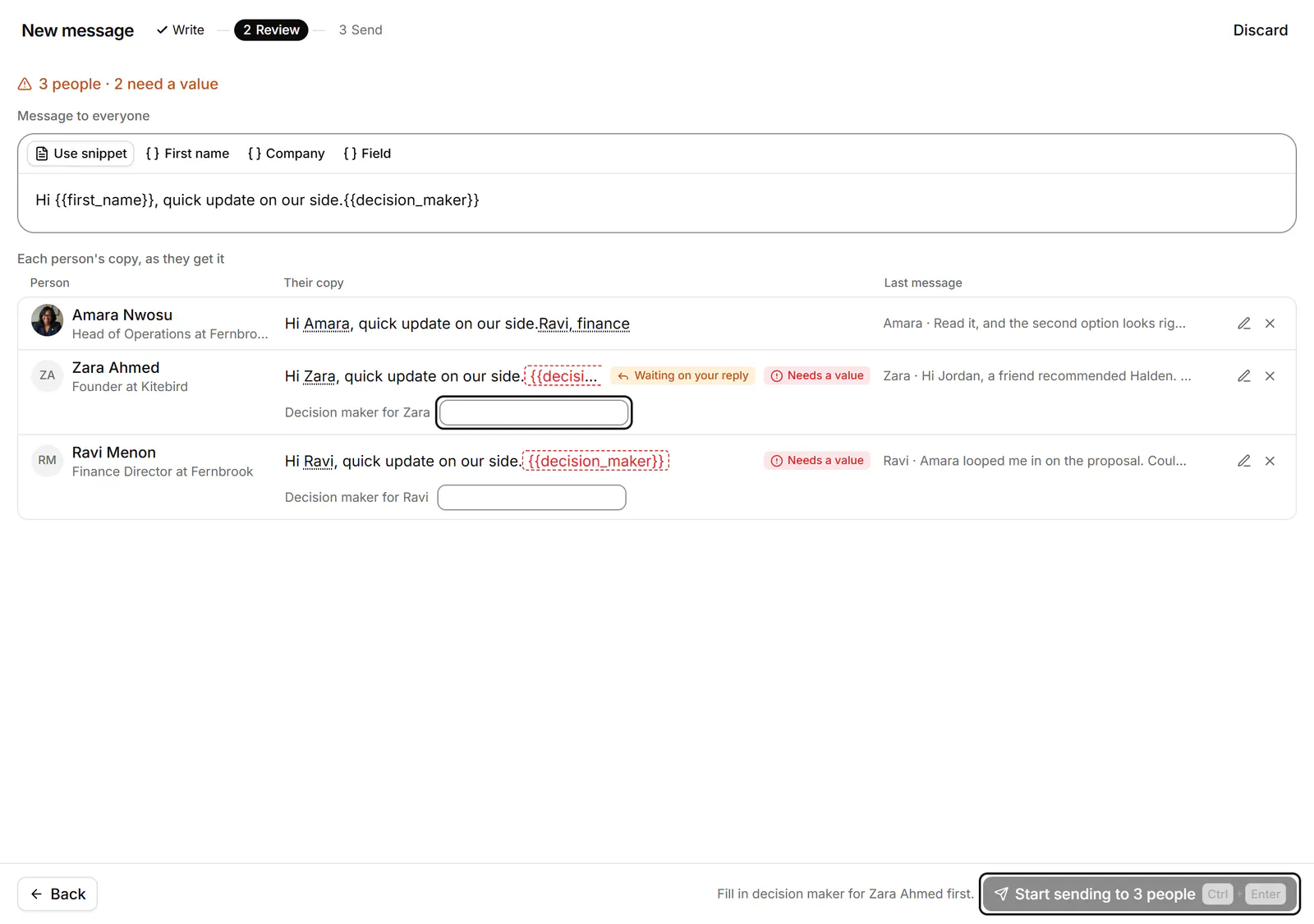
Bokka is an AI-first CRM for your LinkedIn inbox. LinkedIn automation is software that acts on LinkedIn for you, without a person pressing send. Message selected is Bokka's way to write one message to up to 10 conversations, with one Enter per person.
What counts as automation?
Anything that acts on LinkedIn without you being there to do it. In practice:
- Sequences and campaigns that send messages or invitations on a schedule.
- Auto-replies and automatic follow-ups when someone doesn't answer.
- Scheduled or bulk messages sent in one go.
- Invitation and follow actions done for you: sending, accepting, withdrawing.
- Scraping: crawling profiles, posts or search results to build lists.
- Cloud tools that sign in to your account from a server and act while you're offline.
Bokka does none of these.
What does LinkedIn say?
LinkedIn doesn't permit automation tools. Its help centre says it doesn't allow third-party software, including browser plug-ins and extensions, that scrapes, changes the look of, or automates activity on its website. It adds that members using such tools risk having their accounts restricted or shut down (LinkedIn Help, retrieved 24 October 2026). Its User Agreement lists the same prohibitions, such as using bots to send messages or add contacts.
Bokka is a third-party tool, and it isn't approved by LinkedIn; no tool is. What we can control is how Bokka behaves, so we designed it to do none of the three things LinkedIn names: it doesn't scrape, it adds nothing to LinkedIn's pages, and it doesn't automate.
How does Bokka behave instead?
- Every send is yours. A message goes only when you press the key to send it, and a failed send is never retried on its own.
- Message selected is not bulk sending. You can write one message to up to 10 conversations, each personalised with the person's name, but you review every copy and press Enter for each person.
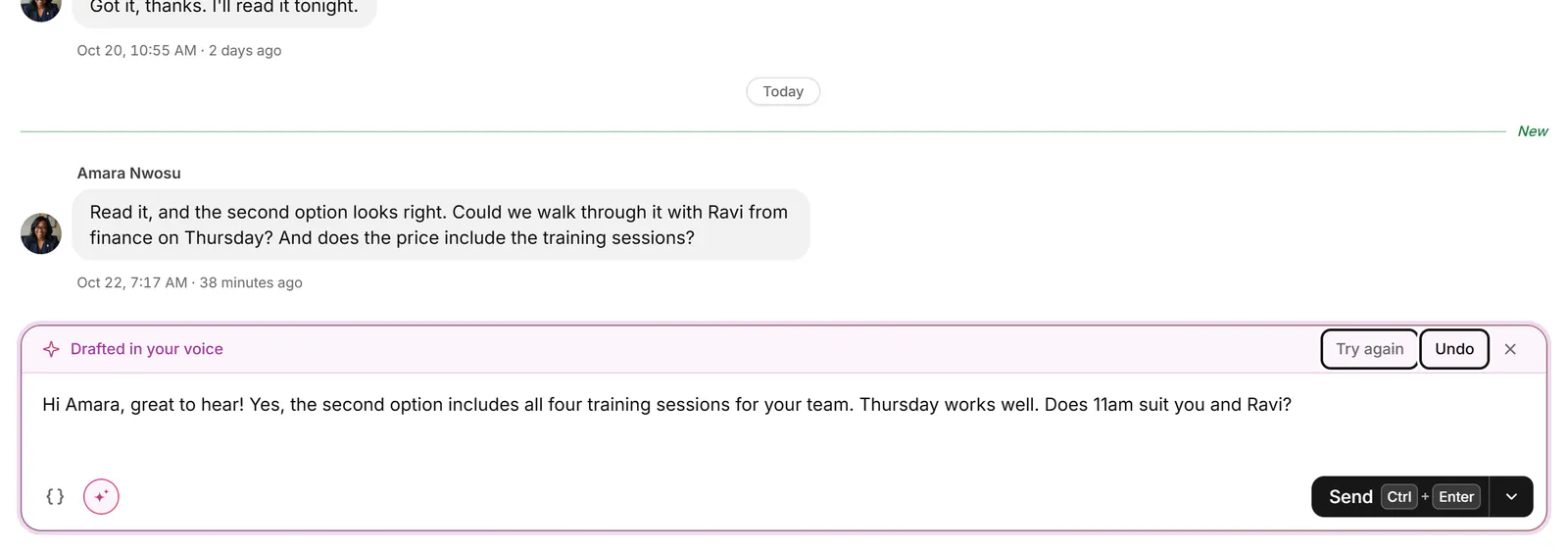
- AI drafts, you send. AI writes a draft into your reply box; it never sends, archives or changes anything on LinkedIn.
- Assistants can't send either. Claude, ChatGPT and other assistants connected over MCP can read, label and draft, never send.
- Reminders remind you. A reminder brings a conversation back to the top of your inbox; it never sends a follow-up.
- No invitation or follow actions at all. You can see your invitations and followers; accepting, withdrawing and following stay on LinkedIn.
- Only your own inbox. Bokka reads your conversations and the lists you open, never other people's profiles or posts in bulk.
How does it talk to LinkedIn?
From your own browser, at a measured pace, only while you're using it. Bokka's servers never connect to LinkedIn and never hold your session. The extension sends one request at a time, the way a person browsing would, only while Bokka is open in a tab, and stops and waits when LinkedIn asks it to slow down. There's no background syncing when you're away and no hidden tabs. Read more in where your LinkedIn messages go.
So how is it faster?
By making each action you take quicker, rather than taking actions for you.
- A keyboard-first inbox: J and K to move, E to archive, H to set a reminder, L to label, ⌘K or Ctrl+K for everything else. See keyboard shortcuts.
- Snippets with fill-in gaps for the person's name and company. See snippets.
- AI drafts in your voice on Pro, ready to edit and send. See write with AI.
- Whose turn it is: the Waiting on you view and reminders mean nothing slips.
- Pipelines so you see every deal's stage without a spreadsheet. See pipelines.
Is no automation right for you?
If your work is conversations, with founders, candidates, clients or investors, people can tell a message you wrote from one a sequence sent, and replies follow. If you want campaigns that contact hundreds of people a week, Bokka isn't that tool; see Bokka vs Waalaxy for how the two approaches differ.
Pricing
Bokka starts with a free 14-day trial, AI included and no credit card. After it, Starter is $25 and Pro is $35 per user a month ($19 and $30 for your first month). Team, at $50, is coming soon.
Frequently asked questions
Does Bokka automate LinkedIn?
No. Bokka has no sequences, auto-replies, scheduled or bulk messages, and takes no invitation or follow actions. Nothing is sent unless you send it.
Can Bokka's AI send messages?
No. AI, and assistants connected over MCP, can read, organise and draft. Only you can send.
Can I send one message to several people in Bokka?
Yes, to up to 10 conversations at once with Message selected. Each person gets their own copy, and you press Enter for every one.
Is Bokka approved by LinkedIn?
No. Bokka is an independent product, not affiliated with or endorsed by LinkedIn. It's designed not to scrape, change LinkedIn's pages or automate, which are what LinkedIn's help centre says it doesn't permit.
Sources
Other products' prices and features were read on their own pages on 24 October 2026. They change; check each page before you buy.
Try Bokka free for 14 days, AI included, with no credit card. It runs in Chrome, Edge, Brave and Arc on a desktop or laptop.
Start your free trialAbout the author
Amardeep Anand founded Bokka, the AI-first CRM for your LinkedIn inbox, and runs it from Deoghar, India. Questions or corrections: support@gobokka.com.
Related
- Where your LinkedIn messages go when you use BokkaBokka's privacy and security in plain words: what stays on your device, what our servers keep, what the extension can do, and what AI sees.
- Bokka vs Waalaxy: LinkedIn inbox CRM or automation tool?Bokka vs Waalaxy: Waalaxy automates LinkedIn outreach; Bokka helps you answer and track conversations yourself, with AI drafts. Compared.
- 7 best LinkedIn inbox and CRM tools in 2026, comparedThe best tools for managing LinkedIn messages in 2026: Bokka, Kondo, Narrow, Breakcold, Dex, LeadDelta and Waalaxy, plus Sales Navigator, by job.