Bokka vs Waalaxy: LinkedIn inbox CRM or automation tool?
Bokka vs Waalaxy: Waalaxy automates LinkedIn outreach; Bokka helps you answer and track conversations yourself, with AI drafts. Compared.
By Amardeep Anand, founder of Bokka · Published
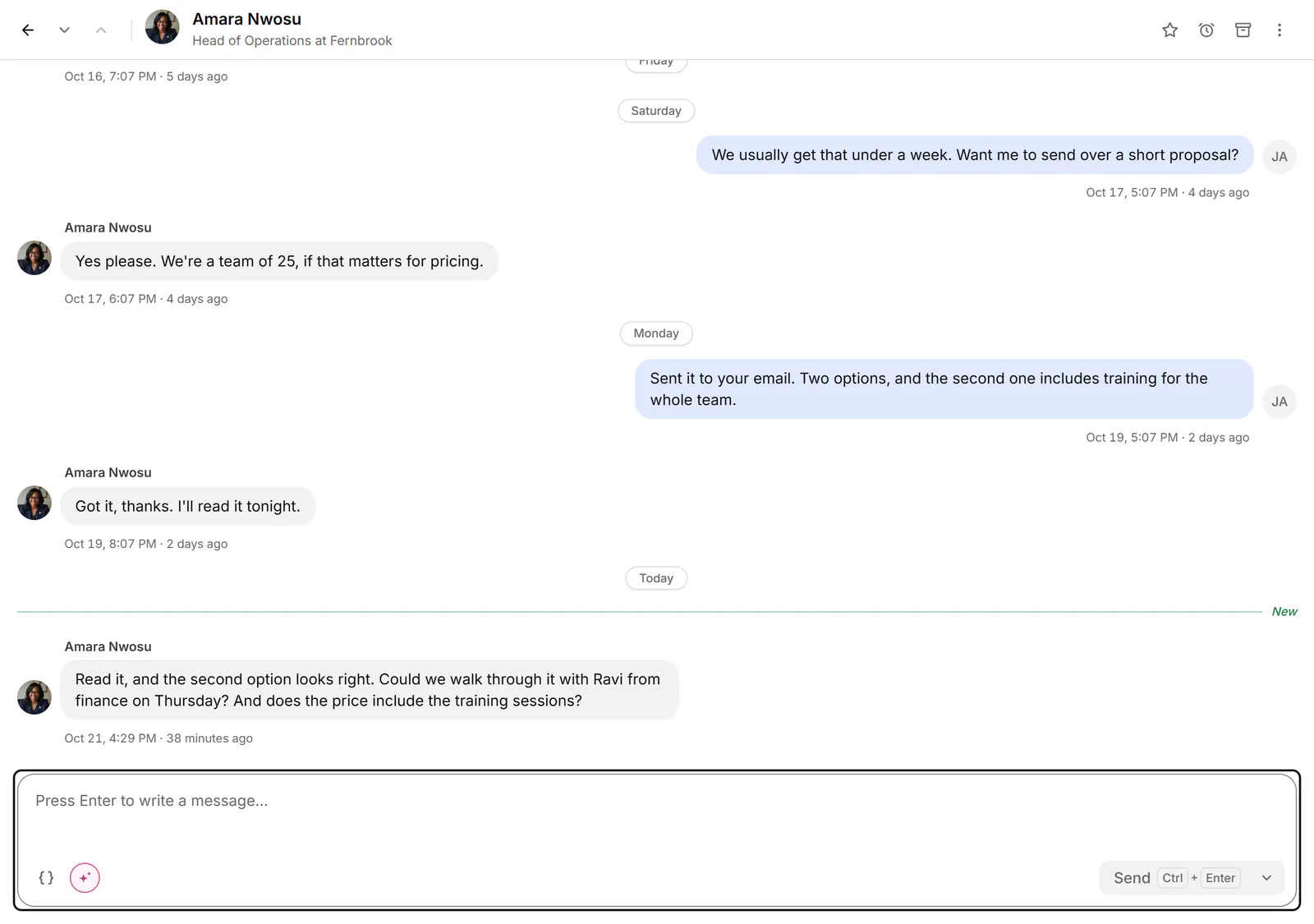
People often weigh Waalaxy and Bokka side by side, but they do opposite jobs. Waalaxy sends on your behalf, at volume and on a schedule. Bokka never sends anything you didn't send yourself; it makes the inbox, the follow-ups and the pipeline fast enough that you don't need to automate them.
Bokka is an AI-first CRM for your LinkedIn inbox. Waalaxy is a LinkedIn and email outreach automation tool. LinkedIn automation is software that sends invitations, messages or follow-ups for you, without a person pressing send.
Bokka vs Waalaxy at a glance
| Bokka | Waalaxy | |
|---|---|---|
| Best for | Answering and tracking conversations yourself | Automated outreach campaigns |
| Automated campaigns and follow-ups | None | Yes |
| Invitations | Never sent for you | 300 a month (Pro), 800 a month (Advanced, Business) |
| Inbox | Included: keyboard-first, labels, reminders, snippets, pipelines | Add-on, €20 a month |
| AI reply drafts in your voice | Yes (Pro) | Not listed |
| Email sequences | No | Business plan |
| Price | Starter $25, Pro $35 per user a month (USD) | Pro €19, Advanced €49, Business €69 per user a month |
| Trial | 14 days, no card | 14 days |
Waalaxy's details are from Waalaxy's pricing page, retrieved 24 October 2026.
What does each tool actually send?
Waalaxy sends for you; Bokka never does. Waalaxy builds campaigns that send invitations and follow-ups on a schedule, up to your plan's monthly invitation limit. Bokka has no sequences, auto-replies, scheduled or bulk campaigns. Its AI and any assistant you connect over MCP can draft; only you can send, one message at a time. For example, when someone hasn't replied in a week, Waalaxy can send the next step of a campaign; Bokka brings the conversation back to the top of your inbox so you decide what to write. Reminders in Bokka remind you; they never send a follow-up themselves.
LinkedIn's help centre says it doesn't permit third-party software, including browser extensions, that scrapes, changes the look of, or automates activity on its website. It adds that members using such tools risk having their accounts restricted (LinkedIn Help, retrieved 24 October 2026). That's a decision to make with your eyes open. Bokka is designed so automation is never part of it; read why Bokka doesn't automate.
Which is better for handling replies?
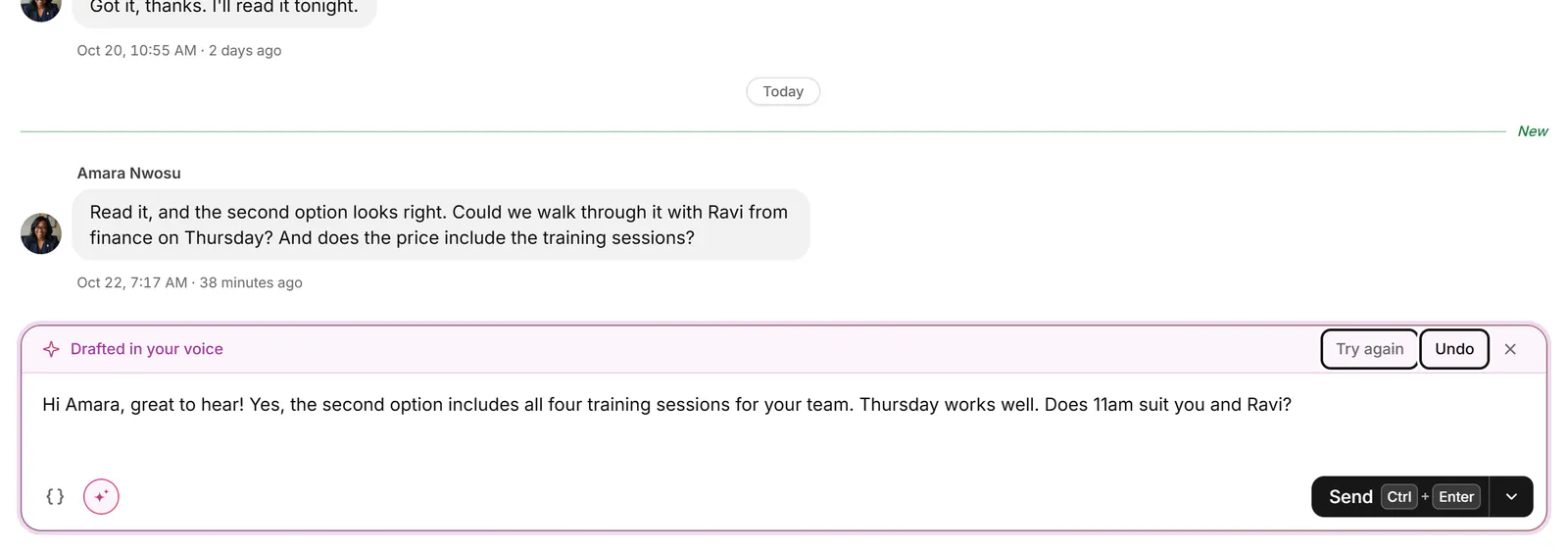
Bokka wins on replies. Every conversation opens the moment you press a key. You label it, move it through a pipeline stage, add a note, set a reminder for when someone goes quiet, and reply, with AI drafting in your voice on Pro. Waalaxy's inbox add-on offers response templates, scheduled follow-ups, tags and CRM export.
Which reaches more people?
Waalaxy wins on reach. If you want campaigns that contact hundreds of people a month, that's what Waalaxy is for, and Bokka won't do it. Waalaxy's Business plan adds cold email sequences next to LinkedIn.
How Bokka treats your LinkedIn account
- Your messages are loaded into your browser and stay there, on your device. Bokka's servers keep how you organise them (labels, stages, fields, notes, reminders, snippets) and a list of your conversations without their messages.
- Bokka never sees your LinkedIn password. A small browser extension works inside the LinkedIn session you already have, and Bokka's servers never connect to LinkedIn.
- Requests go from your own browser at a measured pace, only while Bokka is open in a tab. There is no background syncing while you're away.
- No automation: no sequences, auto-replies, scheduled or bulk campaigns, and nothing is sent unless you send it. AI, and any assistant you connect over MCP, drafts only.
Pricing compared
Waalaxy's entry plan is cheaper, but its inbox costs extra. Waalaxy's Pro is €19, Advanced €49 and Business €69 per user a month, each with a 14-day trial; the LinkedIn Inbox add-on is €20 a month and includes 500 free conversations. Bokka starts with a free 14-day trial, AI included and no credit card. After it, Starter is $25 and Pro is $35 per user a month ($19 and $30 for your first month). Team, at $50, is coming soon.
Who should choose which?
- You'd rather write to people yourself and want that to be fast: Bokka.
- You want automated outreach campaigns: Waalaxy.
Comparing inbox tools instead? See the best LinkedIn inbox tools and Bokka vs LeadDelta.
The verdict
| Category | Winner |
|---|---|
| Automated outreach | Waalaxy |
| Handling replies | Bokka |
| Inbox included | Bokka |
| Entry price | Waalaxy |
| Overall | Different jobs: Waalaxy automates, Bokka helps you reply |
Frequently asked questions
Is Bokka an automation tool like Waalaxy?
No. Bokka sends nothing on its own: no sequences, auto-replies, scheduled or bulk messages, and no invitations. You send every message yourself.
Can Bokka handle replies from my outreach?
Yes. Bokka is a full LinkedIn inbox, so every reply lands there to label, put in a pipeline stage, set a reminder on and answer, with AI drafts on Pro.
How much is Waalaxy's inbox?
Waalaxy sells its LinkedIn Inbox as an add-on at €20 a month, according to its pricing page on 24 October 2026.
Sources
Other products' prices and features were read on their own pages on 24 October 2026. They change; check each page before you buy.
Try Bokka free for 14 days, AI included, with no credit card. It runs in Chrome, Edge, Brave and Arc on a desktop or laptop.
Start your free trialAbout the author
Amardeep Anand founded Bokka, the AI-first CRM for your LinkedIn inbox, and runs it from Deoghar, India. Questions or corrections: support@gobokka.com.
Related
- Why Bokka doesn't automate LinkedIn, and what it does insteadBokka sends nothing on its own: no sequences, auto-replies, scheduled or bulk messages. What that means, why we chose it, and how you still move fast.
- 7 best LinkedIn inbox and CRM tools in 2026, comparedThe best tools for managing LinkedIn messages in 2026: Bokka, Kondo, Narrow, Breakcold, Dex, LeadDelta and Waalaxy, plus Sales Navigator, by job.
- Bokka vs LeadDelta: LinkedIn inbox CRM or prospecting suite?Bokka vs LeadDelta: a focused LinkedIn inbox CRM with built-in AI against a team prospecting platform with campaigns and a contact database.