Bokka vs Surfe: LinkedIn inbox or prospecting data?
Bokka vs Surfe compared from each product's own pages: a LinkedIn inbox CRM against contact data and CRM sync, with prices, strengths and who needs which.
By Amardeep Anand, founder of Bokka · Published · 2 min read
On this page
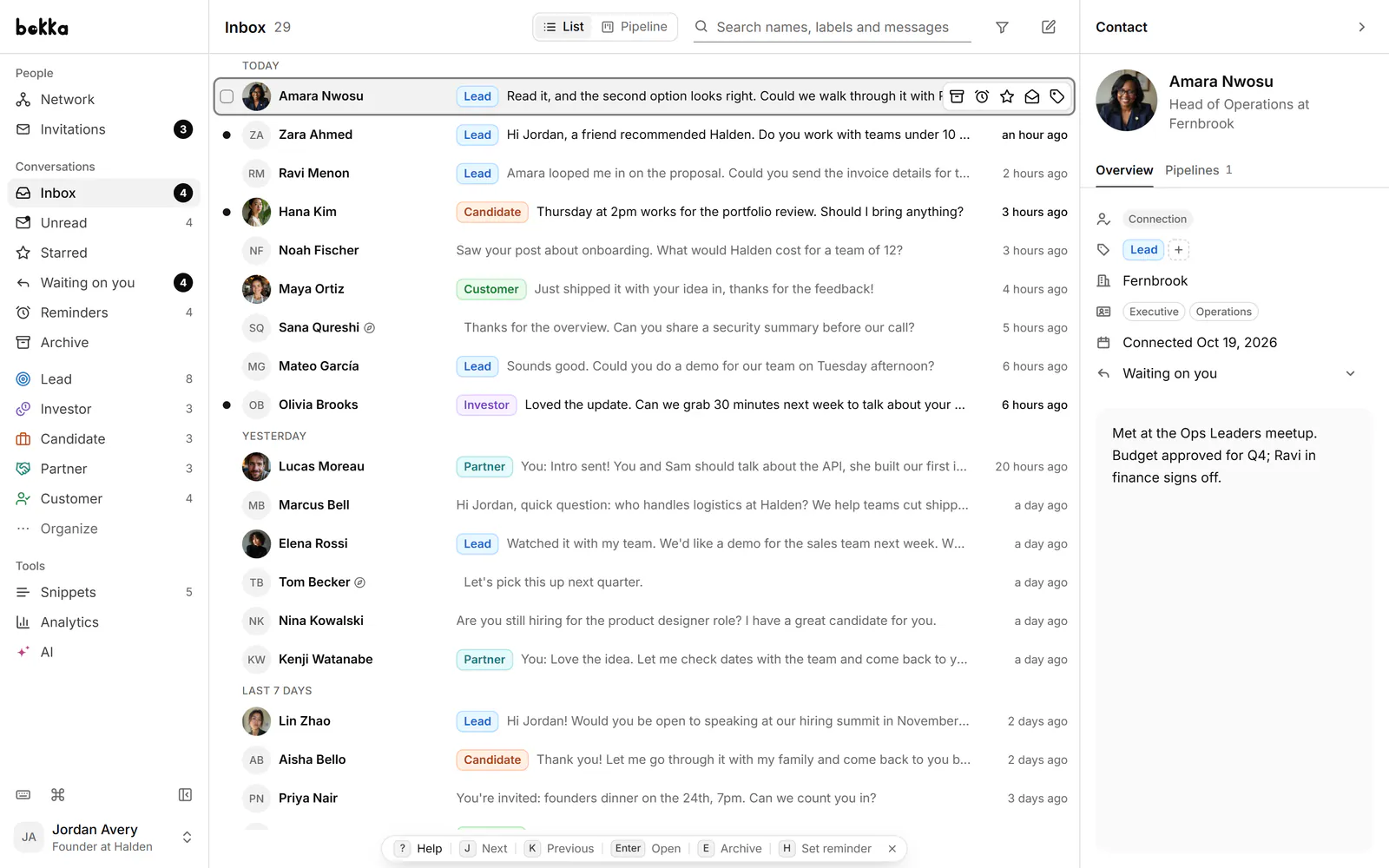
Surfe and Bokka solve different problems: Surfe finds contact details for prospects and keeps your CRM up to date, while Bokka is where you read, organise and answer your LinkedIn messages. If you need emails, phone numbers and CRM sync, look at Surfe; if your deals happen in LinkedIn conversations, look at Bokka.
Surfe describes itself as pipeline generation for go-to-market teams, finding, enriching and activating accounts and contacts (Surfe's home page, retrieved November 1, 2026). Enrichment means adding details, such as a work email or phone number, to a contact. Bokka is an AI-first CRM for your LinkedIn inbox.
Bokka vs Surfe at a glance
| Bokka | Surfe | |
|---|---|---|
| What it is | LinkedIn inbox CRM | Contact data and CRM sync for sales teams |
| Price | Starter $25, Pro $35 per user a month | Free plan; Essential $49, Pro $89 per user a month |
| LinkedIn inbox | Yes | Not listed |
| Labels, reminders, pipeline | Yes | Not listed |
| Message templates | Yes, with fill-ins | Not listed |
| AI reply drafts | Yes (trial and Pro) | Not listed |
| Emails and phone numbers | No | Yes, from 15+ sources |
| Native CRM sync | No | Salesforce, HubSpot, Pipedrive |
| Other destinations | Notion, Google Sheets, webhooks (Pro) | Google Sheets (Essential), Salesloft, Outreach, Lemlist (Pro) |
| AI assistants | MCP (Pro) | API and MCP |
Surfe's details are from its home page, retrieved November 1, 2026 and its pricing page, retrieved November 1, 2026.
What Surfe does well
- Contact data. It searches 15+ data sources for verified emails and mobile numbers, using several providers in a waterfall to get the best coverage.
- Buying signals. It tracks job changes, hiring, funding and growth, and flags members of a buying committee.
- CRM upkeep. It keeps Salesforce, HubSpot and Pipedrive up to date with continuous enrichment and native sync.
- Where reps work. A Chrome extension lets reps reveal contacts and sync them to the CRM in one click.
Source: Surfe's home page, retrieved November 1, 2026.
What Bokka does well
- An inbox for your LinkedIn messages. Views such as Waiting on you, labels as lists, reminders that cancel when they reply, and a key for every action.
- A pipeline on the conversations. Stages and fields on the same threads you reply in.
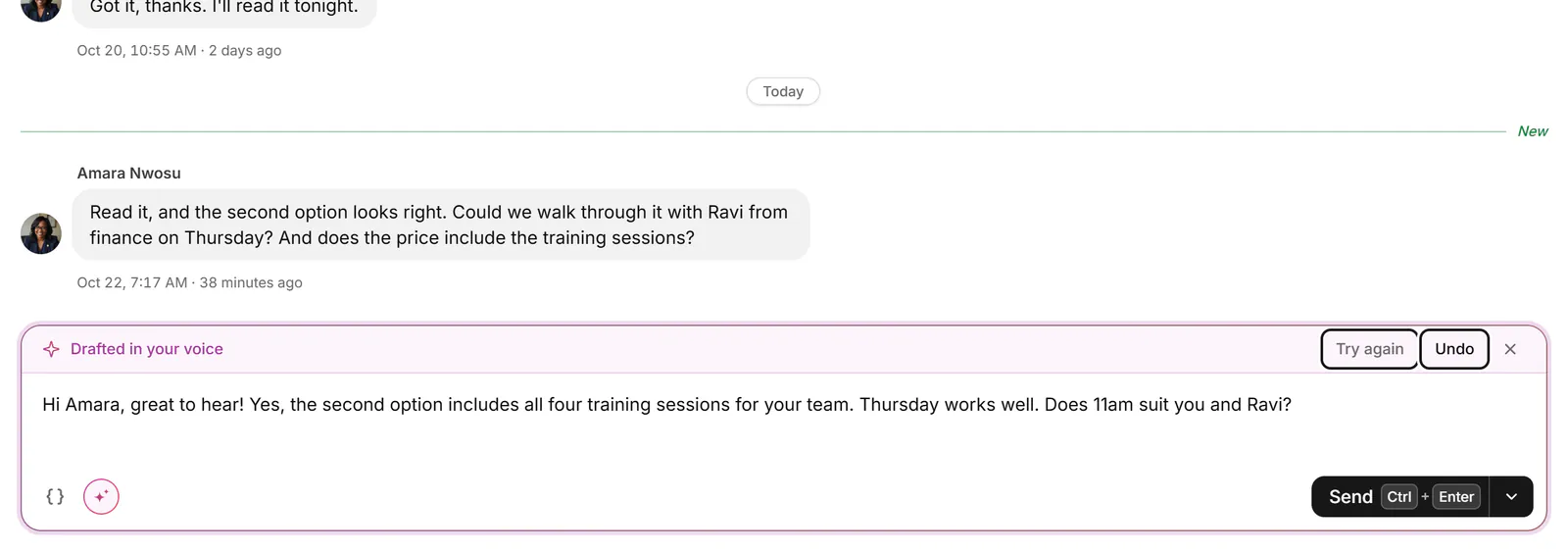
- AI that drafts. On the trial and Pro, drafts in your voice, summaries and sorting you approve; nothing is sent until you send it.
- Your messages stay in your browser. Integrations send message text only if you turn it on.
How do they connect to your CRM?
Surfe wins. It syncs natively with Salesforce, HubSpot and Pipedrive, and its pricing page lists Copper too. The free plan syncs one contact a day; Essential removes that limit and adds Google Sheets; Pro adds Salesloft, Outreach and Lemlist (Surfe's pricing page, retrieved November 1, 2026).
Bokka has no native CRM sync. On Pro, it sends the conversations you choose, with labels, stages, notes and fields, to Notion, Google Sheets or a webhook, which a tool such as Zapier can pass to a CRM. See send LinkedIn conversations to Notion or Google Sheets.
Pricing compared
| Plan | Monthly | Billed yearly | Credits a month (monthly billing) |
|---|---|---|---|
| Surfe Free | $0 | $0 | 20 email, 5 mobile |
| Surfe Essential | $49 per user | $39 per user a month | 150 email, 50 mobile |
| Surfe Pro | $89 per user | $79 per user a month | 1,000 email, 100 mobile |
| Surfe Enterprise | Custom | Custom | Custom |
| Bokka Starter | $25 per user | ||
| Bokka Pro | $35 per user |
Surfe's prices are from its pricing page, retrieved November 1, 2026, which also sells its CRM connector on its own for $29 a month. Bokka starts with a free 14-day trial, AI included and no credit card. After it, Starter is $25 and Pro is $35 per user a month ($19 and $30 for your first month). Team, at $50, is coming soon.
Who should choose which?
- You need emails and phone numbers for LinkedIn prospects, synced to your CRM: Surfe.
- You need to keep up with LinkedIn conversations and move them through stages: Bokka.
- You do both: use Surfe for the contact data and CRM, and Bokka for the conversations. They don't overlap much.
Comparing inbox tools instead? See Bokka vs Kanbox and the best LinkedIn inbox tools.
The verdict
| Category | Winner |
|---|---|
| Contact data and enrichment | Surfe |
| Native CRM sync | Surfe |
| LinkedIn inbox and follow-ups | Bokka |
| AI reply drafts | Bokka |
| Free to start | Surfe (free plan) |
Frequently asked questions
Is Bokka a Surfe alternative?
Not really. Surfe is for contact data and CRM sync; Bokka is for reading, organising and answering your LinkedIn messages. Many teams would use both.
Does Surfe have a LinkedIn inbox?
Surfe's current home and pricing pages, read on November 1, 2026, don't list a LinkedIn inbox or message templates. They describe contact data, buying signals and CRM sync.
How much does Surfe cost?
Surfe has a free plan. Essential is $49 and Pro $89 per user a month billed monthly, or $39 and $79 billed yearly, according to its pricing page.
Does Bokka sync with HubSpot or Salesforce?
Not natively. On Pro, Bokka sends conversations to Notion, Google Sheets or a webhook, which can feed a CRM through a tool such as Zapier.
Sources
Other products' prices and features were read on their own pages on November 1, 2026. They change; check each page before you buy.
Join the waitlist for early access to Bokka. Your first 14 days are free, AI included, with no credit card. It runs in Chrome, Edge, Brave and Arc on a desktop or laptop.
Join the waitlistAbout the author
Amardeep Anand founded Bokka, the AI-first CRM for your LinkedIn inbox, and runs it from Deoghar, India. Questions or corrections: support@gobokka.com.
Related

8 best LinkedIn inbox and CRM tools in 2026, compared
3 min read

Bokka vs Kanbox: LinkedIn inbox CRM or automation suite?
3 min read

How to send LinkedIn conversations to Notion or Google Sheets
2 min read

7 best LeadDelta alternatives for LinkedIn in 2026
4 min read