7 best LeadDelta alternatives for LinkedIn in 2026
Leaving LeadDelta? Bokka, Kondo, Narrow, Breakcold, Kanbox, Surfe and Dex compared on price, AI drafting, pipelines, Sales Navigator, MCP and teams.
By Amardeep Anand, founder of Bokka · Published · 4 min read
On this page
- What LeadDelta gives you, and why people look elsewhere
- 1. Bokka: best for working your LinkedIn inbox on your own
- 2. Kondo: best for LinkedIn and WhatsApp in one inbox
- 3. Narrow: best for a simple inbox at a low price
- 4. Breakcold: best for a sales team on email and LinkedIn
- 5. Kanbox: best for outreach campaigns with an inbox
- 6. Surfe: best for emails and phone numbers
- 7. Dex: best personal CRM for your network
- Which LeadDelta alternative is right for you?
- Bokka pricing
The best LeadDelta alternative depends on which part of LeadDelta you used. If you work your LinkedIn inbox on your own, Bokka gives you AI drafting, a pipeline and the Sales Navigator inbox from $25 per user a month; a team that sells across email and LinkedIn will fit Breakcold, which sells seats with roles; and if you mostly needed emails and phone numbers, Surfe does contact data with a free plan.
| Tool | Price | AI reply drafting | Pipeline | Sales Navigator inbox | MCP | Team features | Free trial |
|---|---|---|---|---|---|---|---|
| LeadDelta (baseline) | $69.30 per user a month, billed yearly | Yes, in your voice | Tags, notes and tasks | Yes | Yes | Shared networks, admin and member roles | 7 days, no card |
| Bokka | Starter $25, Pro $35 per user a month | Built in (Pro) | Yes (Starter) | Pro | Pro | No; Team is coming soon | 14 days, no card |
| Kondo | $28 per user a month, billed yearly | Through MCP | Not listed | Business ($36) | Business ($36) | Per-user plans; Okta SSO on Enterprise | No; 14-day money-back guarantee |
| Narrow | $15 a month billed yearly, $19 monthly | Not listed | Yes, a kanban board | Yes | Super Pro ($22 billed yearly) | Not listed | Free to start, no card |
| Breakcold | $49 per seat a month | Yes, on every channel | Yes | Not listed | Every plan | Seats, roles and permissions | 14 days, card required |
| Kanbox | $20 a month, $12 billed yearly | AI prompts and templates (Pro) | Yes, kanban | Yes, in its unified inbox | Not listed | Team and multi-account (Essential, $45) | 15 days, no card |
| Surfe | Free plan; Essential $49 per user a month | Not listed | No; syncs to your CRM | Not listed | Yes; plan not stated | Shared contact lists (Pro) | Free plan, no card |
| Dex | $20 a month, $12 billed yearly | Not listed | Not listed | Not listed | Yes; plan not stated | Team plan, $40 per user a month | 7 days, card required |
Each row is from that product's own pricing and product pages, linked in its section below, retrieved November 10, 2026. "Not listed" means those pages don't mention it. Prices are the entry plan unless the cell says otherwise.
LeadDelta calls itself "the #1 LinkedIn CRM with an AI inbox". Bokka is an AI-first CRM for your LinkedIn inbox. A LinkedIn inbox CRM is a tool that adds labels, reminders and deal stages to your LinkedIn messages; a prospecting tool finds new people and their contact details.
What LeadDelta gives you, and why people look elsewhere
LeadDelta's Growth plan is $69.30 per user a month billed yearly ($831.60 a year), after a 7-day free trial with no credit card. It bundles unlimited LinkedIn and email campaigns, an AI LinkedIn inbox, a database of 500 million people with an email and phone finder (500 credits), a LinkedIn CRM with shared networks, Warm Intro AI, buying signals, and MCP and API access that works with Claude, ChatGPT, HubSpot and Zapier (LeadDelta's pricing, retrieved November 10, 2026). Its inbox drafts replies in your voice, labels messages for you and shows Sales Navigator conversations beside the rest (its Smart Inbox page, retrieved November 10, 2026).
Its team workspace merges teammates' LinkedIn networks into one shared graph, with admin and member roles, while each person's messages and inbox stay private to them (LeadDelta's team workspace page, retrieved November 10, 2026). Its MCP page says the connection is read-only and runs on its Business plan (LeadDelta's MCP page, retrieved November 10, 2026); its pricing page names only Growth. Its product pages also quote a starting price of $55 a seat in their comparison tables; we use the pricing page's figure.
That is a lot of product, and people look elsewhere when they use only part of it: they want a simpler inbox, they work alone and don't need shared networks, they want a lower price, or they want one piece, such as contact data, done in more depth. Each tool below answers one of those.
1. Bokka: best for working your LinkedIn inbox on your own
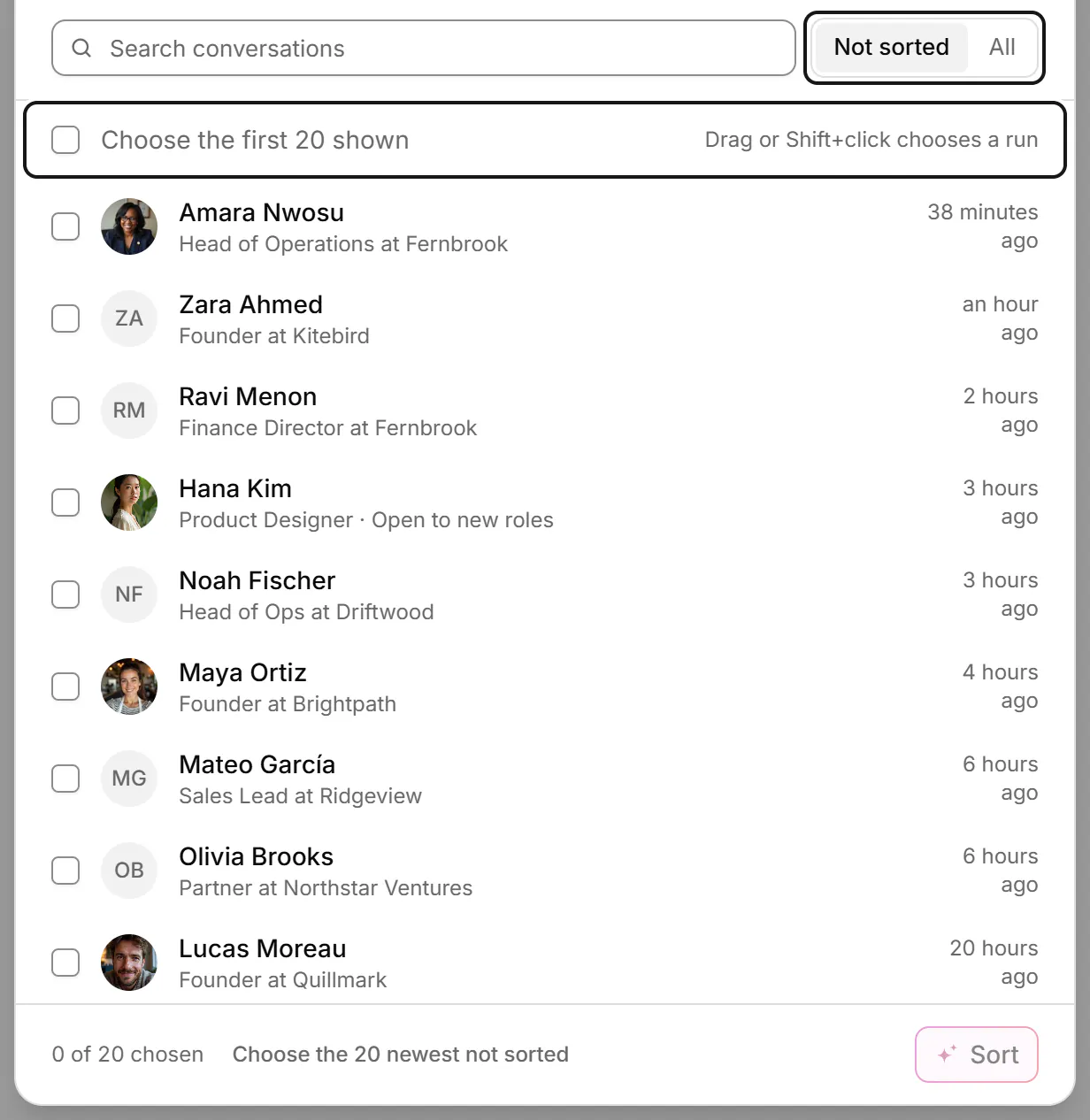
Bokka is the AI-first CRM for your LinkedIn inbox: you read, sort and answer your LinkedIn messages in one keyboard-first inbox, and track the conversations that matter. Your messages are kept in your browser, on your device. It has:
- AI on Pro: replies in your voice, sorting into labels and reminders you approve, and summaries.
- Pipelines on Starter: stages, a board and CRM fields on the same conversations you reply in. See pipelines.
- Pro extras: your Sales Navigator inbox (your LinkedIn account needs a Sales Navigator subscription), analytics, Notion, Google Sheets and webhooks, and MCP for Claude, ChatGPT, Cursor or any assistant that supports it, to read, organise and draft. It never sends a message.
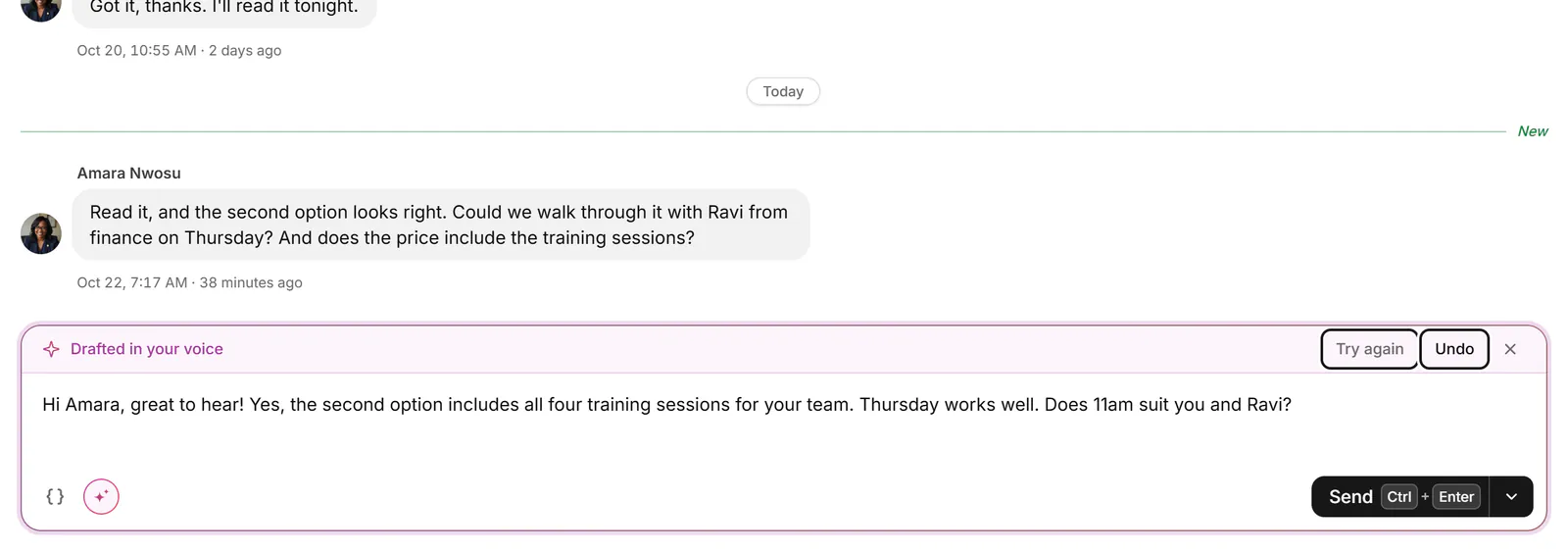
Bokka doesn't automate: there are no campaigns, sequences, auto-replies or scheduled messages, and nothing is sent unless you send it. It has no contact database or email finder, and no team seats today: Team, at $50 per user a month, is coming soon, so for now each person has their own plan. Best for: founders, recruiters and sales people whose deals happen in LinkedIn messages. Price: Starter $25, Pro $35 per user a month, after a free 14-day trial with no card. Full comparison: Bokka vs LeadDelta.
2. Kondo: best for LinkedIn and WhatsApp in one inbox
Kondo is a keyboard-first inbox for WhatsApp and LinkedIn, with labels, notes, reminders and snippets; your inbox stays on your computer, and Kondo says it doesn't automate. AI works through MCP: Claude, ChatGPT, Cursor or another assistant can search chats, add labels and write drafts that wait for you to send. It syncs the chats you choose to HubSpot, Salesforce, Attio, Notion, Google Sheets and others (Kondo's home page, retrieved November 10, 2026). Basic is $28 per user a month billed yearly; Business, at $36, adds the Sales Navigator inbox, CRM integrations, analytics and MCP; Enterprise adds Okta SSO. Instead of a free trial it has a 14-day money-back guarantee (Kondo's pricing, retrieved November 10, 2026). Its pages don't list shared inboxes or seats. Kondo's pricing page shows rupees from our location, so we read its US dollar prices from search results of that same page. More: Kondo alternatives and Bokka vs Kondo.
3. Narrow: best for a simple inbox at a low price
A local-first LinkedIn inbox with labels, reminders, a kanban board and snippets on Pro, at $15 a month billed yearly or $19 month to month. Super Pro, at $22 billed yearly or $29 monthly, adds voice and video messages, MCP for your AI tools and AI lead screening (Narrow's pricing, retrieved November 10, 2026). Its home page says Sales Navigator conversations appear in the same workspace as your LinkedIn inbox, that it isn't an automation tool, and that you can start without a credit card (Narrow's home page, retrieved November 10, 2026). Its pages don't list reply drafting, CRM integrations or team features. Best for: one person who wants an organised inbox for the least money. Full comparison: Bokka vs Narrow.
4. Breakcold: best for a sales team on email and LinkedIn
An AI sales CRM with one inbox for every channel: each seat connects 2 accounts, such as LinkedIn, WhatsApp, Telegram or email. Every plan includes pipelines that update themselves, reply drafts on every channel, enrichment, roles and permissions, and Claude, ChatGPT and MCP access; its AI queues tasks and you approve every send. Price: X1 $49, X5 $99 and X20 $199 per seat a month, differing by how much AI work each seat gets, after a 14-day free trial that needs a card (Breakcold's pricing, retrieved November 10, 2026). Its pricing page doesn't mention a Sales Navigator inbox. Best for: a team whose deals run across email and LinkedIn and who want seats and roles today. Full comparison: Bokka vs Breakcold.
5. Kanbox: best for outreach campaigns with an inbox
Kanbox is an automation tool with an inbox: its home page says "LinkedIn automation made simple" and describes scraping, automated sequences, a smart inbox and kanban pipelines, plus an AI agent that imports leads, scores them and handles auto-responses (Kanbox's home page, retrieved November 10, 2026). It imports leads from Sales Navigator searches. Essential and Pro add team and multi-account access with unlimited account managers, and Pro adds AI prompts, templates, webhooks and an API. Price: Starter $20 a month or $12 billed yearly; Essential $45 or $30 and Pro $80 or $50 per LinkedIn account, after a 15-day free trial with no card (Kanbox's pricing, retrieved November 10, 2026; the page shows rupees from our location, and we read the dollar prices from the same page's built-in price list). Its pages don't mention MCP. Best for: a team or agency that used LeadDelta's campaigns and wants cheaper ones. Full comparison: Bokka vs Kanbox.
6. Surfe: best for emails and phone numbers
If you used LeadDelta mainly for contact details, Surfe does that one job in depth. It finds verified emails and mobile numbers from 15+ data sources, tracks buying signals such as job changes, hiring and funding, and syncs to Salesforce, HubSpot and Pipedrive; it also has an MCP server (Surfe's home page, retrieved November 10, 2026). Its pages don't list a LinkedIn inbox. Price: a free plan with 20 email and 5 mobile credits a month; Essential $49 and Pro $89 per user a month, or $39 and $79 billed yearly. Pro adds shared contact lists, and Enterprise adds SSO and SCIM (Surfe's pricing, retrieved November 10, 2026). Best for: a sales team that needs contact data in its CRM, often next to an inbox tool. Full comparison: Bokka vs Surfe.
7. Dex: best personal CRM for your network
If you used LeadDelta to keep your connections as a searchable CRM, Dex is a personal CRM that pulls contacts from 15+ sources, including email, calendar, LinkedIn and WhatsApp, with keep-in-touch reminders, apps for web, phone and desktop, and an MCP server for AI agents (Dex's home page, retrieved November 10, 2026). Premium syncs up to 2,500 LinkedIn connections and Professional up to 9,000; its pages describe syncing connections, not answering LinkedIn messages. Price: Premium $20 and Professional $34 a month, or $12 and $20 billed yearly, after a 7-day free trial that needs a card; Team is $40 per user a month and adds CRM integrations and SAML SSO (Dex's pricing, retrieved November 10, 2026). Full comparison: Bokka vs Dex.
Which LeadDelta alternative is right for you?
- You work your LinkedIn inbox alone and want AI drafts and a pipeline: Bokka.
- You also need WhatsApp in the same inbox, and CRM sync: Kondo.
- You want a simple, organised inbox for little money: Narrow.
- Your team sells across email and LinkedIn and needs seats and roles now: Breakcold.
- You want outreach campaigns across several LinkedIn accounts: Kanbox.
- You mostly need emails and phone numbers in your CRM: Surfe.
- You want a contact book across every channel: Dex.
- Your team relies on shared networks and warm intros: stay with LeadDelta; none of these pool a team's connections the same way.
For more on the difference between working replies and running campaigns, see why Bokka doesn't automate LinkedIn and the best LinkedIn inbox tools.
Bokka pricing
Bokka starts with a free 14-day trial, AI included and no credit card. After it, Starter is $25 and Pro is $35 per user a month ($19 and $30 for your first month). Team, at $50, is coming soon.
Frequently asked questions
What is the best LeadDelta alternative?
It depends on what you used LeadDelta for. For working your own LinkedIn inbox, Bokka has AI drafting, pipelines and the Sales Navigator inbox. For a team selling across email and LinkedIn, Breakcold has seats and roles. For contact data, Surfe has a free plan.
Is there a cheaper alternative to LeadDelta?
Yes. LeadDelta's Growth plan is $69.30 per user a month billed yearly, as of November 10, 2026. Kanbox and Dex start at $12 a month and Narrow at $15, each billed yearly, Bokka's Starter is $25 per user a month, and Surfe has a free plan.
LeadDelta vs Kondo: what's the difference?
LeadDelta is a LinkedIn CRM with campaigns, a contact database, shared team networks and an AI inbox that drafts replies. Kondo is an inbox for LinkedIn and WhatsApp that doesn't automate, with AI through MCP and CRM sync on its Business plan, at $36 per user a month billed yearly.
Which LeadDelta alternative works for a team?
Breakcold sells seats with roles and permissions on every plan, and Kanbox has team and multi-account access from its Essential plan. Dex has a Team plan at $40 per user a month. Bokka has no team seats yet; Team is coming soon.
Which LeadDelta alternative has a free trial without a card?
Bokka has a free 14-day trial with AI included and no credit card. Kanbox has a 15-day trial and Narrow is free to start, both without a card, and Surfe has a free plan. Breakcold's and Dex's trials need a card.
Sources
Other products' prices and features were read on their own pages on November 10, 2026. They change; check each page before you buy.
Join the waitlist for early access to Bokka. Your first 14 days are free, AI included, with no credit card. It runs in Chrome, Edge, Brave and Arc on a desktop or laptop.
Join the waitlistAbout the author
Amardeep Anand founded Bokka, the AI-first CRM for your LinkedIn inbox, and runs it from Deoghar, India. Questions or corrections: support@gobokka.com.
Related

Bokka vs LeadDelta: LinkedIn inbox CRM or prospecting suite?
2 min read

6 best Kondo alternatives for your LinkedIn inbox (2026)
3 min read

8 best LinkedIn inbox and CRM tools in 2026, compared
3 min read

Bokka vs Surfe: LinkedIn inbox or prospecting data?
2 min read