LinkedEmbed alternatives: LinkedIn widgets for your site compared
LinkedEmbed, Elfsight, LinkedIn's profile badge and Bokka's widgets compared on what they show, how they update and what they cost, from their own pages.
By Amardeep Anand, founder of Bokka · Published
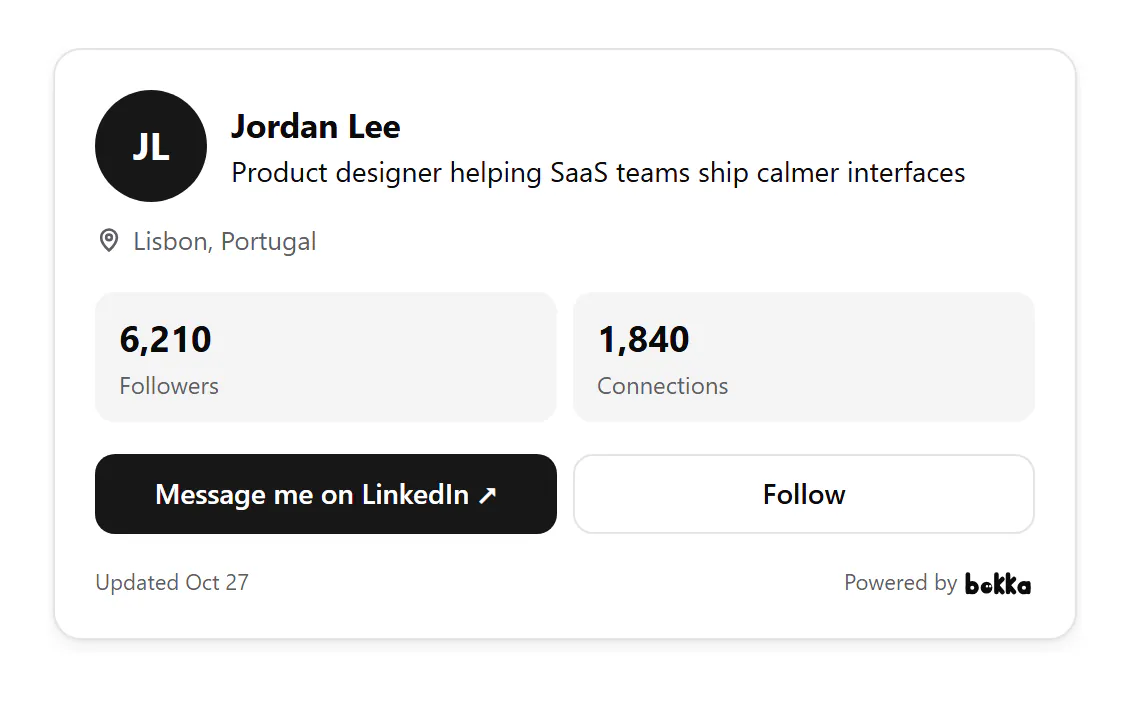
The best LinkedIn widget for your website depends on what you want visitors to do. To show a feed of your posts, use LinkedEmbed or Elfsight. For a free link to your profile, use LinkedIn's own public profile badge. To turn visitors into LinkedIn conversations you answer in one place, use Bokka's widgets.
A LinkedIn widget is a block of your LinkedIn content (your profile, your posts or your company page) that you paste into a website. LinkedEmbed and Elfsight are widget makers. Bokka is an AI-first CRM for your LinkedIn inbox, and its widgets come with it.
LinkedIn widgets compared at a glance
| LinkedEmbed | Elfsight | LinkedIn badge | Bokka | |
|---|---|---|---|---|
| What it shows | Posts feed, profile, company page, jobs, recommendations, certifications, projects | A feed of posts | A View profile button | Contact card, Featured links, network stats, growth, QR code, link page, intake form, email signature; a Team grid on Team (coming soon) |
| Whose profile | Any public profile or company page | A company page or profile | Yours | Yours, read by your own browser |
| How it updates | Automatically: every 96 hours (Free), 24 hours (Pro), 30 minutes (Essentials) | Every 48 hours; can't be refreshed by hand | It's a link | When you press Refresh from LinkedIn |
| Free option | Free plan: 1 widget, "Powered by" link | Free plan: 1 widget, 200 views a month, Elfsight branding | Free | 14-day free trial |
| Paid plans from | $11.04 a month, billed yearly | $5 a month, billed yearly | None | $25 a month, the whole CRM included |
Sources for the table: LinkedEmbed pricing, retrieved 28 October 2026; LinkedEmbed widgets, retrieved 28 October 2026; Elfsight LinkedIn Feed pricing, retrieved 28 October 2026; Elfsight LinkedIn Feed, retrieved 28 October 2026; LinkedIn Help, retrieved 28 October 2026.
LinkedEmbed: the widest choice of LinkedIn widgets
LinkedEmbed offers seven widget types: a posts feed, a profile card, a company page card, recommendations, certifications, projects and jobs (LinkedEmbed widgets, retrieved 28 October 2026). You add "any public LinkedIn profile or company page" as a source, with no API key or developer account. A widget goes into WordPress, Wix, Webflow, Squarespace, Shopify or any HTML page as two lines of code (LinkedEmbed's home page, retrieved 28 October 2026).
Widgets refresh "automatically while they are being viewed": every 96 hours on the free plan, every 24 hours on Pro and every 30 minutes on Essentials. The free plan covers one profile or page and one widget, with a "Powered by LinkedInEmbed" link. Pro is $11.04 a month billed yearly for two sources and three widgets. Essentials is $25.49 a month billed yearly for five of each. Both paid plans include views and click analytics (LinkedEmbed pricing, retrieved 28 October 2026).
Choose it if you want your posts, your company page or your job openings on your site, kept up to date without doing anything.
Elfsight: a LinkedIn posts feed, priced by views
Elfsight's LinkedIn widget shows a feed of posts, articles, photos, videos and announcements. You connect it by giving a LinkedIn profile or company page URL, with no API key, and it "updates every 48 hours"; the page adds that this cycle "cannot be manually overridden" (Elfsight LinkedIn Feed, retrieved 28 October 2026).
The free plan allows one widget and 200 views a month with Elfsight branding, and going over the monthly limit "will temporarily deactivate your app". Paid plans start with Basic at $5 a month billed yearly (3 widgets, 5,000 views) and Pro at $10 (9 widgets, 50,000 views) (Elfsight LinkedIn Feed pricing, retrieved 28 October 2026).
Choose it if a feed of your company's posts is what you want, on a small budget, and you already use other Elfsight widgets.
LinkedIn's public profile badge: free and simple
LinkedIn lets you create a public profile badge, a "View profile" button you can add to an online résumé, a blog or a website, from your Public profile settings (LinkedIn Help: promoting your public profile, retrieved 28 October 2026). It's a link to your profile rather than a card: it doesn't show your followers, your work or a way to message you.
Choose it if all you need is a link to your profile and you'd rather not add another tool.
Bokka's widgets: built to start a conversation
Bokka's widgets show your own LinkedIn profile, read by your own browser when you press Refresh from LinkedIn, never by Bokka's servers. They're part of Bokka, so the conversations they start arrive in the same LinkedIn inbox you answer, label and follow up from in Bokka.
- Contact card: your picture, headline, followers and how fast you usually reply, with Message and Follow buttons.
- Featured: the links from your LinkedIn Featured section, with their pictures, in a grid or a list in the order you choose.
- Network stats and Growth: your followers and connections, and how much they grew in the last 30, 90 or 365 days.
- QR code, link page, email signature and intake form: for badges and slides, your bio, every email you send, and visitors who'd rather write to you; their requests wait in Bokka.
- Team grid: your teammates' own cards together, each with their own Message button, on the Team plan (coming soon).
Two differences matter. Bokka only ever shows your own profile: it can't show a feed of your posts or someone else's page. And a widget changes when you refresh it, not by itself: it always says when it was last read. In return, each widget comes with views and clicks per day, and with the inbox and CRM the conversations land in. See how to add your LinkedIn profile to your website and every widget.
Choose it if you want people who find you online to message you, and a place to answer, label and follow them up.
Which LinkedIn widget should you choose?
| If you want to… | Choose |
|---|---|
| Show a feed of your LinkedIn posts | LinkedEmbed or Elfsight |
| Show your company's job openings | LinkedEmbed |
| Show recommendations, certifications or projects | LinkedEmbed |
| Link to your profile for free | LinkedIn's public profile badge |
| Get visitors to message you, and answer them in a CRM | Bokka's contact card or intake form |
| Put your best links on your site, in your order | Bokka's Featured widget |
| A link page, a QR code or an email signature | Bokka's widgets |
About Bokka
Bokka starts with a free 14-day trial, AI included and no credit card. After it, Starter is $25 and Pro is $35 per user a month ($19 and $30 for your first month). Team, at $50, is coming soon.
Frequently asked questions
What is the best LinkedIn widget for a website?
It depends on the goal. For a feed of posts, LinkedEmbed or Elfsight; for a free link to your profile, LinkedIn's own badge; for a card that gets visitors to message you, with an inbox to answer them, Bokka's widgets.
Is there a free LinkedIn widget for my website?
Yes. LinkedIn's public profile badge is free, and LinkedEmbed and Elfsight both have free plans with one widget and their own branding; Elfsight's also caps views at 200 a month.
Can I embed my LinkedIn posts on my website?
Feed widgets such as LinkedEmbed and Elfsight show your posts. Bokka doesn't show a feed of posts; its Featured widget shows the links in your LinkedIn Featured section.
Do LinkedIn widgets update automatically?
LinkedEmbed refreshes every 96 hours to every 30 minutes depending on the plan, and Elfsight every 48 hours. Bokka's widgets update when you press Refresh from LinkedIn, and show when they were last read.
Sources
Other products' prices and features were read on their own pages on 28 October 2026. They change; check each page before you buy.
Join the waitlist for early access to Bokka. Your first 14 days are free, AI included, with no credit card. It runs in Chrome, Edge, Brave and Arc on a desktop or laptop.
Join the waitlistAbout the author
Amardeep Anand founded Bokka, the AI-first CRM for your LinkedIn inbox, and runs it from Deoghar, India. Questions or corrections: support@gobokka.com.
Related
- How to add your LinkedIn profile to your websiteLinkedIn's own badge is a View profile button. How to show your name, headline, followers and a Message button on your site instead, with Bokka.
- A link-in-bio page for your LinkedIn profileLinkedIn shows three website links. How to make one page with your profile, all your links, a status line and a contact form, in Bokka.