A link-in-bio page for your LinkedIn profile
LinkedIn shows three website links. How to make one page with your profile, all your links, a status line and a contact form, in Bokka.
By Amardeep Anand, founder of Bokka · Published
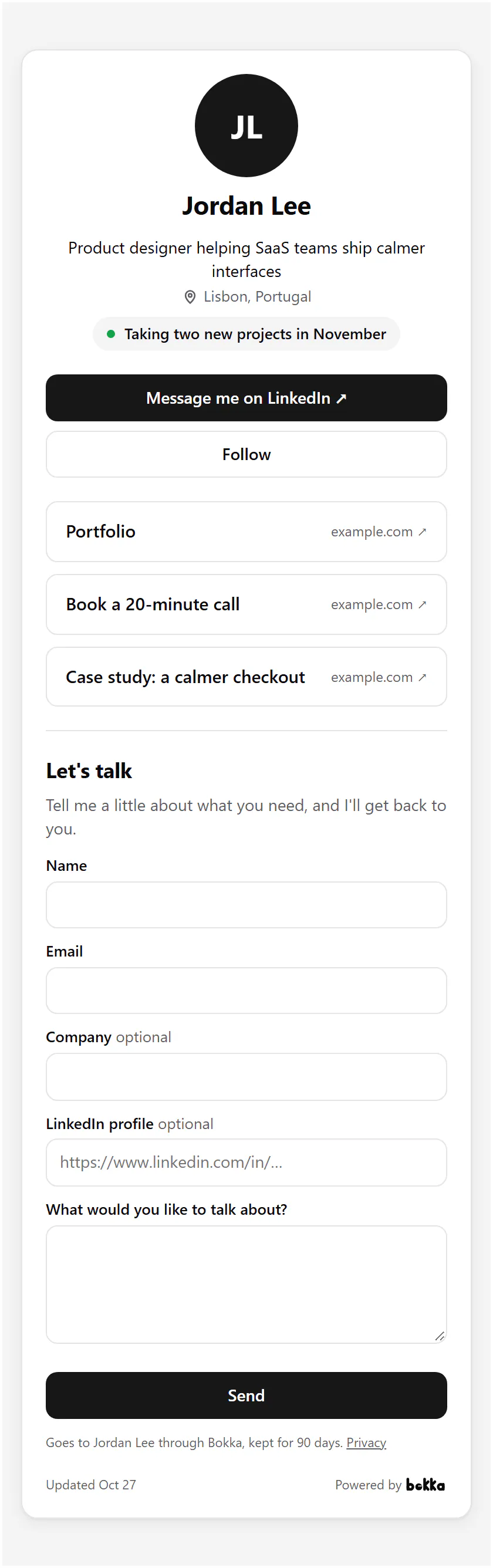
A link-in-bio page for LinkedIn is one address that holds your profile and every link you want to share. In Bokka, make a link page, add your links and a status line, publish it, and share gobokka.com/@yourname wherever one link has to do the work of many.
A link page is a single web page with your name, what you do and a list of links: your site, your calendar, a deck, a case study. Bokka is an AI-first CRM for your LinkedIn inbox, and its link page is built around starting a conversation with you on LinkedIn.
What LinkedIn offers
On your profile you can show up to three website links, in the Contact info of your introduction section (Add or remove a website from your profile, retrieved 27 October 2026). There's also a Featured section for posts, links and media (Add sections to your profile, retrieved 27 October 2026). Neither gives you a page of your own to share outside LinkedIn.
What goes on the page
- Your picture, name, headline and location, from your LinkedIn profile.
- A status line you write, such as "Taking two new projects in November".
- Message me on LinkedIn and Follow, which open your profile.
- Up to 10 links, in the order you set.
- Your QR code, if you want it, and an intake form that sends requests to your Requests list.
How to make one in Bokka
- In Bokka, choose Widgets, then New widget, then Link page.
- Under Address, keep the one made from your LinkedIn username or choose your own: 3 to 30 lower-case letters, numbers or dashes.
- Write a Status line.
- Under Links, add each link's title and address; the arrow beside a link moves it up.
- Turn on QR code or Show the form on the page if you want them.
- Choose Publish, then Integration to copy the page's address.
Where to share it
- Your LinkedIn Featured section: one link that holds everything else.
- Instagram, X or TikTok bios, which allow a single link.
- Your email signature, beside or instead of a website.
- A QR code on a slide, a badge or a business card.
- When you have no website: the page is one, with a contact form.
Contact form and requests
With Show the form on the page on, visitors can leave their name, email and what they'd like to talk about, and if you ask, their company and LinkedIn profile. Each request goes to Requests in Bokka, where you mark it done after you reply. Requests are kept for 90 days, then deleted. More: Intake forms and requests.
Bokka never connects to LinkedIn from its servers. A widget shows your own profile and totals as your browser last read them, and says when that was. To update it, press Refresh from LinkedIn in the editor, with the Bokka extension on. Nothing about your visitors is stored: Bokka counts views and clicks per day, and that's all.
Widgets come with every Bokka plan: one of each kind on the free trial and on Starter, five of each on Pro, and 20 per member on Team. A small "Powered by Bokka" line sits under each widget; on Pro and Team you can turn it off. Widgets you publish on the trial keep showing after it ends.
See every widget, what each one shows and where people use it: LinkedIn widgets.
About Bokka
Bokka starts with a free 14-day trial, AI included and no credit card. After it, Starter is $25 and Pro is $35 per user a month ($19 and $30 for your first month). Team, at $50, is coming soon.
Frequently asked questions
How many links can I add to my LinkedIn profile?
Up to three websites in the Contact info of your profile's introduction, plus links in the Featured section.
What address does the link page have?
gobokka.com/@ followed by your handle, which starts as your LinkedIn username and which you can change.
Can people contact me from the page?
Yes. Message me on LinkedIn opens your profile, and if you turn the form on, requests go to your Requests list in Bokka.
Sources
Other products' prices and features were read on their own pages on 27 October 2026. They change; check each page before you buy.
Join the waitlist for early access to Bokka. Your first 14 days are free, AI included, with no credit card. It runs in Chrome, Edge, Brave and Arc on a desktop or laptop.
Join the waitlistAbout the author
Amardeep Anand founded Bokka, the AI-first CRM for your LinkedIn inbox, and runs it from Deoghar, India. Questions or corrections: support@gobokka.com.
Related
- How to add your LinkedIn profile to your websiteLinkedIn's own badge is a View profile button. How to show your name, headline, followers and a Message button on your site instead, with Bokka.
- How to add a LinkedIn button to your email signatureAdd your name, headline and a Message me on LinkedIn button under every email in Gmail, Outlook or Apple Mail, and see who clicks it, with Bokka.