How to add a LinkedIn button to your email signature
Add your name, headline and a Message me on LinkedIn button under every email in Gmail, Outlook or Apple Mail, and see who clicks it, with Bokka.
By Amardeep Anand, founder of Bokka · Published
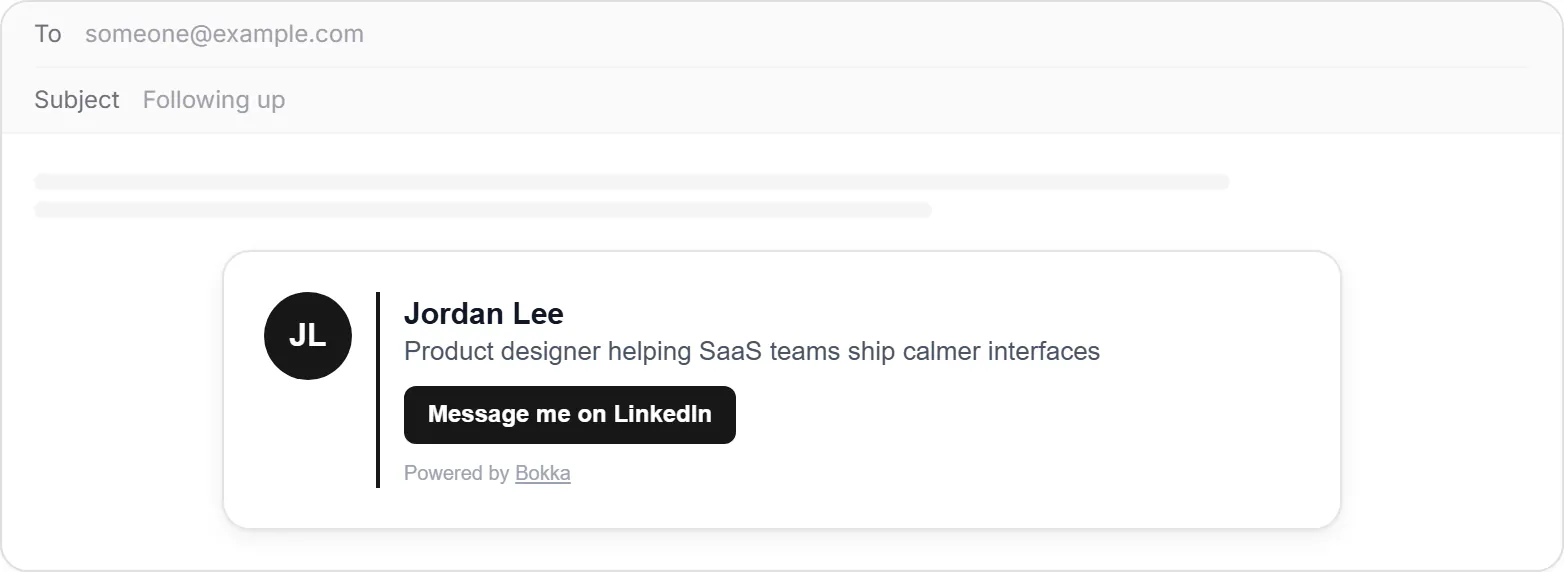
To add LinkedIn to your email signature, paste a signature that includes a link to your profile. In Bokka, make an email signature card, choose Copy signature, and paste it into your mail app's signature settings: Gmail, Outlook and Apple Mail all take it.
An email signature card is the block under your emails with your name, your role and a way to reach you; this one adds a Message me on LinkedIn button. Bokka is an AI-first CRM for your LinkedIn inbox, so a message sent from that button lands where you already work.
What goes in it
- Your initials, name and headline, as on your LinkedIn profile.
- Message me on LinkedIn: a button that opens your profile. You can change its words.
- If you like: your follower count, and your email, phone and website.
- A small "Powered by Bokka" line, which you can turn off on Pro and Team.
It shows your initials rather than your photo. Many mail apps hide images from outside until the reader allows them, and a signature that looks broken is worse than one without a photo.
How to make it in Bokka
- In Bokka, choose Widgets, then New widget, then Email signature card.
- On Customize, pick what it shows.
- Choose Publish, so the button's link works.
- On Integration, choose Copy signature. Copy HTML is there for mail apps that take raw HTML.
How to paste it into Gmail
- In Gmail on a computer, open Settings (the cog), then See all settings.
- In the Signature section, choose Create new, name it, and paste.
- Scroll down and choose Save Changes.
Gmail allows up to 10,000 characters in a signature, images included (Gmail Help, retrieved 27 October 2026), so the card fits with room to spare.
How to paste it into Outlook
On the web and in the new Outlook, Microsoft's path is Settings, Account, then Signatures (Microsoft Support, retrieved 27 October 2026). In classic Outlook for Windows, open a new email and choose Message, Signature, then Signatures (Microsoft Support, retrieved 27 October 2026).
- Open Signatures by either path above.
- Choose New, name it, and paste.
- Save, and choose it for new messages and replies.
How to paste it into Apple Mail
Apple's steps start in Mail, Settings, then Signatures (Apple Support, retrieved 27 October 2026).
- Open Mail, Settings, Signatures.
- Select your account, then + to add a signature, and name it.
- Untick Always match my default message font, then paste into the preview on the right.
Then send yourself a test email, on your phone too, and click the button.
Where it works best
- Sales follow-ups: a buyer who'd rather chat than book a call has a way to.
- Recruiting: candidates can see who you are before they reply.
- Cold outreach: your headline answers "who is this?" before they ask.
- Investor and partner updates: one click to your profile and your track record.
Counting clicks, nothing else
The button goes through a Bokka link that adds one to the day's Message clicks, then sends the reader to your profile. There's no tracking pixel, and nothing about who clicked is kept. The count is on the widget's Analytics tab.
Widgets come with every Bokka plan: one of each kind on the free trial and on Starter, five of each on Pro, and 20 per member on Team. A small "Powered by Bokka" line sits under each widget; on Pro and Team you can turn it off. Widgets you publish on the trial keep showing after it ends.
About Bokka
Bokka starts with a free 14-day trial, AI included and no credit card. After it, Starter is $25 and Pro is $35 per user a month ($19 and $30 for your first month). Team, at $50, is coming soon.
Frequently asked questions
How do I add a LinkedIn link to my email signature?
Add a link to your LinkedIn profile URL in your mail app's signature settings, or paste a ready-made signature such as Bokka's email signature card, which includes a Message me on LinkedIn button.
Why doesn't the signature show my photo?
Many mail apps hide outside images until the reader allows them, so the card uses your initials, which always show.
Does the signature work in Gmail, Outlook and Apple Mail?
Yes. It's a plain HTML table with the styles written in, the format all three keep when you paste it.
Does Bokka track who opens my emails?
No. There's no tracking pixel. Bokka only counts clicks on the Message button, per day, without knowing who clicked.
Sources
Other products' prices and features were read on their own pages on 27 October 2026. They change; check each page before you buy.
Try Bokka free for 14 days, AI included, with no credit card. It runs in Chrome, Edge, Brave and Arc on a desktop or laptop.
Start your free trialAbout the author
Amardeep Anand founded Bokka, the AI-first CRM for your LinkedIn inbox, and runs it from Deoghar, India. Questions or corrections: support@gobokka.com.
Related
- How to add your LinkedIn profile to your websiteLinkedIn's own badge is a View profile button. How to show your name, headline, followers and a Message button on your site instead, with Bokka.
- How to set a reminder to follow up on a LinkedIn messageLinkedIn has no reminders for messages. The closest built-in workaround, and how to set a follow-up that returns only if they haven't replied, in Bokka.