How to set a reminder to follow up on a LinkedIn message
LinkedIn has no reminders for messages. The closest built-in workaround, and how to set a follow-up that returns only if they haven't replied, in Bokka.
By Amardeep Anand, founder of Bokka · Published
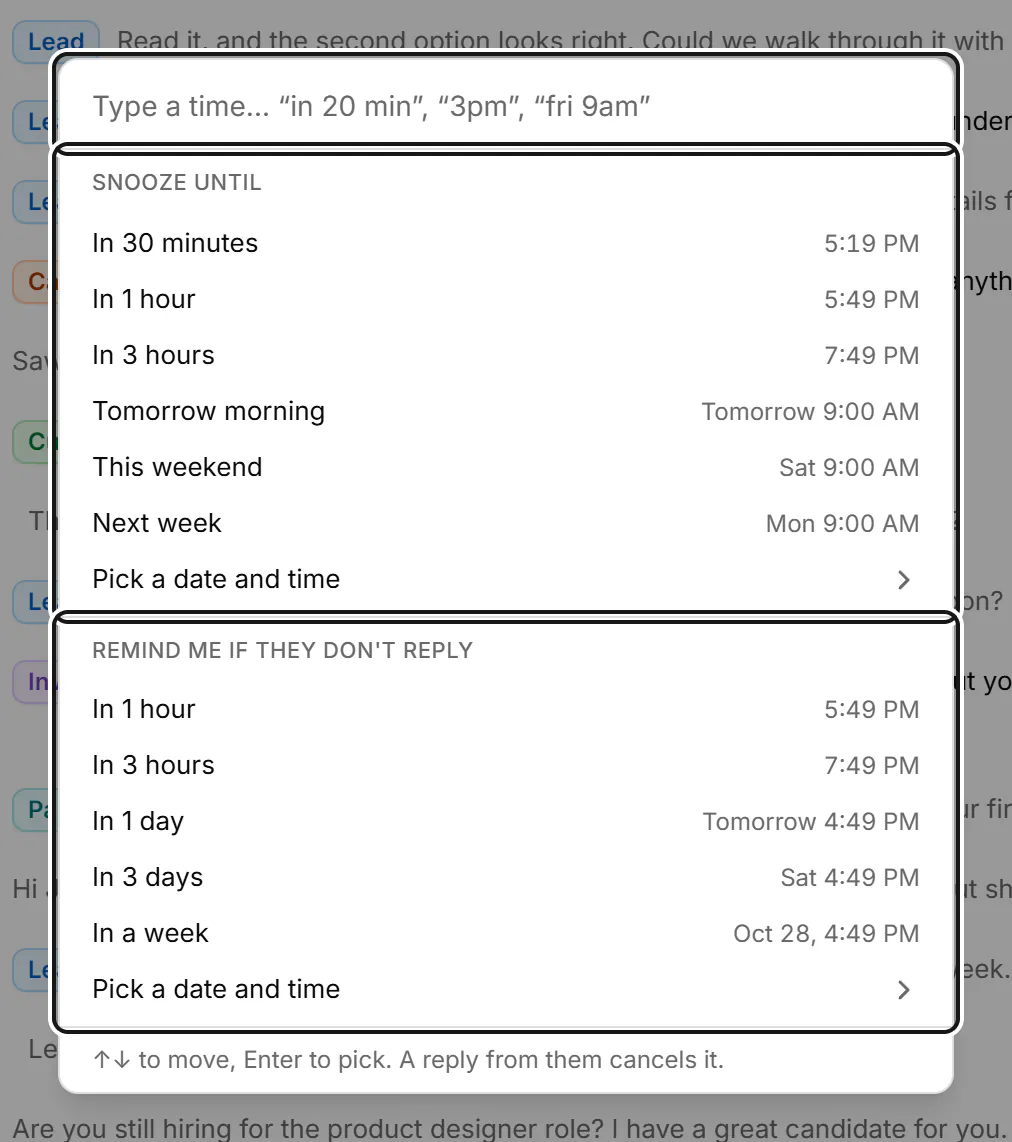
LinkedIn doesn't let you set a reminder on a message. The closest you can get inside LinkedIn is to mark a conversation as unread or star it, then remember to check. To be reminded automatically, and only if they haven't replied, use an inbox tool such as Bokka: press H on the conversation and choose when.
A follow-up reminder brings a conversation back to your attention at a time you choose. A snooze hides a conversation until then. Bokka is an AI-first CRM for your LinkedIn inbox.
What LinkedIn offers
LinkedIn's messaging inbox has filters such as Unread and Starred (Filter and search messages, retrieved 24 October 2026), and you can mark conversations read or unread one at a time or in bulk (Manage conversations, retrieved 24 October 2026). There's no option to schedule a reminder, and nothing reappears on its own.
The built-in workaround
- After you send your message, mark the conversation unread, or star it.
- Each morning, open the Unread or Starred filter.
- Check which ones have replied, follow up on the rest, and clear the star or unread mark.
It works for a handful of conversations. Past that, it breaks down: every starred conversation looks the same whether it's due today or next week, a reply doesn't clear the star, and the filter is only as good as your memory to open it.
How to set a follow-up reminder in Bokka
Bokka has two kinds of reminder. A snooze hides a conversation until the time you pick. A follow-up leaves it where it is and reminds you only if they haven't replied by then.
- Open or select the conversation and press H. You can also click the clock in the conversation header, or press ⌘+Shift+Enter (Ctrl+Shift+Enter on Windows) to send your reply and set a reminder at once.
- Type a time such as "in 3 days", "fri 9am" or "3pm". It's offered both as a snooze and as a follow-up.
- Or pick a choice. Remind me if they don't reply offers In 1 hour, In 3 hours, In 1 day, In 3 days, In a week, and Pick a date and time. Snooze until offers times from 30 minutes to next week.
- Press Enter.
What happens next
- A follow-up stays where it is. If they haven't replied by the time you picked, it shows Time to follow up.
- A snoozed conversation leaves every list except Reminders, then returns marked Back from snooze.
- A new message from them cancels either kind, so you're never reminded about someone who already answered.
- Reminders show in the app only. Nothing is sent for you, and there's no email or browser notification.
- Every pending reminder is in the Reminders view. Press Shift+H in a conversation to clear its reminder.
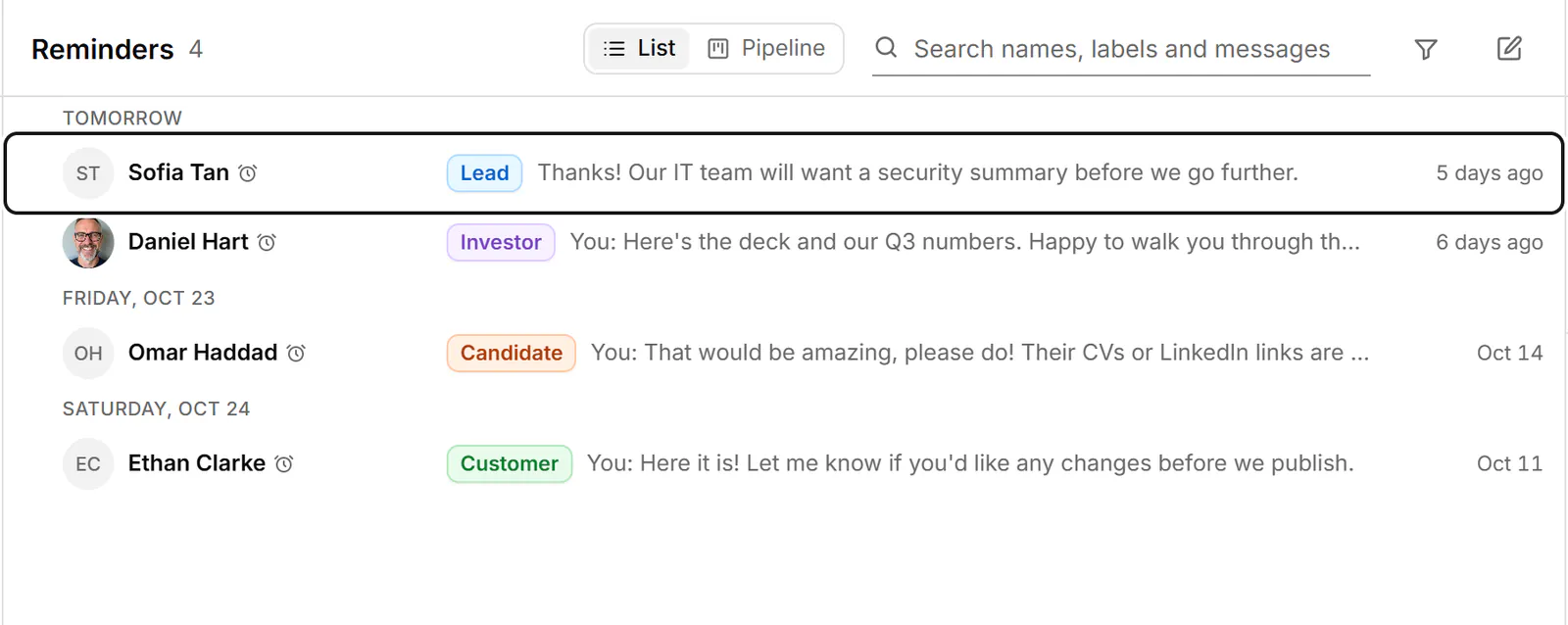
Reminders come with every Bokka plan, from the free trial on. For conversations that are part of a deal, a pipeline can also mark one for follow-up when it's been quiet in a stage for a set number of days. Full details: Get reminded to follow up.
How long to wait before following up
- Sales and recruiting: 2 to 4 working days for a first follow-up is common; longer for a senior person you've never met.
- Warm introductions and investors: about a week, unless they gave you a date.
- After a call: whatever you agreed. Set the reminder before you hang up.
Not sure whether they've even read it? See what the grey check mark means.
About Bokka
Bokka starts with a free 14-day trial, AI included and no credit card. After it, Starter is $25 and Pro is $35 per user a month ($19 and $30 for your first month). Team, at $50, is coming soon.
Frequently asked questions
Can you set reminders on LinkedIn messages?
Not in LinkedIn itself. You can mark a conversation unread or star it and check the Unread or Starred filter. Inbox tools such as Bokka add real reminders that return a conversation at a time you choose.
How do I get reminded only if someone doesn't reply on LinkedIn?
In Bokka, press H on the conversation and choose Remind me if they don't reply. If they answer before then, the reminder is cancelled.
Does Bokka send follow-up messages for me?
No. Bokka reminds you; it never sends a message on its own. You write and send every follow-up.
Sources
Other products' prices and features were read on their own pages on 24 October 2026. They change; check each page before you buy.
Try Bokka free for 14 days, AI included, with no credit card. It runs in Chrome, Edge, Brave and Arc on a desktop or laptop.
Start your free trialAbout the author
Amardeep Anand founded Bokka, the AI-first CRM for your LinkedIn inbox, and runs it from Deoghar, India. Questions or corrections: support@gobokka.com.
Related
- LinkedIn grey check mark meaning: sent, not read (yet)A grey check mark on a LinkedIn message means Sent: it reached their inbox but isn't shown as read. Why it can stay that way, and what to do next.
- How to archive LinkedIn messages, one or many at onceArchive a LinkedIn conversation from its More menu, or many at once with Manage conversations. Where archived messages go, and how to bring them back.
- Why Bokka doesn't automate LinkedIn, and what it does insteadBokka sends nothing on its own: no sequences, auto-replies, scheduled or bulk messages. What that means, why we chose it, and how you still move fast.