Widgets
Your link page
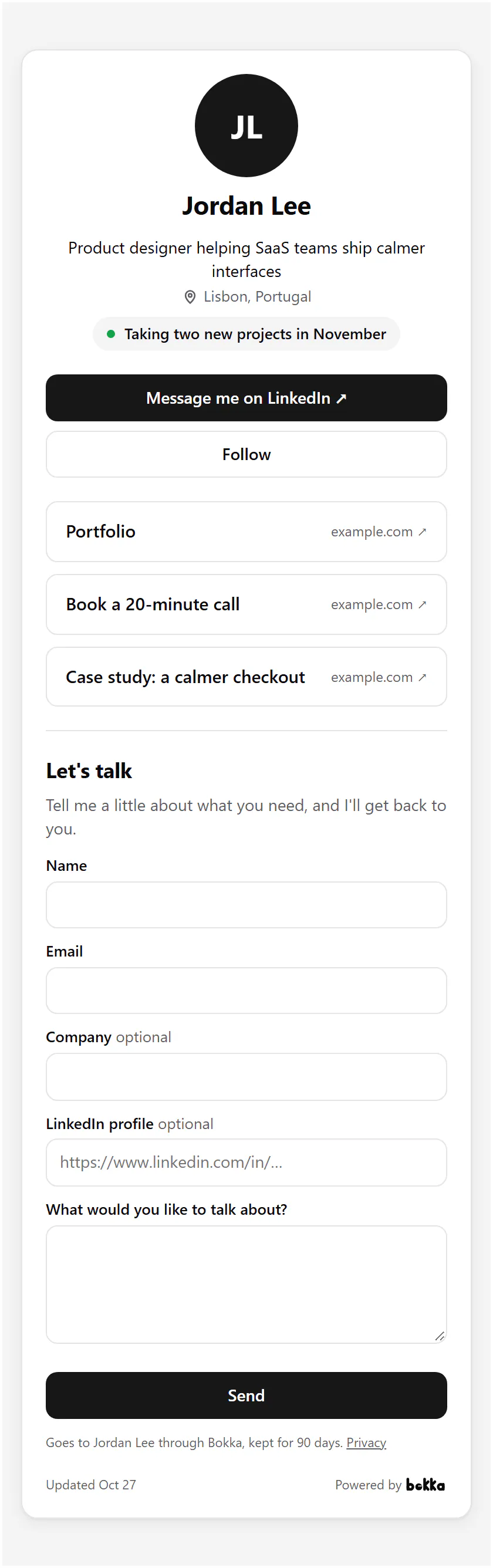
A page of your own at gobokka.com/@yourname: your profile, your links, a status line, your QR code and a form, for your bio or email.
No website? A link page is one. Put its address in your LinkedIn Featured section, your email signature or anywhere you'd share a link.
Set it up
- In Widgets, choose New widget, then Link page.
- Under Address, keep the address made from your LinkedIn username or choose your own: 3 to 30 lower-case letters, numbers or dashes.
- Write a Status line, like what you're working on or whether you're taking new work.
- Under Links, add up to 10: your site, your calendar, a deck. The arrow beside a link moves it up.
- Turn on QR code or Show the form on the page if you want them.
- Choose Publish, then Integration to copy the page's address.
The page shows your picture, name and headline with Message and Follow buttons that open your LinkedIn profile.
Related
Still stuck? Email support@gobokka.com and say what you were trying to do.