How to show your LinkedIn follower count on your website
Show your LinkedIn followers and connections on a media kit, speaker page or About page, read from your own profile, with Bokka's network stats widget.
By Amardeep Anand, founder of Bokka · Published
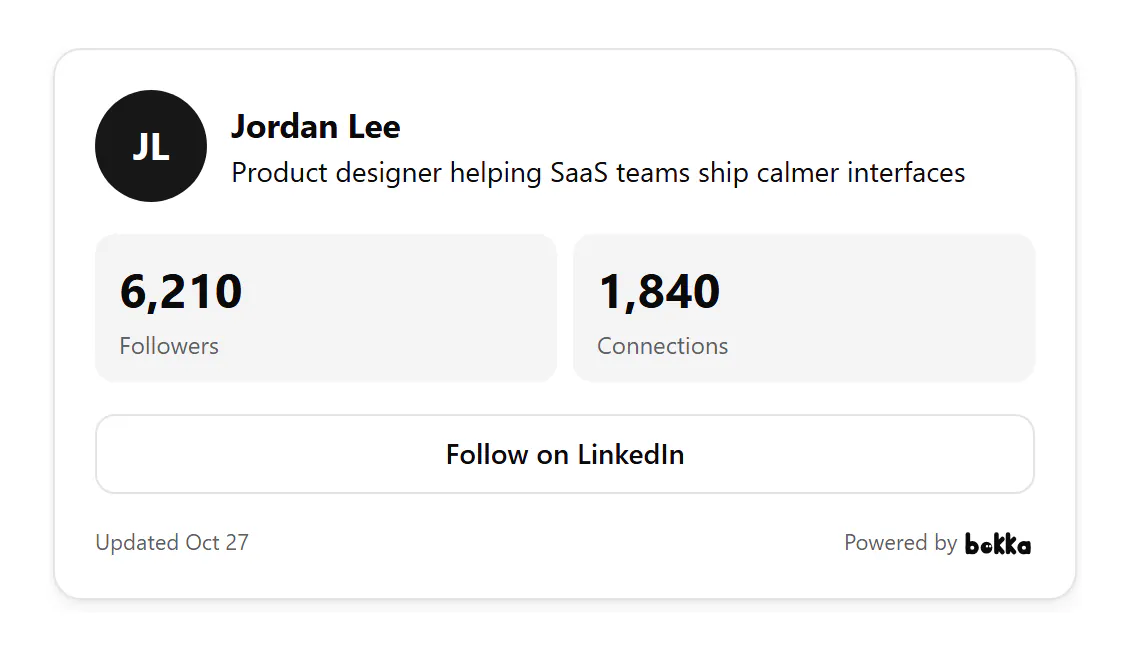
To show your LinkedIn follower count on your website, embed a widget that reads it from your own profile. In Bokka, make a network stats widget, choose which totals it shows, publish it and paste its code into your page.
A follower count widget is a small card showing how many people follow you on LinkedIn. Bokka is an AI-first CRM for your LinkedIn inbox; it reads your own totals when you ask it to, from your browser.
Followers or connections?
On LinkedIn, your 1st-degree connections follow your posts automatically, and anyone can follow you even if they aren't in your network (Manage who can follow your updates, retrieved 27 October 2026). So followers are usually the larger number and the one to show an audience. If you limit followers to your connections, the two numbers are the same.
How to add it with Bokka
- In Bokka, choose Widgets, then New widget, then Network stats.
- On Customize, choose what it shows: followers, connections, following, your headline and a Follow button.
- Press Refresh from LinkedIn to read today's totals, with the extension on.
- Choose Publish, then copy its code from Integration and paste it into your page.
Where to use it
- A media kit, next to your rates and past partners.
- A speaker page, where organisers check your reach.
- A sponsorship or partnership page.
- A creator's or consultant's About page.
To show how fast your audience is growing rather than its size, use the Growth widget instead.
Which number to show
| Page | Show | Why |
|---|---|---|
| Media kit, sponsorship page | Followers | Sponsors pay for reach, and followers is the number that counts everyone who sees your posts |
| Speaker page | Followers and connections | Organisers want reach, and connections show the people who know you |
| Consultant's About page | Connections | Clients buy trust; connections are people who chose to link with you |
| Recruiting or hiring page | Followers | Candidates check whether people follow what you post |
For example, with sample numbers: a designer with 6,210 followers and 1,840 connections shows followers on a sponsorship page, because about 4,370 of those followers aren't connections and still see the posts. On a page selling one-to-one work, connections tell the better story: 1,840 people who know them.
How the numbers stay accurate
Bokka never connects to LinkedIn from its servers. A widget shows your own profile and totals as your browser last read them, and says when that was. To update it, press Refresh from LinkedIn in the editor, with the Bokka extension on. Nothing about your visitors is stored: Bokka counts views and clicks per day, and that's all.
Widgets come with every Bokka plan: one of each kind on the free trial and on Starter, five of each on Pro, and 20 per member on Team. A small "Powered by Bokka" line sits under each widget; on Pro and Team you can turn it off. Widgets you publish on the trial keep showing after it ends.
See every widget, what each one shows and where people use it: LinkedIn widgets.
About Bokka
Bokka starts with a free 14-day trial, AI included and no credit card. After it, Starter is $25 and Pro is $35 per user a month ($19 and $30 for your first month). Team, at $50, is coming soon.
Frequently asked questions
Can I show my LinkedIn follower count on my website?
Yes. Bokka's network stats widget shows your followers, and if you like your connections and following, read from your own profile.
Does the count update by itself?
No. It shows the totals Bokka last read, with the date. Press Refresh from LinkedIn in the editor to update them; Bokka never reads LinkedIn in the background.
Why is my follower count higher than my connections?
Your connections follow you automatically, and people who aren't connected can follow you too.
Sources
Other products' prices and features were read on their own pages on 27 October 2026. They change; check each page before you buy.
Join the waitlist for early access to Bokka. Your first 14 days are free, AI included, with no credit card. It runs in Chrome, Edge, Brave and Arc on a desktop or laptop.
Join the waitlistAbout the author
Amardeep Anand founded Bokka, the AI-first CRM for your LinkedIn inbox, and runs it from Deoghar, India. Questions or corrections: support@gobokka.com.
Related
- How to add your LinkedIn profile to your websiteLinkedIn's own badge is a View profile button. How to show your name, headline, followers and a Message button on your site instead, with Bokka.
- A link-in-bio page for your LinkedIn profileLinkedIn shows three website links. How to make one page with your profile, all your links, a status line and a contact form, in Bokka.