How to show your LinkedIn follower growth on your website
Show how many LinkedIn followers or connections you gained in the last 30, 90 or 365 days, with a chart, on a media kit or report, with Bokka.
By Amardeep Anand, founder of Bokka · Published
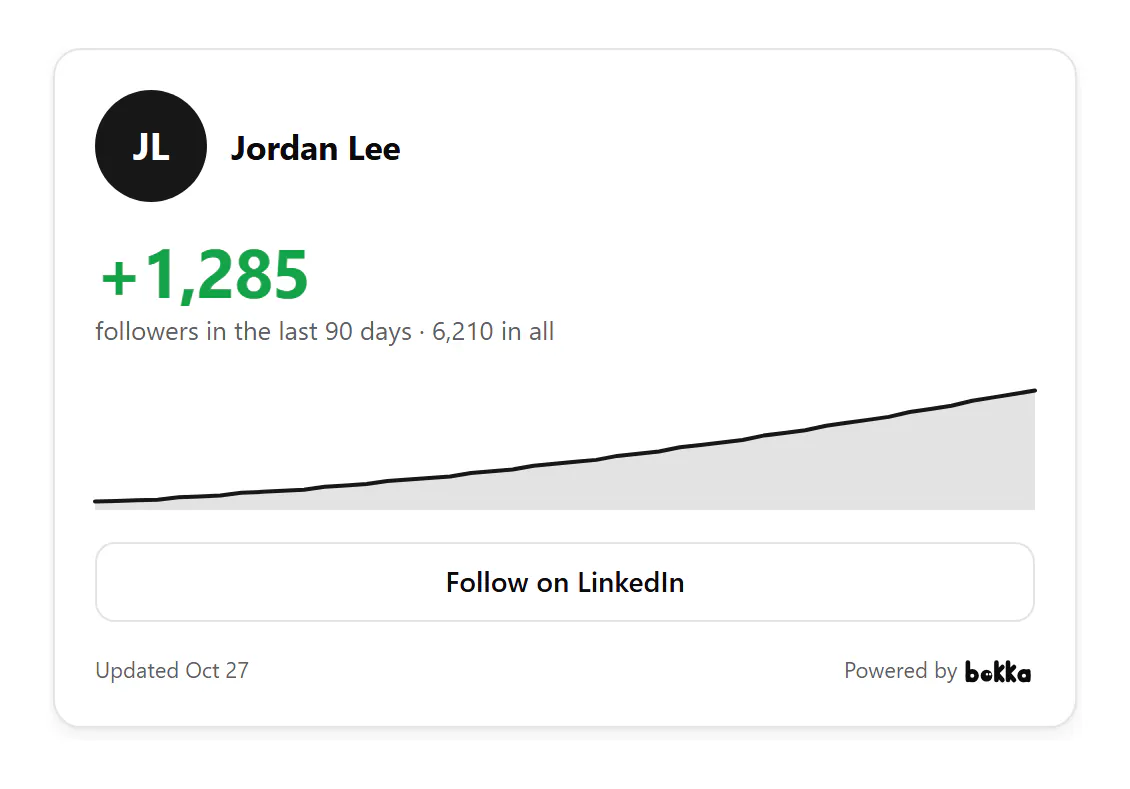
To show your LinkedIn growth on your website, use a widget that compares your totals over time. In Bokka, make a growth widget, choose followers or connections and a period of 30, 90 or 365 days, publish it and paste its code into your page.
A follower growth widget shows how many followers you gained in a period, rather than how many you have. Bokka is an AI-first CRM for your LinkedIn inbox, and it keeps a daily record of your own LinkedIn totals each time it reads them.
Why growth, not the total
- A total says how big an audience is. Growth says it's still building, which is what a sponsor or a new client is betting on.
- A smaller account growing quickly reads better as "+1,285 in 90 days" than as a total.
- It turns a report into a trend: put it in a monthly update to clients or investors.
How to add it with Bokka
- In Bokka, choose Widgets, then New widget, then Growth.
- On Customize, choose Followers or Connections, a period of 30, 90 or 365 days, and whether to show the chart and a Follow button.
- Choose Publish, then copy its code from Integration.
How the chart fills in
Bokka records your totals each day it reads them: when you press Refresh from LinkedIn in the editor or on Analytics, or open your lists in People. The chart joins those days, so it's fuller the more often they're read. Totals from your connections and followers count the same way as on your LinkedIn profile, where your connections follow you automatically (Manage who can follow your updates, retrieved 27 October 2026).
Where to use it
- A creator's media kit, beside your follower total.
- A monthly report to clients, investors or your team.
- A page about your audience or newsletter.
For your totals alone, see how to show your LinkedIn follower count on your website.
Which period to choose
| Period | Best for | Watch out for |
|---|---|---|
| 30 days | A launch, a talk or a post that took off | One quiet month looks like a stall |
| 90 days | Media kits and quarterly reports | Needs about three months of refreshes to fill the chart |
| 365 days | Year-end reports and long-running creators | A big early jump flattens the rest of the line |
For example, with sample numbers: an account that went from 4,925 to 6,210 followers over 90 days shows "+1,285 followers in the last 90 days · 6,210 in all". That's 26% growth in a quarter, and the line shows whether it came steadily or in one burst after a post. Show the period that tells the true story, not the one with the biggest number: a sponsor who checks your profile will see the total anyway.
Bokka never connects to LinkedIn from its servers. A widget shows your own profile and totals as your browser last read them, and says when that was. To update it, press Refresh from LinkedIn in the editor, with the Bokka extension on. Nothing about your visitors is stored: Bokka counts views and clicks per day, and that's all.
Widgets come with every Bokka plan: one of each kind on the free trial and on Starter, five of each on Pro, and 20 per member on Team. A small "Powered by Bokka" line sits under each widget; on Pro and Team you can turn it off. Widgets you publish on the trial keep showing after it ends.
See every widget, what each one shows and where people use it: LinkedIn widgets.
About Bokka
Bokka starts with a free 14-day trial, AI included and no credit card. After it, Starter is $25 and Pro is $35 per user a month ($19 and $30 for your first month). Team, at $50, is coming soon.
Frequently asked questions
Can I show my LinkedIn follower growth on my website?
Yes. Bokka's growth widget shows your gain in followers or connections over 30, 90 or 365 days, with a chart.
Why is my chart short?
It's built from the days Bokka read your totals. Press Refresh from LinkedIn now and then, and it fills in.
Can I show connections instead of followers?
Yes. Choose Followers or Connections in the widget's settings.
Sources
Other products' prices and features were read on their own pages on 27 October 2026. They change; check each page before you buy.
Join the waitlist for early access to Bokka. Your first 14 days are free, AI included, with no credit card. It runs in Chrome, Edge, Brave and Arc on a desktop or laptop.
Join the waitlistAbout the author
Amardeep Anand founded Bokka, the AI-first CRM for your LinkedIn inbox, and runs it from Deoghar, India. Questions or corrections: support@gobokka.com.
Related
- How to show your LinkedIn follower count on your websiteShow your LinkedIn followers and connections on a media kit, speaker page or About page, read from your own profile, with Bokka's network stats widget.
- How to add your LinkedIn profile to your websiteLinkedIn's own badge is a View profile button. How to show your name, headline, followers and a Message button on your site instead, with Bokka.