How to add a contact form that leads to LinkedIn
A short form on your site or link page where visitors say what they'd like to talk about, with every request kept in one list in Bokka.
By Amardeep Anand, founder of Bokka · Published
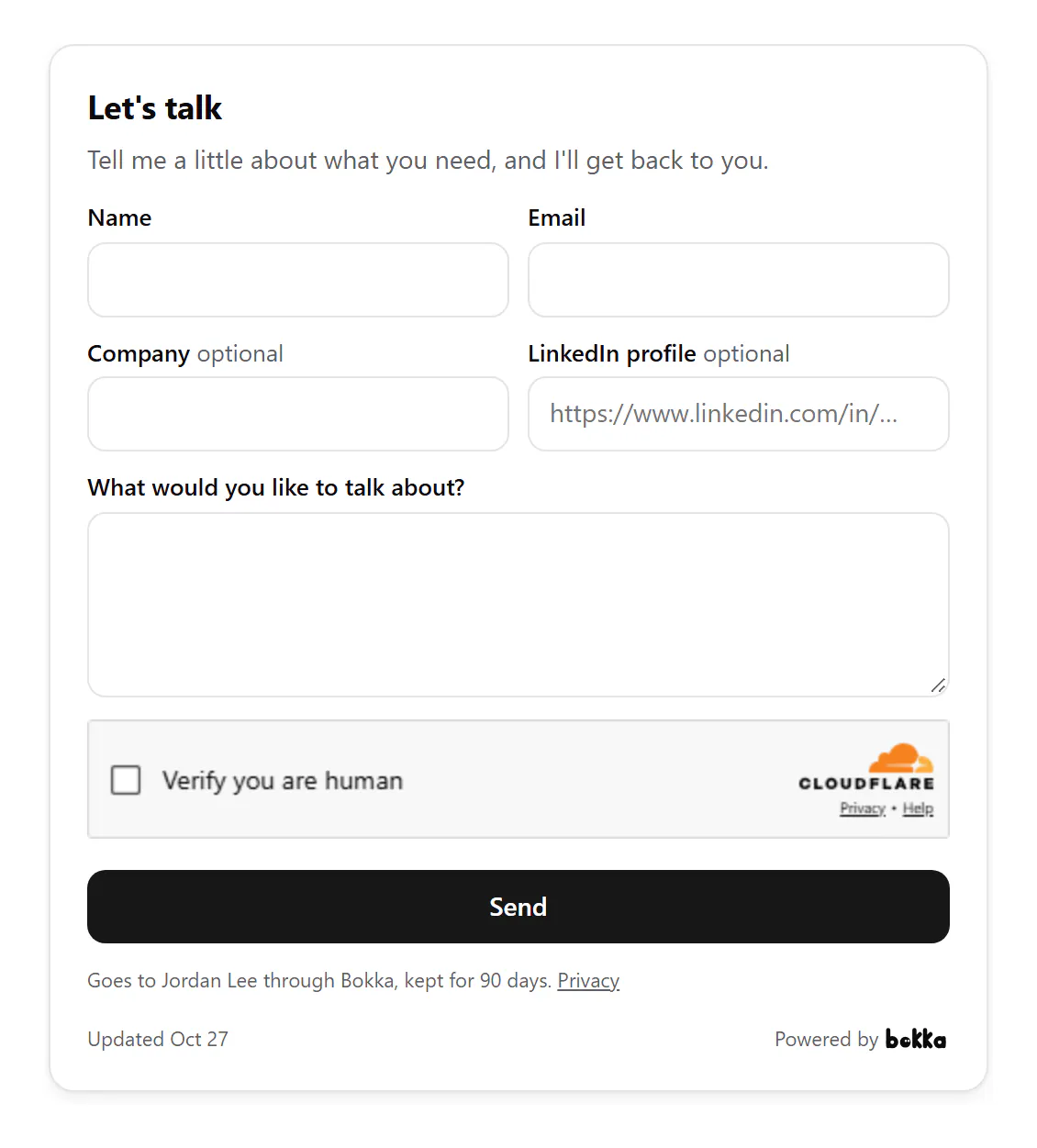
To get leads from your website into the place you work on LinkedIn, add a short contact form that sends each request to your inbox CRM. In Bokka, make an intake form, publish it, paste its code into your site (or turn it on in your link page), and answer requests from the Requests list.
An intake form is a short contact form that asks who someone is and what they want before you talk. Bokka is an AI-first CRM for your LinkedIn inbox; the form brings people from your website to the same place your LinkedIn conversations are.
Why a form, when there's a Message button?
- Some visitors aren't on LinkedIn, or won't message a stranger there.
- A form makes them say what they want, so you can reply with the right answer the first time.
- Asking for their LinkedIn profile lets you look them up, and reply on LinkedIn if that's where you'd rather talk.
What it asks
- Name, email and what they'd like to talk about, always.
- Company and LinkedIn profile, each if you turn it on.
- Its title and the words above it are yours to change, such as "Let's talk".
How to add it with Bokka
- In Bokka, choose Widgets, then New widget, then Intake form.
- On Customize, set its title and intro, and choose whether to ask for a company and a LinkedIn profile.
- Choose Publish.
- On Integration, copy its code and paste it into your Contact or Work with me page. Or, on your link page, turn on Show the form on the page.
How to answer requests
- In Bokka, choose Widgets, then Requests. The number on the tab is how many wait for you.
- Search, filter by widget, or sort by newest, oldest or name.
- Open a request. Reply by email writes to them; Open LinkedIn profile opens theirs, when they gave it.
- Choose Mark done.
There's no email for each request: check Requests as you check your inbox. Full details: Intake forms and requests.
What to write above the form
The words above the form decide who fills it in. Three patterns that work, from vague to specific:
- Open: "Let's talk. Tell me a little about what you need." Most requests, least sorting.
- Qualifying: "Planning a redesign in the next three months? Tell me where you are." Fewer requests, closer to buying.
- Routing: "Say if it's about a project, speaking or something else." Helps you answer the right way first time.
Turn on the LinkedIn profile field when you'd rather reply on LinkedIn than by email: you can open their profile from the request, look them up first, and keep the conversation where your other leads are.
Where to put it
- A Contact or Work with me page.
- A services or pricing page, for "not sure which fits?" questions.
- A landing page for a talk, a launch or a newsletter.
- Your link page, for people who find you from a bio or a QR code.
Privacy and spam
- Under the button, visitors read that their request goes to you through Bokka and is kept for 90 days.
- Only you can see your requests, and they're deleted after 90 days.
- Each form takes a few requests an hour from one visitor and up to 50 a day, and checks the sender is a person.
Widgets come with every Bokka plan: one of each kind on the free trial and on Starter, five of each on Pro, and 20 per member on Team. A small "Powered by Bokka" line sits under each widget; on Pro and Team you can turn it off. Widgets you publish on the trial keep showing after it ends.
See every widget, what each one shows and where people use it: LinkedIn widgets.
About Bokka
Bokka starts with a free 14-day trial, AI included and no credit card. After it, Starter is $25 and Pro is $35 per user a month ($19 and $30 for your first month). Team, at $50, is coming soon.
Frequently asked questions
Where do the form's requests go?
To the Requests list in Bokka, on the Widgets page. There's no email for each one.
Can I ask for their LinkedIn profile?
Yes. Turn on Ask for their LinkedIn profile, and Open LinkedIn profile appears on each request that has one.
How long are requests kept?
90 days, then they're deleted. Only you can see them.
Sources
Other products' prices and features were read on their own pages on 27 October 2026. They change; check each page before you buy.
Join the waitlist for early access to Bokka. Your first 14 days are free, AI included, with no credit card. It runs in Chrome, Edge, Brave and Arc on a desktop or laptop.
Join the waitlistAbout the author
Amardeep Anand founded Bokka, the AI-first CRM for your LinkedIn inbox, and runs it from Deoghar, India. Questions or corrections: support@gobokka.com.
Related
- A link-in-bio page for your LinkedIn profileLinkedIn shows three website links. How to make one page with your profile, all your links, a status line and a contact form, in Bokka.
- How to add your LinkedIn profile to your websiteLinkedIn's own badge is a View profile button. How to show your name, headline, followers and a Message button on your site instead, with Bokka.