How to see your LinkedIn reply rate and reply speed
LinkedIn doesn't report a reply rate for regular messages. How to see yours, how fast you and others reply, and who's waiting, in Bokka Analytics.
By Amardeep Anand, founder of Bokka · Published · 2 min read
On this page
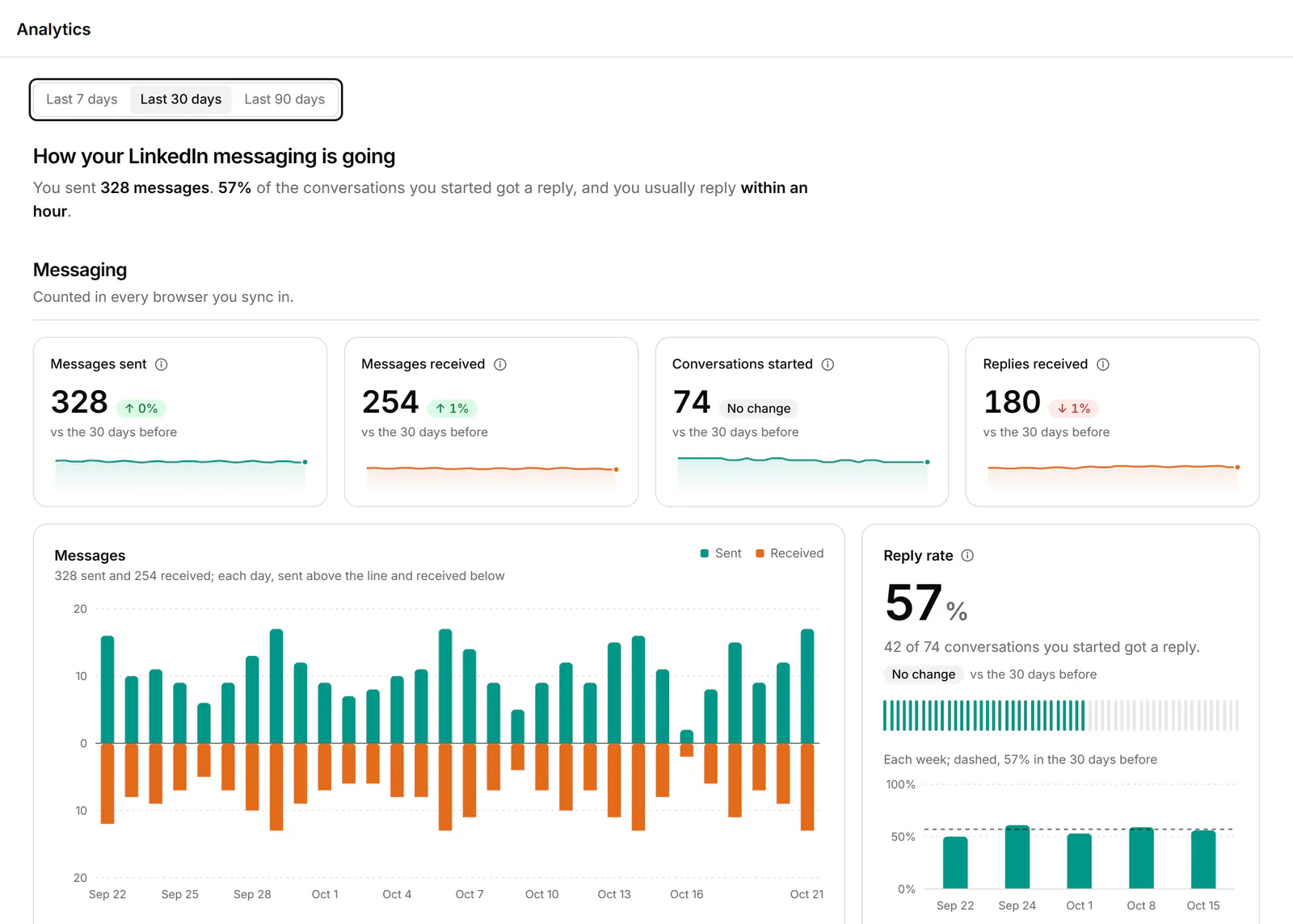
LinkedIn doesn't show a reply rate for your regular messages, so you either count it yourself or use a tool that does. In Bokka, press G then D for Analytics: reply rate, reply speed and who's waiting on whom, for the last 7, 30 or 90 days.
Reply rate is the share of your conversations or messages that got an answer in a period. Reply speed is how long a reply usually takes. Bokka is an AI-first CRM for your LinkedIn inbox.
What LinkedIn offers
LinkedIn Recruiter has an InMail response rate, and its help notes that automated follow-ups count toward it as individual messages; its inbox also has an Awaiting Reply folder (LinkedIn Help: InMail responses in Recruiter, retrieved November 1, 2026). For your regular LinkedIn messages, we couldn't find a LinkedIn Help article describing a reply rate or reply-speed report. Your Download your data archive includes your messages with dates (LinkedIn Help: download your account data, retrieved November 1, 2026), so you can count by hand.
Counting by hand
- Request your data archive with messages, and open it in a spreadsheet.
- Keep the period you care about, such as the last 30 days.
- Count the conversations you started, and how many got at least one reply.
- Divide the second by the first.
It works once. It's a chore to repeat, and it says nothing about how long people took, or who's waiting on whom right now.
Open Analytics in Bokka
- In the sidebar, choose Analytics, or press G then D.
- Pick the period at the top: Last 7 days, Last 30 days or Last 90 days. Every number on the page follows it.
- Each headline number has an About button that explains how it's counted.
What it shows
| Section | What it shows |
|---|---|
| Messages sent, Messages received, Conversations started, Replies received, Reply rate | Totals for the period, and messages per day |
| Reply speed | How long you usually take to reply in one-to-one conversations, and how long they do |
| Follow-ups | One-to-one conversations waiting on a reply now, yours and theirs, by how long they've waited |
| Pipeline | Conversations in each stage now, and how they moved in the period |
| Snippets you used most | How often each snippet went into a message |
| When people write to you | Messages you got by weekday and hour, and the busiest time |
A number is compared with the period before only when Bokka counted all of that period, so in your first weeks there's no "vs the days before".
Reading the numbers
For example, if your reply speed shows you take two days to answer and they take two hours, the bottleneck is you: spend ten minutes a morning in Waiting on you. If your reply rate drops after you change your opening message, look at Snippets you used most to see which version went out. Read trends across periods, not one week on its own; small numbers swing a lot.
Your network
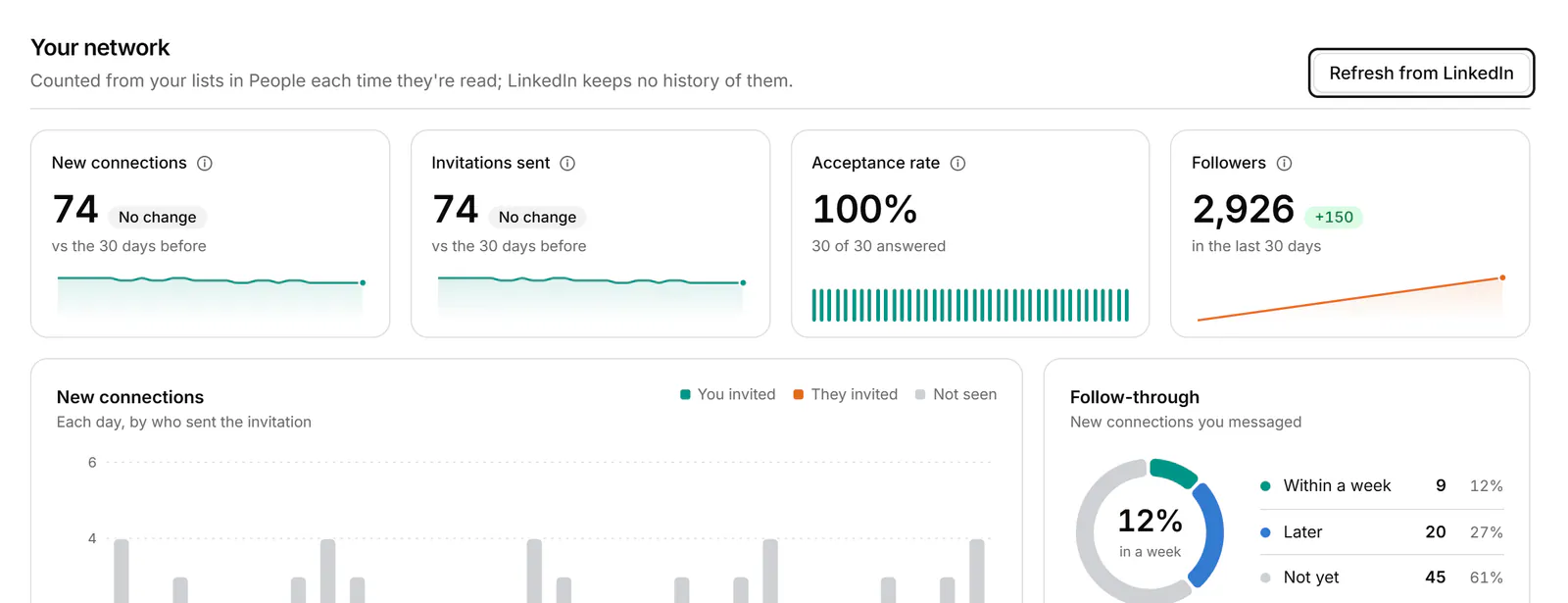
Your network counts new connections, your connections, followers and following, and the invitations waiting each way. There's no acceptance rate: invitations accepted before your lists are next read are never seen as invitations, so a rate would come out wrong.
Full details: Read your inbox analytics. To act on what you find, see whose turn it is in your inbox and follow-up templates with fill-ins.
About Bokka
Bokka starts with a free 14-day trial, AI included and no credit card. After it, Starter is $25 and Pro is $35 per user a month ($19 and $30 for your first month). Team, at $50, is coming soon.
Frequently asked questions
Can I see my reply rate on LinkedIn?
Not for regular messages, as far as LinkedIn Help describes. LinkedIn Recruiter tracks InMail response rates. Bokka Analytics, on Pro, shows reply rate and reply speed for your LinkedIn messages.
What is a good LinkedIn reply rate?
It depends on who you write to and why: warm contacts answer far more often than cold ones. Compare your own numbers period to period rather than against a general benchmark.
Does Bokka count before I upgrade to Pro?
Yes. Bokka counts on every plan, so your history is there when you upgrade. Before you connected LinkedIn, it read only part of your history.
Sources
Other products' prices and features were read on their own pages on November 1, 2026. They change; check each page before you buy.
Join the waitlist for early access to Bokka. Your first 14 days are free, AI included, with no credit card. It runs in Chrome, Edge, Brave and Arc on a desktop or laptop.
Join the waitlistAbout the author
Amardeep Anand founded Bokka, the AI-first CRM for your LinkedIn inbox, and runs it from Deoghar, India. Questions or corrections: support@gobokka.com.