How to track deals from LinkedIn messages in a pipeline
LinkedIn has no deal stages for conversations. How to move LinkedIn conversations through stages on a board, with deal fields, in Bokka.
By Amardeep Anand, founder of Bokka · Published
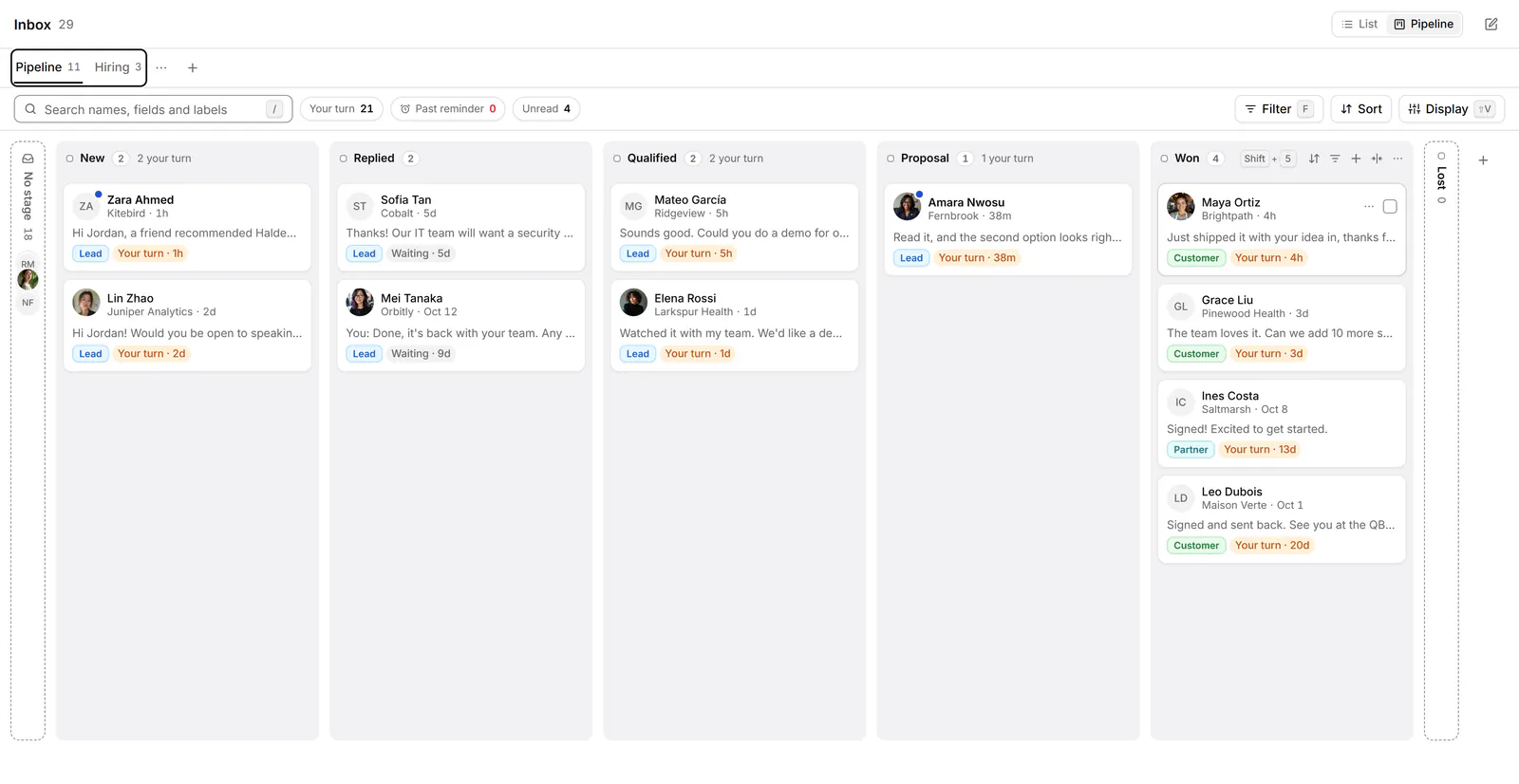
LinkedIn doesn't let you put a conversation in a deal stage. If your deals, hires or raise happen in LinkedIn messages, you either keep a spreadsheet beside your inbox or use a tool that adds a pipeline to the conversations themselves. In Bokka, press V to see your inbox as a board.
A pipeline is the set of stages a deal moves through, such as New, Replied, Qualified, Proposal, Won and Lost. A board shows each stage as a column of cards. Bokka is an AI-first CRM for your LinkedIn inbox.
Why a spreadsheet stops working
- It's always out of date. Every reply means switching tabs to update a row.
- It can't tell you whose turn it is. The spreadsheet doesn't know they replied an hour ago.
- The context lives elsewhere. The row says Proposal; the conversation that explains why is in another tab.
Exporting LinkedIn messages into a CRM has the same gap the other way round: the CRM has the stage, LinkedIn has the conversation, and you're the sync.
How to set up a pipeline in Bokka
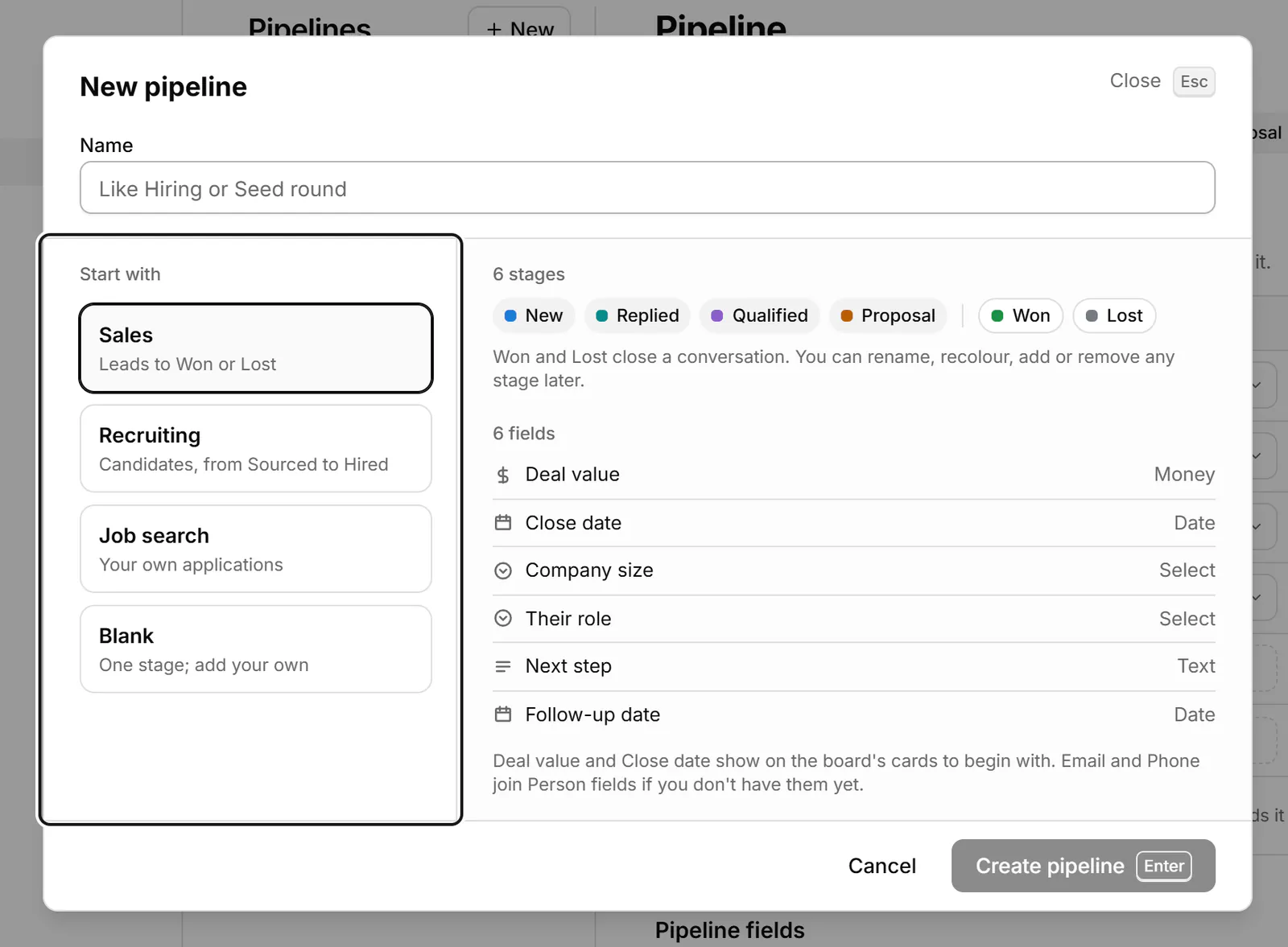
- Go to Settings → Pipelines and choose New, or New pipeline on the board.
- Name it and pick a template: Sales (New, Replied, Qualified, Proposal, Won, Lost, with fields such as Deal value, Close date and Next step), Recruiting (Sourced to Hired or Declined), Job search (Saved to Accepted or Rejected) or Blank.
- Rename stages, change their colours, or add your own. For each stage, set Follow up after (never, 3, 7, 14 or 30 days): a conversation quiet in that stage that long is marked for a follow-up.
Move conversations through it
- In the inbox, switch the layout from List to Pipeline, or press V. G then P goes straight to the board.
- Drag a card to another stage. Or focus it with J and K and press Shift+1 to Shift+9 to move it to that stage.
- Press Enter to open the conversation and reply; the card stays where it is.
- Use the quick filters Your turn, Past reminder and Unread to see what needs you first.
Conversations not in a pipeline yet sit in No stage. From the list, you can select several and use Set stage… to move them at once.
Pipelines for different jobs
| You're | Template | Useful fields |
|---|---|---|
| Selling | Sales | Deal value, Close date, Next step |
| Hiring | Recruiting | Role, Salary range, Interview date |
| Raising | Blank: Intro, Call, Diligence, Committed, Passed | Cheque size, Lead or follow |
| Looking for a job | Job search | Company, Role, Next interview |
Labels and pipelines work together: label a conversation Lead to say who it is, and put it in a stage to say where the deal stands. See how to label LinkedIn conversations and Track deals in a pipeline.
About Bokka
Bokka starts with a free 14-day trial, AI included and no credit card. After it, Starter is $25 and Pro is $35 per user a month ($19 and $30 for your first month). Team, at $50, is coming soon.
Frequently asked questions
Can you track deals in LinkedIn messages?
Not in LinkedIn itself, which has no stages for conversations. In Bokka, your LinkedIn conversations can move through pipeline stages on a board, with fields such as Deal value and Close date.
Do I still need a CRM if I use a LinkedIn pipeline?
If most of your deals happen in LinkedIn messages, a pipeline on the conversations may be all you need. If you need your main CRM updated too, Bokka Pro can send labelled conversations to Notion, Google Sheets or a webhook.
Which Bokka plan includes pipelines?
Pipelines, the board and CRM fields are on Starter, at $25 per user a month, and in the free 14-day trial.
Sources
Other products' prices and features were read on their own pages on 24 October 2026. They change; check each page before you buy.
Try Bokka free for 14 days, AI included, with no credit card. It runs in Chrome, Edge, Brave and Arc on a desktop or laptop.
Start your free trialAbout the author
Amardeep Anand founded Bokka, the AI-first CRM for your LinkedIn inbox, and runs it from Deoghar, India. Questions or corrections: support@gobokka.com.
Related
- How to label LinkedIn conversations (leads, candidates, investors)LinkedIn messaging has no labels. How to tag conversations as Lead, Candidate or Investor and work each label as its own list, in Bokka.
- How to add private notes to a LinkedIn contactLinkedIn messaging has no private notes; Sales Navigator has them on saved leads. How to keep a note on everyone you message, in Bokka.
- How to set a reminder to follow up on a LinkedIn messageLinkedIn has no reminders for messages. The closest built-in workaround, and how to set a follow-up that returns only if they haven't replied, in Bokka.