How to see whose turn it is in your LinkedIn inbox
LinkedIn can't filter by who wrote last. How to spot the conversations waiting on you, and the ones waiting on them, in Bokka.
By Amardeep Anand, founder of Bokka · Published · 2 min read
On this page
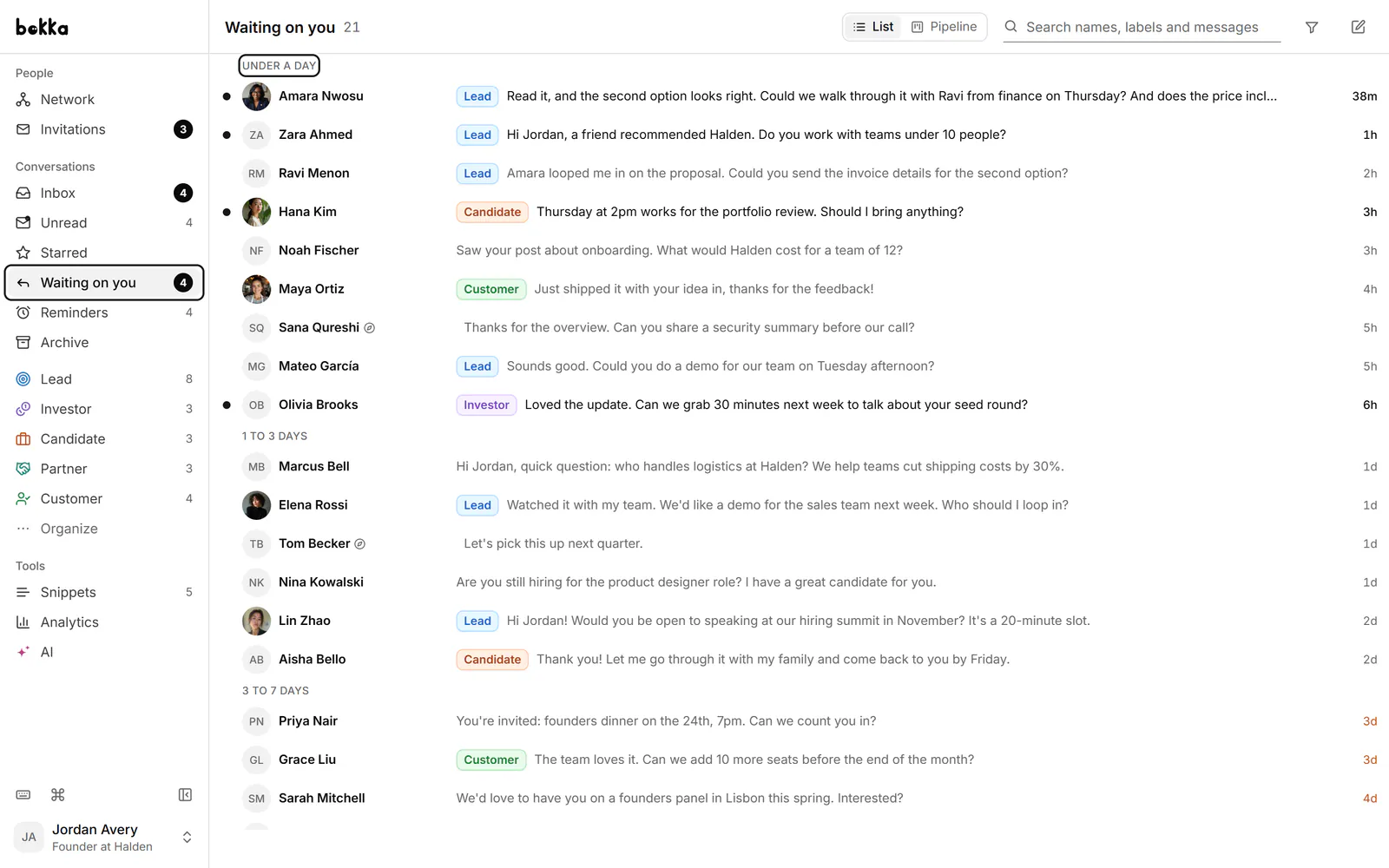
LinkedIn doesn't show whose turn it is: none of its message filters sort conversations by who wrote last. To see it at a glance, use an inbox tool that tracks reply status, such as Bokka, where Waiting on you lists every conversation where the other person wrote last.
Whose turn it is means who owes the next message in a conversation. Waiting on you is a conversation where they wrote last; Waiting on them is one where you did. Bokka is an AI-first CRM for your LinkedIn inbox.
What LinkedIn offers
LinkedIn's messaging page has four inbox categories (Focused, Other, Archived and Spam) and five filters: Jobs, Unread, My Connections, Starred and InMail (LinkedIn Help: filters and search in Messaging, retrieved November 1, 2026). None of them separate the conversations you owe a reply from the ones where you're waiting.
Unread comes closest, but it stops working the moment you open a message on your phone and don't answer. The conversation is read, and still your turn. A message's status icons tell you whether yours was delivered or read, not whether a reply is due; see what the grey check mark means.
The built-in workaround
- Open Messaging and scan the previews: a preview that starts with You: means you wrote last.
- Mark the ones you owe as unread, or star them.
- Work through Unread or Starred, and clear each mark when you've replied.
It works for a few conversations a day. It breaks when you're juggling dozens, because a mark doesn't clear itself when you reply, and nothing tells you how long someone has been waiting.
See whose turn it is in Bokka
- Waiting on you (Shift+W): one-to-one conversations where they wrote last. Group chats aren't listed.
- Waiting on them (Shift+S): one-to-one conversations where you wrote last, and ones you marked Follow up.
- Both group conversations by how long they've waited: Under a day, 1 to 3 days, 3 to 7 days, 7 to 30 days and Over 30 days. Work from the oldest group up.
- Press F and choose Waited 3+ days or Waited 7+ days to see only the ones that have sat longest.
Views without a sidebar entry still open from their key, from the command palette (Ctrl+K) or from Filter. To show them in the sidebar, click Organize and the eye next to each.
Set a reply status by hand
Sometimes the last message doesn't tell the whole story. "Thanks!" doesn't need an answer, and "I'll get back to you next week" means it's their turn even though they wrote last.
- No reply needed (Shift+N) takes a conversation out of both views until a new message arrives.
- Mark as follow up and Reset reply status are in the command palette.
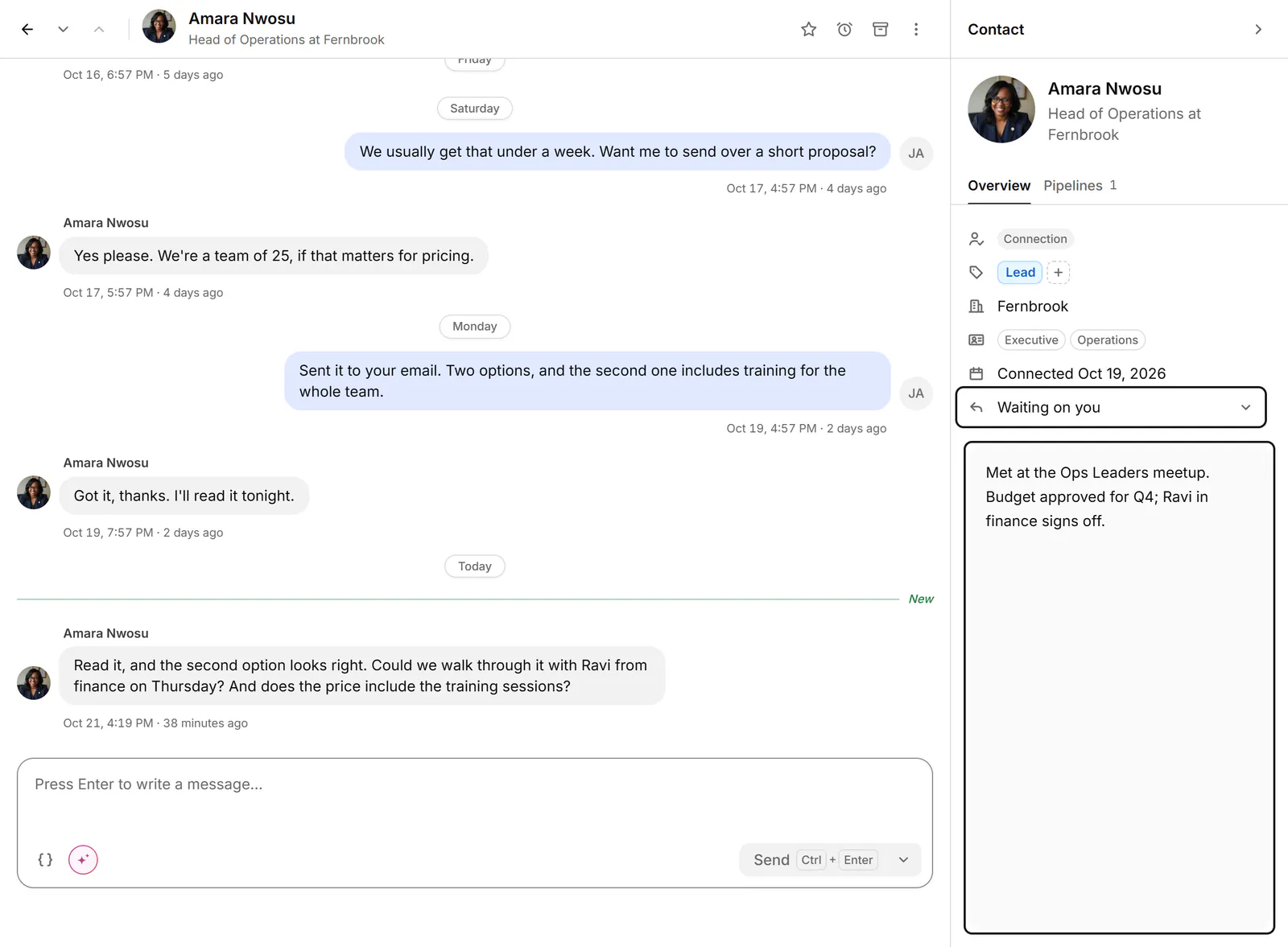
- The contact panel shows the Reply status (Waiting on you, Waiting on them, Follow up or No reply needed); click it to change it.
A five-minute routine
For example, each morning: open Waiting on you and answer from the oldest group up, archiving with E as you finish. Then open Waiting on them, filter to Waited 7+ days, and decide for each one: follow up now, set a reminder with H, or mark it No reply needed and let it go.
On the pipeline board, the Waiting on you quick filter shows the same thing for the deals in a pipeline, and on Pro, Analytics counts the one-to-one conversations waiting on a reply, yours and theirs. More: LinkedIn inbox zero and Use the inbox views.
About Bokka
Bokka starts with a free 14-day trial, AI included and no credit card. After it, Starter is $25 and Pro is $35 per user a month ($19 and $30 for your first month). Team, at $50, is coming soon.
Frequently asked questions
Can LinkedIn show me which messages I haven't replied to?
Not directly. LinkedIn's filters are Jobs, Unread, My Connections, Starred and InMail, and none of them sort by who wrote last.
How does Bokka know it's my turn?
In a one-to-one conversation, whoever wrote last is waiting. You can override it: mark a conversation No reply needed, or mark it Follow up.
Are group chats included?
No. Waiting on you and Waiting on them list one-to-one conversations only.
Sources
Other products' prices and features were read on their own pages on November 1, 2026. They change; check each page before you buy.
Join the waitlist for early access to Bokka. Your first 14 days are free, AI included, with no credit card. It runs in Chrome, Edge, Brave and Arc on a desktop or laptop.
Join the waitlistAbout the author
Amardeep Anand founded Bokka, the AI-first CRM for your LinkedIn inbox, and runs it from Deoghar, India. Questions or corrections: support@gobokka.com.