LinkedIn reply templates for the messages you put off answering
Fill-in LinkedIn reply templates for declining a pitch, saying not now, booking a call, asking for a referral, answering a recruiter and thanking an intro.
By Amardeep Anand, founder of Bokka · Published · 2 min read
On this page
A good LinkedIn reply template answers in its first line, gives one reason at most, and ends with the next step or a clear close. Below are two for each of the six messages people most often leave unanswered, with gaps you fill for each person.
A reply template is a message you reuse, with gaps for what changes from person to person. Bokka is an AI-first CRM for your LinkedIn inbox, where templates are called snippets. Follow-ups after silence have their own post: LinkedIn follow-up templates with first-name fill-ins.
Declining a sales pitch
Say no in the first sentence. A vague answer gets a follow-up; a clear one ends the thread.
Hi {{first_name}}, thanks for the note. We're not looking for this right now, so I'll pass. Good luck with it.Hi {{first_name}}, thanks. We already use {{current_tool}} and we're happy with it, so it isn't a fit. Please don't hold a follow-up for me.Saying not now
Give a time, or tell them to write back after something happens. Then mean it.
Hi {{first_name}}, this is interesting, but the timing's wrong: we're busy with {{reason}} until {{month}}. Could you check in then?Hi {{first_name}}, not for this quarter. If it's still relevant when {{event}}, I'll write to you.Booking a call
Offer two times and a length. A yes then needs one word.
Hi {{first_name}}, happy to talk. Would {{time_1}} or {{time_2}} work for 20 minutes? I'll send an invite to whichever suits.Hi {{first_name}}, let's do it. Here's my calendar: {{link}}. If none of those times fit, send me two that do.Asking for a referral
Name the person, say why, and make it easy to say no.
Hi {{first_name}}, I see you know {{name}} at {{their_company}}. Would you be comfortable introducing me? I'd like to ask about {{topic}}. No problem at all if not.Hi {{first_name}}, a favour, only if it's easy: do you know anyone who handles {{role}} at {{their_company}}? A name is plenty.Answering a recruiter
Whatever your answer, say it plainly and say what would change it.
Hi {{first_name}}, thanks for reaching out. I'm happy at {{my_company}} and not looking right now, but I'd be glad to hear from you if a {{role}} role comes up next year.Hi {{first_name}}, thanks, this sounds interesting. Could you share the salary range and whether it's remote? If it fits, I'm free {{time_1}} for a call.Thanking someone for an intro
Thank them where they introduced you, then take the conversation one-to-one so the introducer isn't copied on every message. Later, tell them how it went.
Thanks, {{introducer}}, much appreciated. Hi {{new_contact}}, good to meet you. I'll message you directly so we don't fill {{introducer}}'s inbox.Hi {{first_name}}, {{name}} and I spoke on {{day}}. Thanks again for connecting us. I'll let you know how it goes.For example, the first "booking a call" template becomes: "Hi Priya, happy to talk. Would Tuesday at 10 or Wednesday at 3 work for 20 minutes? I'll send an invite to whichever suits."
Save a template as a snippet in Bokka
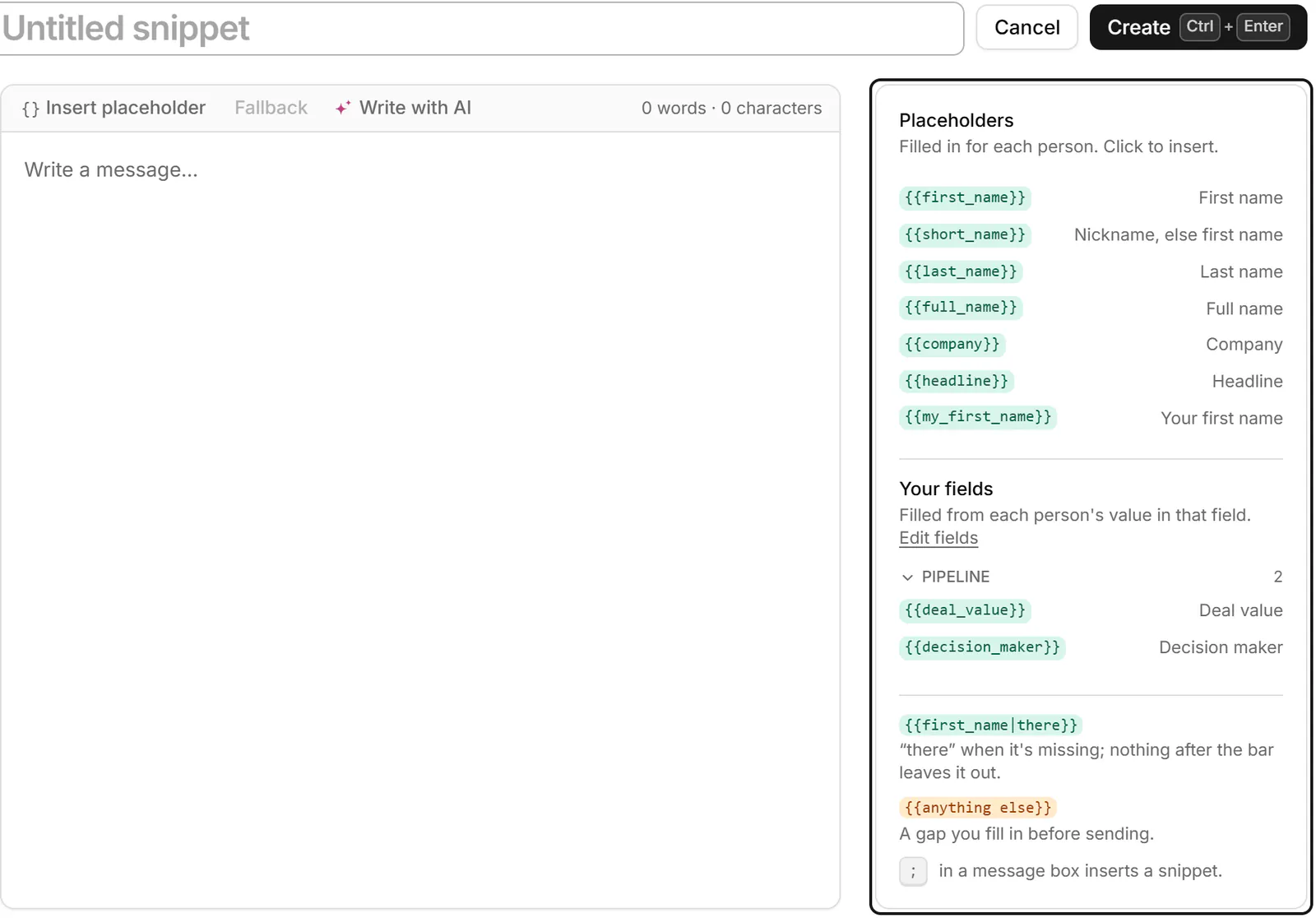
- Go to Settings → Snippets and click New snippet, or press C there.
- Give it a Name of up to 40 characters, such as "Decline a pitch", and paste the Message.
- Add placeholders from the Placeholders panel: first name, nickname, last name, full name, company, persona, headline, your own first name, or one of your own fields. Fallback adds a word for when a value is missing, as in
{{first_name|there}}. - Click Create, or press Ctrl+Enter.
To keep a reply you've just written, use the arrow beside Send, then Save as snippet. A snippet can also carry files and one voice note; see saved replies with files and voice notes.
Insert it, fill the gaps, send it
- In the message box, type ; and a few letters of the snippet's name, or click Insert a snippet.
- Pick it with the arrow keys and Enter. First name, company and the other placeholders fill in for the person you're writing to.
- A placeholder that can't be filled, such as
{{time_1}}, stays selected for you to type over; Tab moves to the next. Send stays off until each is filled or deleted. - Read it, change what needs changing, and send it yourself.
Snippets are on every plan, with no limit. On the trial and Pro, Write with AI can also draft a reply in your voice, or make your own text shorter or friendlier, for you to edit; see AI replies in your voice. Full steps: Reuse a reply with snippets.
About Bokka
Bokka starts with a free 14-day trial, AI included and no credit card. After it, Starter is $25 and Pro is $35 per user a month ($19 and $30 for your first month). Team, at $50, is coming soon.
Frequently asked questions
How do I politely decline a sales pitch on LinkedIn?
Say no in the first sentence, thank them, and close the thread: "Thanks for the note. We're not looking for this right now, so I'll pass." A clear no avoids follow-ups.
How do I reply to a recruiter on LinkedIn if I'm not interested?
Thank them, say you're not looking right now, and say what would change that, such as a certain role next year. It keeps the door open without a call.
Does LinkedIn have reply templates?
LinkedIn Help describes message templates in LinkedIn Recruiter, up to 500 of them, and none for regular messages. For regular messages, keep your own and paste them in, or use a tool with saved replies.
Will Bokka send a template for me?
No. Inserting a snippet only fills the message box. Nothing is sent until you press Send.
Sources
Other products' prices and features were read on their own pages on November 10, 2026. They change; check each page before you buy.
Join the waitlist for early access to Bokka. Your first 14 days are free, AI included, with no credit card. It runs in Chrome, Edge, Brave and Arc on a desktop or laptop.
Join the waitlistAbout the author
Amardeep Anand founded Bokka, the AI-first CRM for your LinkedIn inbox, and runs it from Deoghar, India. Questions or corrections: support@gobokka.com.