AI replies in your own voice on LinkedIn, drafted not sent
AI can draft LinkedIn replies that sound like you if it learns from your own messages. How that works in Bokka, what it won't guess, and why you still send.
By Amardeep Anand, founder of Bokka · Published · 2 min read
On this page
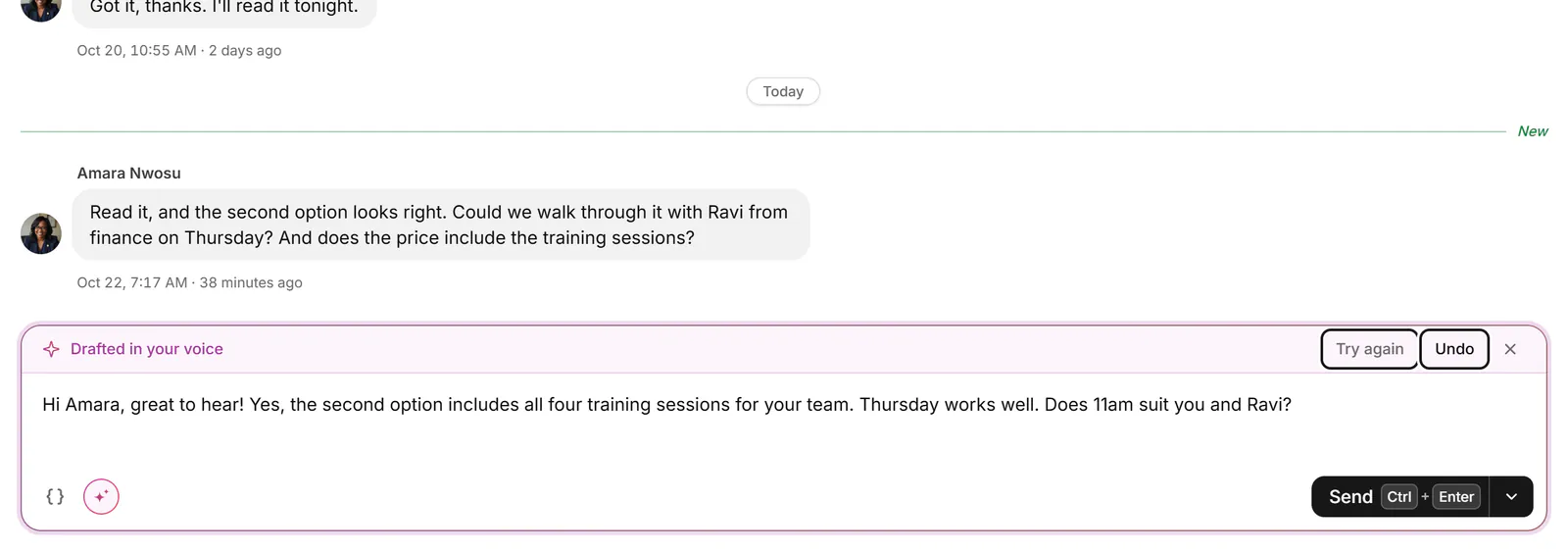
The way to get AI replies in your own voice on LinkedIn is to have AI draft from your own messages, then read, fix and send the draft yourself. In Bokka, AI matches how you already write in that conversation, puts one draft in your reply box, and sends nothing. The last step is always yours.
Your voice here means the habits people recognise: how long you write, how you greet and sign off, whether you use emoji or capitals. A draft is text waiting in your reply box, unsent. Bokka is an AI-first CRM for your LinkedIn inbox.
What your own voice means to the AI
Bokka's AI reads the last 30 messages of the conversation you're in and copies your style from your side of it: length, greetings, sign-offs, emoji, capitals and formality. It writes in the language of the other person's last message. If you've never written in that conversation, it keeps the draft plain and short.
It reads no other conversation. Your messages to other people might teach it a little more about your style, but they could also carry a link, a price or a promise meant for someone else into this reply. So nothing from another chat reaches the AI.
Drafts also follow a few habits of chat, whoever you are: no long dashes, no semicolons, no stock openers such as "I hope this finds you well", one question at most unless they asked several, and never much longer than your usual message.
Why it drafts and doesn't send
A reply often needs something only you know. A model can match your tone and still be wrong about your price, your calendar or whether the role is open. So the rule is that it doesn't guess:
| When | The draft does this |
|---|---|
| They ask your price | Leaves a gap in the sentence, such as [price] |
| They ask if you're hiring | Leaves a gap, and says neither yes nor no |
| A time needs agreeing | Asks what suits them, or writes [your availability] |
| Their message waited over a month | Opens with a short apology and asks if it still stands |
| They said "next Tuesday" weeks ago | Counts from the day they wrote it |
| A link wasn't in the conversation | The draft is held back and you don't see it |
| Their text gives orders to the AI | That text is cut out before the AI reads it |
LinkedIn takes the same view of its own tools. For its AI Messages feature in Recruiter it says "you are responsible for reviewing the message draft for accuracy and making any necessary edits" (LinkedIn Help, retrieved October 30, 2026). The person who sends a message answers for it, whoever typed the first version.
How to draft a reply in Bokka
- Open a conversation.
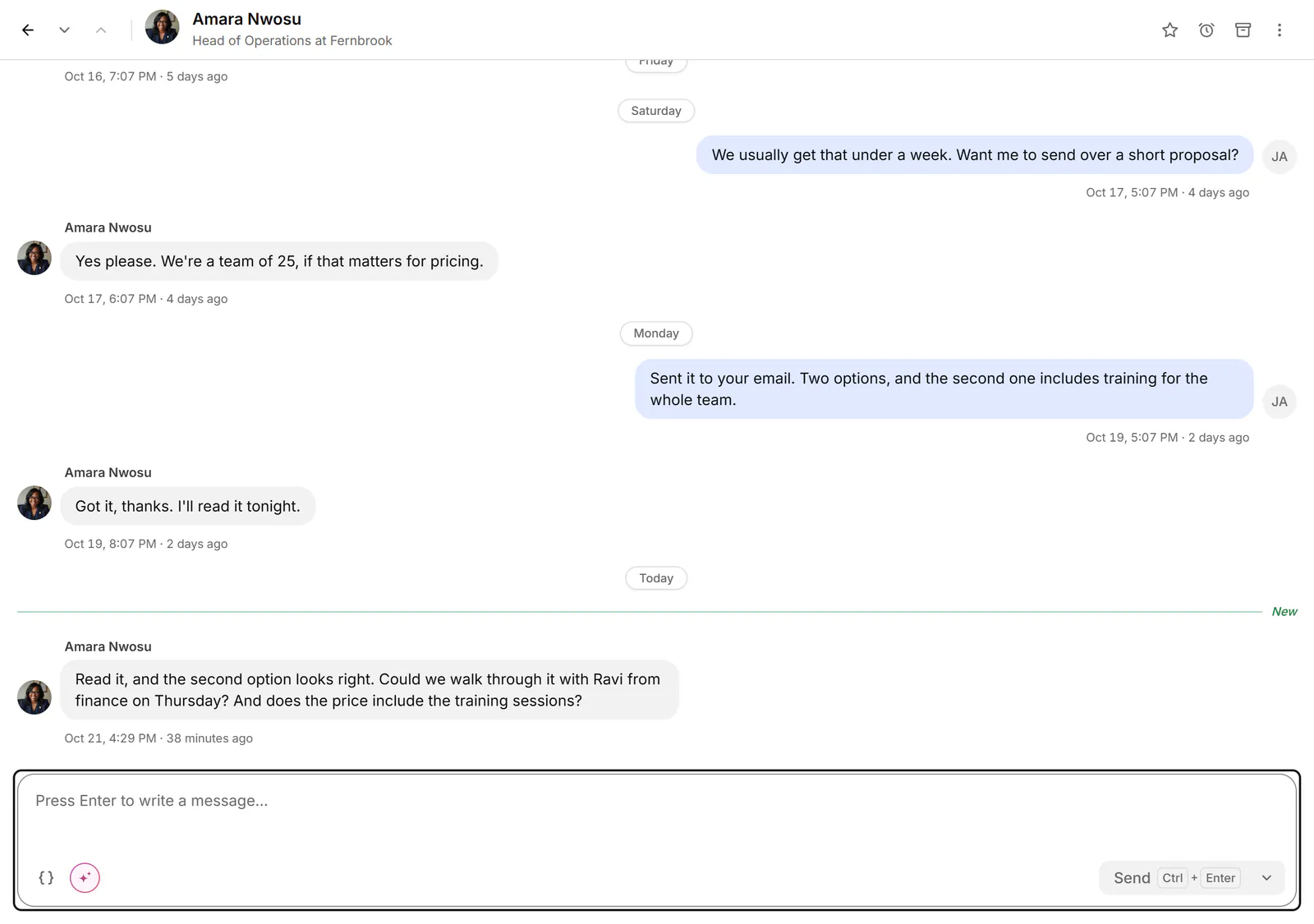
- In the reply box choose Write with AI, or press D when you're not typing in the box.
- Choose Draft a reply, or Draft a follow-up if you wrote last. If you've typed a few notes, choose Draft a reply from your notes.
- The draft appears in the box under Drafted in your voice. Edit it, or choose Try again.
- Fill any gaps, then send it yourself with ⌘+Enter or Ctrl+Enter.
How to steer a draft
- Start from notes. A few words in the box, such as "yes to Thursday, ask about budget", give the AI what it can't know. This is the quickest way to get a usable first draft.
- Regenerate with a note. From the arrow beside Send, say what to change, such as "Offer two times instead of one".
- Rework your own text. Make it shorter, longer, friendlier or more formal, or Fix spelling and grammar.
- Translate. Tone and Translate to are under the same arrow.
Bokka's AI or your own assistant?
You can also have Claude, ChatGPT or Cursor write drafts through Bokka's MCP server. The two work differently:
| Bokka's AI | An assistant you connect | |
|---|---|---|
| Where you ask | In the reply box | In the assistant's own chat |
| What it reads | That conversation | Whatever chats its tools fetch |
| Best for | One reply, right now | A batch of drafts for later review |
| The style rules above | Yes | No, it follows its own model and your prompt |
| Plan | Pro, and the trial with daily limits | Pro |
| Who sends | You | You |
How to make any AI sound more like you
These habits work in any AI tool, including a chat window you paste into:
- Give it your real messages. Paste a few you actually sent to someone similar, not a description of your tone.
- Name your habits. "Two lines. No exclamation marks. I sign off with my first name."
- Ban phrases you never use. It's easier than describing what you do use.
- Tell it to leave gaps. Ask for brackets where a fact is missing, so nothing is made up.
- Cut the first and last lines. That's where AI writing tends to pad.
- Read it as they would. If you wouldn't say it to them, change it.
What goes to the AI
Text goes to our AI provider only when you use an AI feature or turn one on, and our AI provider doesn't keep it or train on it. Bokka never drafts just because you opened a conversation. Settings → AI shows what's sent for each switch. See Draft a reply with AI and What can AI do.
About Bokka
Bokka starts with a free 14-day trial, AI included and no credit card. After it, Starter is $25 and Pro is $35 per user a month ($19 and $30 for your first month). Team, at $50, is coming soon. AI drafts are on Pro, and on the trial with daily limits. They aren't on Starter.
Frequently asked questions
Can AI write LinkedIn messages in my voice?
It can get close if it works from messages you really sent. Expect to edit the draft, because a model can copy your tone but doesn't know your price, your calendar or what you decided.
Does Bokka's AI send messages for me?
No. It puts a draft in the reply box when you ask, and you send it yourself. Bokka has no setting that sends for you.
Does Bokka's AI read all my conversations to learn my style?
No. To draft a reply, it reads the conversation you're in. Nothing from another conversation reaches the AI.
Do people mind AI-written LinkedIn messages?
We have no data to quote. Our advice is simple: if you've read it, changed it and would say it yourself, it's your message.
Sources
Other products' prices and features were read on their own pages on October 30, 2026. They change; check each page before you buy.
Join the waitlist for early access to Bokka. Your first 14 days are free, AI included, with no credit card. It runs in Chrome, Edge, Brave and Arc on a desktop or laptop.
Join the waitlistAbout the author
Amardeep Anand founded Bokka, the AI-first CRM for your LinkedIn inbox, and runs it from Deoghar, India. Questions or corrections: support@gobokka.com.
Related

Use ChatGPT or Cursor with your LinkedIn messages: setup and prompts
2 min read
Why Bokka doesn't automate LinkedIn, and what it does instead
2 min read

Can you unsend a LinkedIn message? The 60-minute rule
2 min read

LinkedIn reply templates for the messages you put off answering
2 min read