How to summarize a long LinkedIn conversation with AI
Catch up on a long LinkedIn thread in seconds: the main points and what you owe them. How AI summaries work in Bokka, and what is sent.
By Amardeep Anand, founder of Bokka · Published · 1 min read
On this page
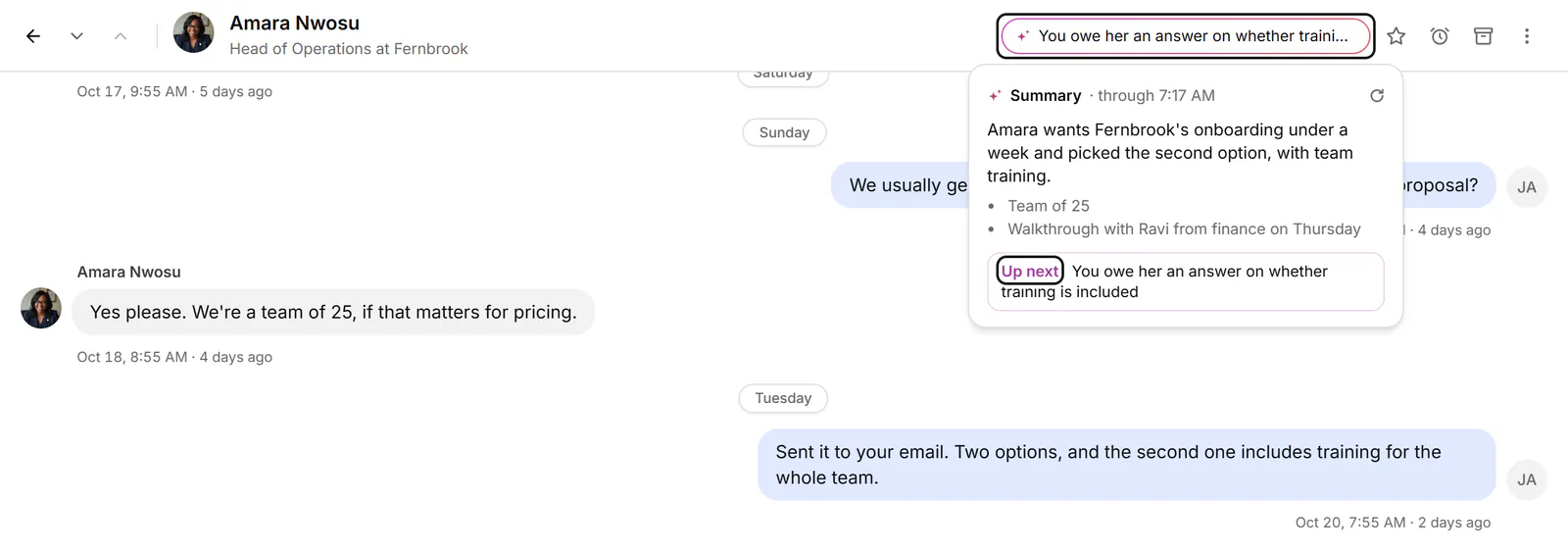
To summarize a long LinkedIn conversation, open it in Bokka and press Shift+Y: you get the main points and an Up next line saying what you owe the other person. Without a tool, the alternative is to scroll back through the thread, or paste it into an AI chat yourself.
A conversation summary is a short account of a thread: what was discussed, what was agreed and what's still open. Up next is Bokka's line for what you owe them, such as an answer to a question. Bokka is an AI-first CRM for your LinkedIn inbox.
Why a summary helps
For example, an investor conversation that started in March runs to 40 messages: an intro, two calls, a deck, questions about churn, and a promise from you to send updated numbers. Before Friday's call you need two things: where you left it, and what you said you'd do. Scrolling back finds the first; the second is easy to miss.
The do-it-yourself way
You can copy a thread from LinkedIn into an AI chat and ask for a summary. It works, but it takes a few steps each time, and the whole conversation goes to whichever AI service you paste it into, under that service's terms. If you'd rather your assistant read your inbox directly, see how to connect Claude to your LinkedIn inbox.
Summarize a conversation in Bokka
- Open the conversation and press Shift+Y (with the cursor outside the reply box). You can also type
/in the box and choose Summarize the conversation, or use the command palette. - A Summary pill appears in the conversation header. Open it to read the main points and Up next.
- When newer messages arrive, choose Update the summary to bring it up to date.
Summarize every long conversation as you open it
In Settings → AI, turn on Summarize long conversations when I open them. Conversations of 8 messages or more are then summarized as you open them. What's sent beside the switch says what goes to our AI provider.
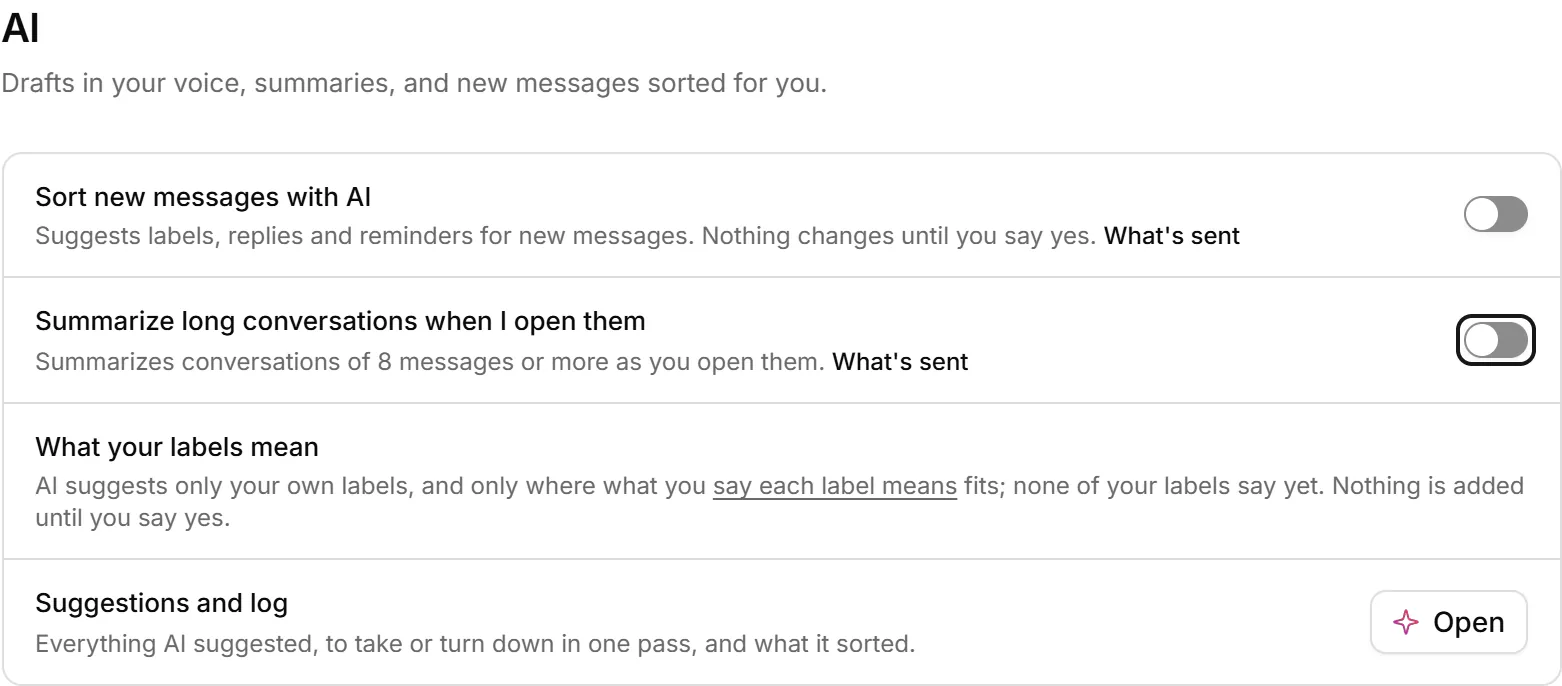
What's sent, and what's kept
- Text goes to our AI provider only when you use an AI feature or turn one on, and our AI provider doesn't keep it or train on it.
- Summaries are kept on this device only, so another browser won't show the ones made here.
- A summary never sends anything or changes the conversation.
Turn the summary into your reply
Once you know what you owe, press D for Draft a reply: AI writes one in your voice and puts it in the box for you to edit and send. See AI replies in your own voice. Before a call, write the outcome in a note with N so it's there next time.
AI is part of the free trial, with daily limits, and of Pro. It isn't on Starter. Full details: Catch up on a long conversation.
About Bokka
Bokka starts with a free 14-day trial, AI included and no credit card. After it, Starter is $25 and Pro is $35 per user a month ($19 and $30 for your first month). Team, at $50, is coming soon.
Frequently asked questions
Can AI summarize my LinkedIn messages?
Yes. In Bokka, press Shift+Y in a conversation for the main points and what you owe them. You can also have every conversation of 8 messages or more summarized as you open it.
Where are summaries stored?
On your device only. Another browser won't show summaries made in this one.
Does the AI keep my messages?
No. Text goes to our AI provider only when you use or turn on an AI feature, and it doesn't keep it or train on it.
Which Bokka plans include summaries?
AI is part of the free trial, with daily limits, and of Pro. It isn't on Starter.
Sources
Other products' prices and features were read on their own pages on November 1, 2026. They change; check each page before you buy.
Join the waitlist for early access to Bokka. Your first 14 days are free, AI included, with no credit card. It runs in Chrome, Edge, Brave and Arc on a desktop or laptop.
Join the waitlistAbout the author
Amardeep Anand founded Bokka, the AI-first CRM for your LinkedIn inbox, and runs it from Deoghar, India. Questions or corrections: support@gobokka.com.