Raising on LinkedIn: a founder's inbox playbook
How founders can run investor conversations from their LinkedIn inbox: a fundraising pipeline, notes, summaries, reminders and updates, in Bokka.
By Amardeep Anand, founder of Bokka · Published · 2 min read
On this page
To run a raise from your LinkedIn inbox, give every investor conversation a stage in its own pipeline, a note after every call, and a reminder for the next step. That way your inbox tells you who's in diligence, who's gone quiet and what you promised, without a separate spreadsheet.
A fundraising pipeline is a board of stages that investor conversations move through, from intro to a decision. A warm intro is an introduction from someone the investor already knows. Bokka is an AI-first CRM for your LinkedIn inbox.
Set up an investor pipeline
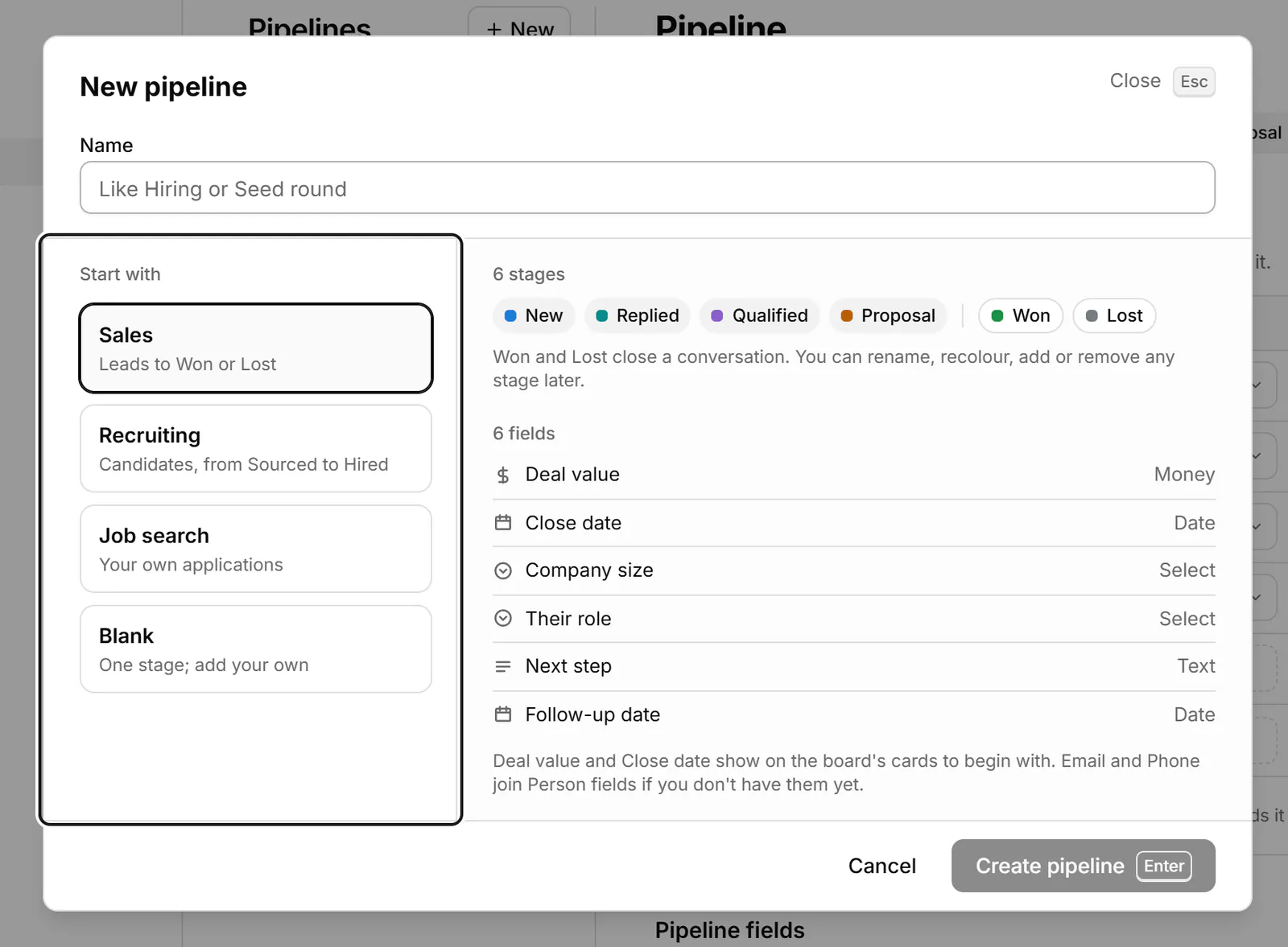
- In Settings → Pipelines, choose New, name it ("Seed round") and pick Blank. There's no fundraising template, so you name the stages.
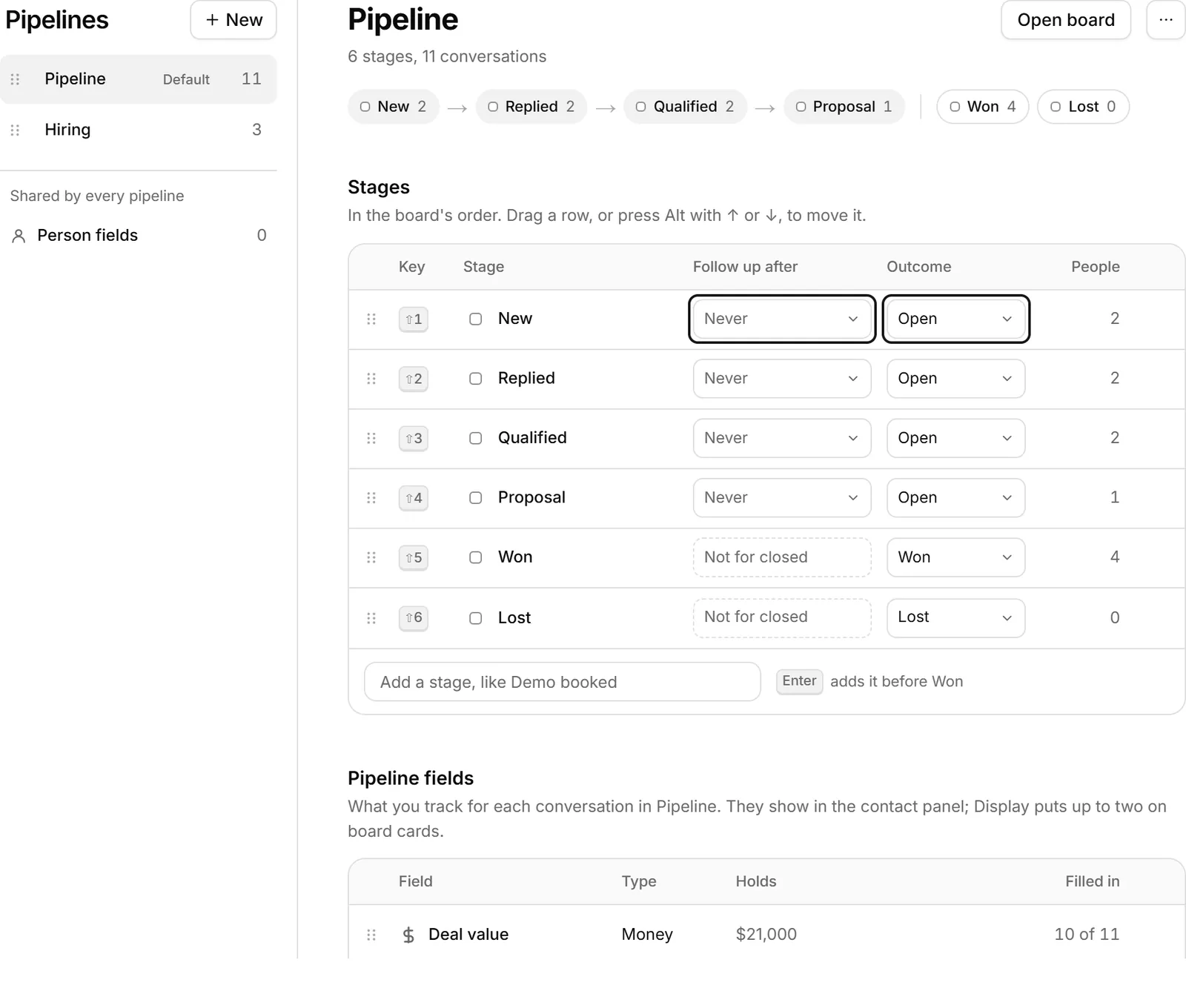
- Add stages: Intro, First meeting, Partner meeting, Diligence, Term sheet, Committed and Passed.
- Set Outcome to Won for Committed and Lost for Passed, so they stop asking for follow-ups.
- Set Follow up after on the open stages, such as 7 days in First meeting, so a quiet investor gets flagged.
- Under Pipeline fields, add a Money field (Cheque size), a Date (Next meeting) and a Select (Fund type). Display puts up to two on each card.
Investor is one of the six starter labels. Label each investor, then move their conversation onto the board with Set stage… or by dragging. See how to track deals from LinkedIn messages.
Getting the first message in
- Warm intros first. Ask a mutual connection to introduce you. If you're both their connections, they can start a LinkedIn group chat with the two of you.
- Invitation notes. A note on an invitation costs nothing, and once they accept you can message freely.
- Message requests. You can send a request to someone you share a group with, or a coworker; they can accept or privately decline, and you won't be told if they decline (LinkedIn Help: message requests, retrieved November 1, 2026).
- InMail, sparingly. Premium Business gets 15 credits a month, and a credit comes back only if the investor accepts, declines or replies within 90 days (LinkedIn Help: InMail credits and renewal, retrieved November 1, 2026).
Before and after every call
- Before: open the conversation and press Shift+Y for a summary: the main points and Up next, what you owe them. Then read your note in the contact panel.
- After: press N and write what you learned: their questions, who else is in the room, what you promised to send.
- Then: update Next meeting, move the card if the stage changed, and press H for a reminder on the date you said you'd follow up.
Notes belong to the person, so you see them in the inbox, in People and on the board. Summaries are on the trial and Pro. See how to summarize a long LinkedIn conversation and private notes on LinkedIn contacts.
Keep warm investors warm
For example, an investor says "too early, keep me posted". Move them to a Keep warm label instead of Passed, and snooze the conversation until your next milestone: press H and type a date such as "3rd" or pick one from the calendar. When it comes back, send a two-line update with one number that moved.
To send that update to a handful of investors at once, each in their own conversation, select them with X and use Message selected: up to 10 conversations, a personalised copy each, and one Enter per person. A group chat would show every investor who else you're talking to.
Your weekly fundraising review
- Open the board (G then P) and work the Waiting on you filter first: those investors need your reply.
- Check Follow-up due for follow-ups you've let slide.
- On Pro, Analytics shows how conversations moved through your stages in the period, and your reply speed. If theirs is faster than yours, that's the fix.
What this doesn't cover
Bokka works with LinkedIn messages only, so investor email, data rooms and calendar invites live elsewhere. On Pro, you can send the pipeline to a Notion database or a Google sheet to sit beside them; see send LinkedIn conversations to Notion or Google Sheets. A founder with two or three investor threads doesn't need any of this; it pays off when you can't remember who you last wrote to.
About Bokka
Bokka starts with a free 14-day trial, AI included and no credit card. After it, Starter is $25 and Pro is $35 per user a month ($19 and $30 for your first month). Team, at $50, is coming soon. Founders who want AI summaries and drafts need Pro, at $35; Starter, at $25, has the pipeline, notes and reminders.
Frequently asked questions
Can I fundraise on LinkedIn?
Many founders use LinkedIn to reach investors and keep in touch. The work is in tracking each conversation: who's at which stage, what you promised and when to follow up.
Is there a fundraising pipeline template in Bokka?
No. Start a pipeline from Blank and name your own stages, such as Intro, First meeting, Diligence and Term sheet, with Won and Lost outcomes at the end.
Should I cold message investors with InMail?
Use it sparingly. Credits are limited, and one comes back only if the investor responds within 90 days. A warm intro or a note on an invitation is usually a better first step.
Does Bokka track investor emails too?
No. Bokka covers your LinkedIn messages only.
Sources
Other products' prices and features were read on their own pages on November 1, 2026. They change; check each page before you buy.
Join the waitlist for early access to Bokka. Your first 14 days are free, AI included, with no credit card. It runs in Chrome, Edge, Brave and Arc on a desktop or laptop.
Join the waitlistAbout the author
Amardeep Anand founded Bokka, the AI-first CRM for your LinkedIn inbox, and runs it from Deoghar, India. Questions or corrections: support@gobokka.com.