Who Bokka is for: founders, recruiters, SDRs and consultants
Who Bokka suits by role: recruiters running candidates in DMs, founders raising or selling, SDRs following up by hand, consultants, and who should skip it.
By Amardeep Anand, founder of Bokka · Published · 4 min read
On this page
Bokka is for people whose work happens in their own LinkedIn messages: founders raising or selling, recruiters running candidates in DMs, SDRs following up by hand, and consultants keeping up with clients. It suits one person with a busy inbox. It doesn't suit anyone who wants software to send for them, or a team that needs a shared inbox today.
Bokka is an AI-first CRM for your LinkedIn inbox. A pipeline is a set of stages a conversation moves through. An SDR is a sales development rep, who starts conversations for a sales team. A DM is a direct message.
Which plan fits which role
| Role | What you'd use most | Start on | Skip it if |
|---|---|---|---|
| Recruiter | Recruiting pipeline, labels, reminders, snippets | Starter, $25 | You source and message from inside LinkedIn Recruiter |
| Founder | Pipelines for investors and customers, notes, AI summaries | Pro, $35 | You get a few messages a week |
| SDR | Waiting on them, reminders, snippets, Sales Navigator inbox | Pro, $35 | Your job depends on sequences or a native CRM sync |
| Consultant | Labels by client, notes, reminders | Starter, $25 | You run several clients' LinkedIn accounts |
Starter has labels, snippets, reminders, pipelines and your whole history. Pro adds AI, analytics, your Sales Navigator inbox and integrations. Bokka starts with a free 14-day trial, AI included and no credit card. After it, Starter is $25 and Pro is $35 per user a month ($19 and $30 for your first month). Team, at $50, is coming soon.
For recruiters: running a candidate pipeline in LinkedIn DMs
If your candidates answer you in regular LinkedIn messages, Bokka gives you a pipeline right there. Candidates, clients and old contacts stop sharing one list, and each conversation shows its stage.
- A Recruiting pipeline. The template runs Sourced, Contacted, Screen, Interview, Offer, then Hired or Declined, with fields for Role, Availability, Notice period, Expected salary, Source and Next interview. See Track deals in a pipeline.
- A follow-up per stage. Follow up after marks a conversation that's sat quiet in a stage for 3, 7, 14 or 30 days, or a number you set. Hired and Declined close it, so it gets no more.
- Reminders tied to the candidate. Press H and pick Remind me. If they reply first, the reminder goes away by itself.
- Labels across roles. Candidate is a starter label, and you can add one per role. A conversation can carry several, and each label is its own list.
- Snippets with gaps. Save your role pitch with
{{first_name}}and{{company}}, and press ; to insert it. Read it through and send it yourself. - Message selected. One text to up to 10 conversations, each person's own copy, and you press Enter for every one. It's useful for telling a shortlist that a role has moved. It isn't a mass mailer.
- A sheet for the hiring manager. On Pro, send labelled conversations to Google Sheets or Notion. Message text stays out unless you turn it on.
What Bokka doesn't do for recruiters
Bokka works with your own messages, so it isn't a sourcing tool or an applicant tracking system. It doesn't search LinkedIn for new candidates, post jobs or sync to an ATS, and it doesn't bring in LinkedIn Recruiter's inbox. If you work from Recruiter, its strengths stay with it: LinkedIn lists 40+ search filters, up to 150 InMails a month per seat, Projects you can share with your team, and ATS connections (LinkedIn Recruiter's product page, retrieved October 30, 2026). It also has AI Messages, which can draft up to 25 messages in bulk (LinkedIn Help: AI Messages in Recruiter, retrieved October 30, 2026).
The fit is the recruiter whose hiring happens in regular LinkedIn messages, such as a founder hiring directly, or an independent recruiter without a Recruiter seat. On a Recruiter seat, check where your conversations actually happen before you decide.
For founders: raising and selling from your LinkedIn inbox
Founders tend to have investors, customers, candidates and friends in one list, and nobody else to keep it straight. Bokka separates them and tells you who you owe a reply.
While you're raising
- A fundraising pipeline. There's no fundraising template, so start from Blank and name your own stages, such as Intro, First meeting, Diligence and Term sheet. Mark the last ones Won or Lost so they stop asking for follow-ups.
- Fields that fit. Add a Money field for the cheque size, a Date for the next meeting, and a Select for the fund type. Display puts up to two on each card.
- Notes that follow the person. Press N after a call. The note shows in the inbox, in People and on the board. See private notes on LinkedIn contacts.
- A summary before the call. On the trial and Pro, Shift+Y gives the main points and Up next, what you owe them.
- A way not to go quiet. Ctrl+Shift+Enter sends your reply and opens the reminder picker, so a warm intro doesn't go cold because you got busy.
While you're selling
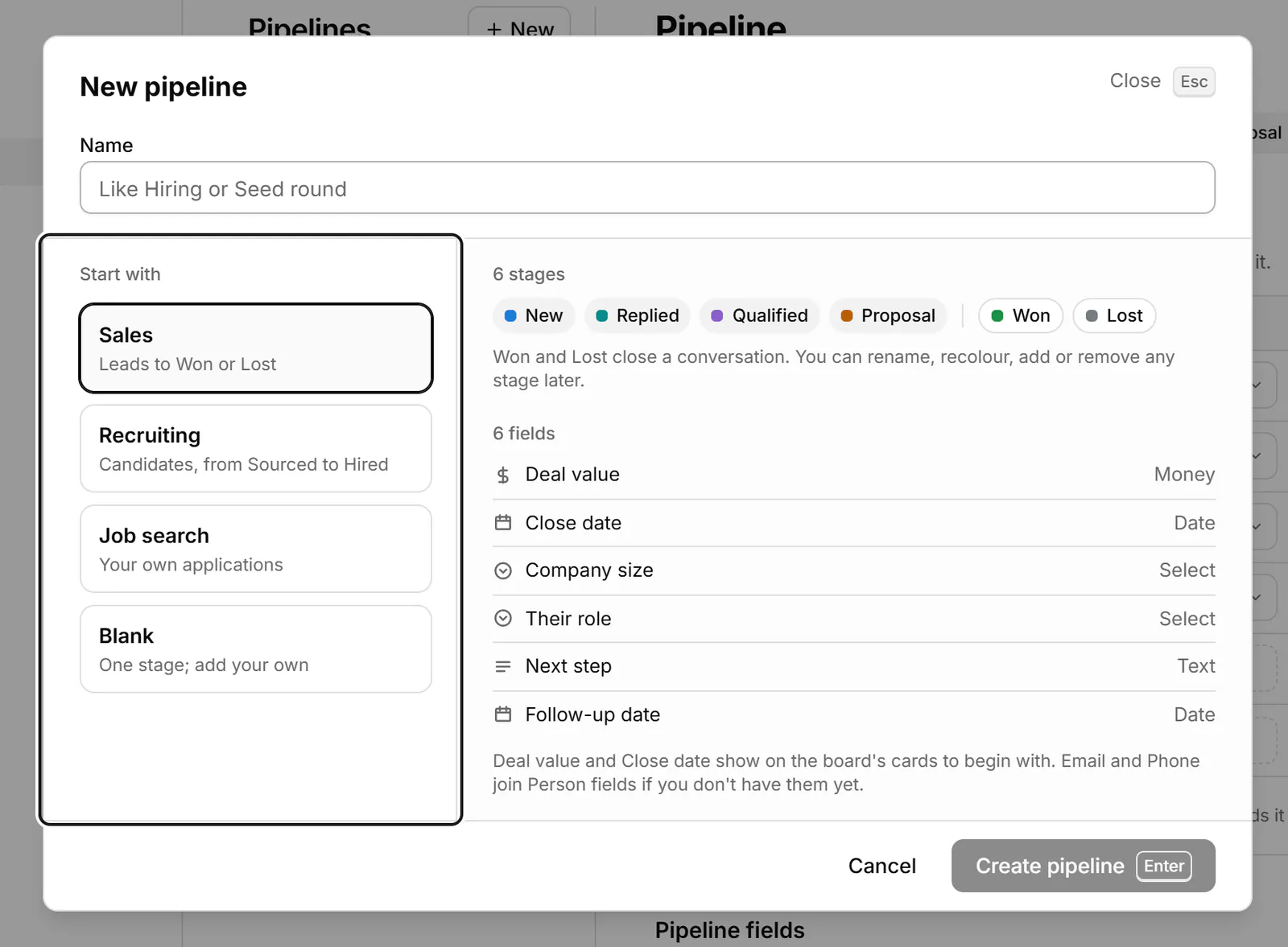
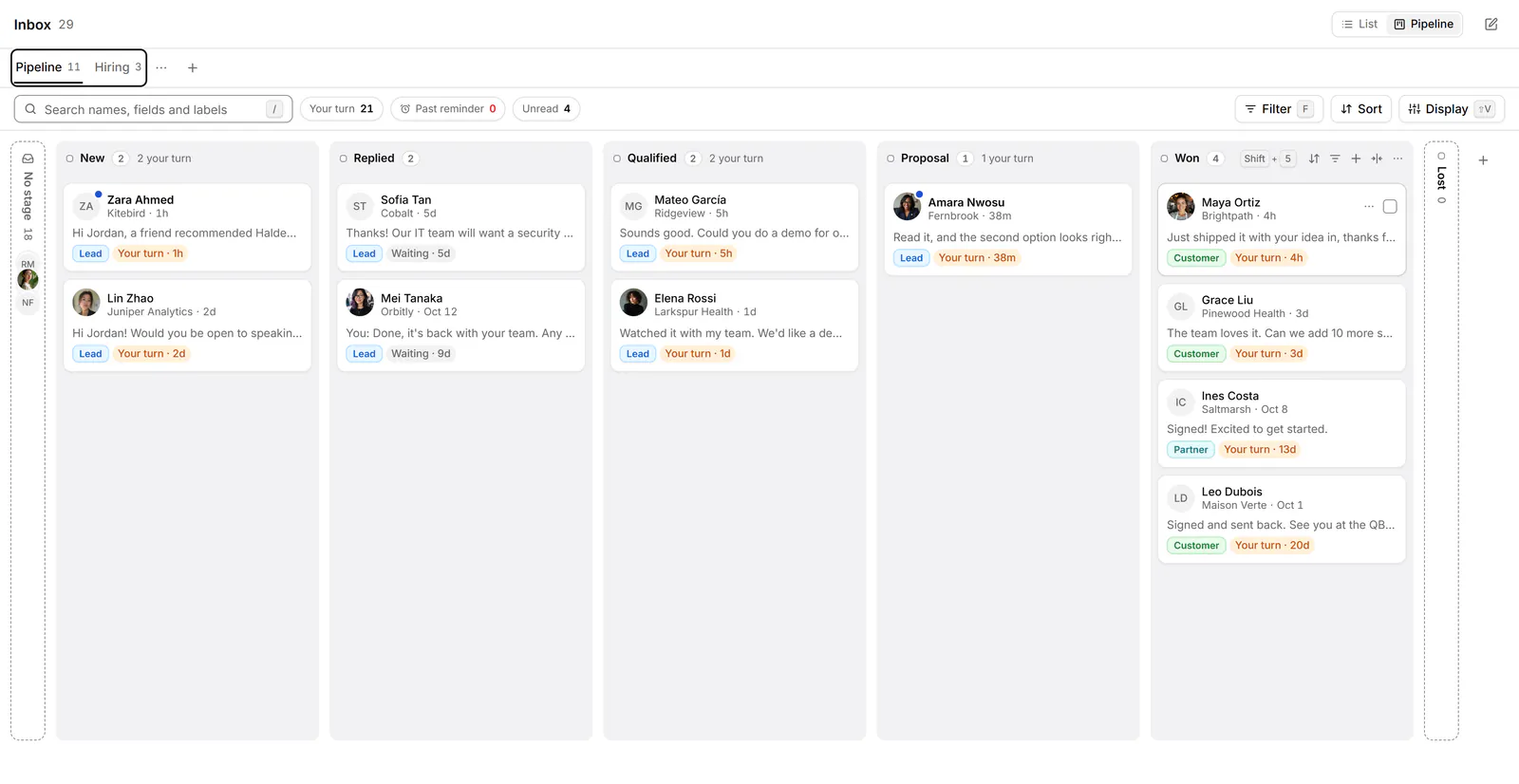
- A Sales pipeline. The template runs New, Replied, Qualified, Proposal, Won and Lost, with fields such as Deal value, Close date and Next step. See track deals from LinkedIn messages.
- Drafts in your voice. On the trial and Pro, press D for a reply you then edit and send. Founders write a lot of the same answer; a draft saves the first pass.
- Reply numbers. On Pro, Analytics shows reply rate, reply speed and how conversations moved through your stages.
A founder with one or two investor threads doesn't need any of this. It starts to pay off when you can't remember who you last wrote to. And if your fundraising runs on email, Bokka won't see it: it covers LinkedIn only.
For SDRs: following up without automation
Bokka doesn't run sequences, so the question for an SDR is whether hand-sent follow-ups can work for you. If your team is measured on automated volume, this is the wrong tool. If you write each message yourself and your problem is forgetting who to chase, it's built for that.
- See who's gone quiet. Waiting on them lists one-to-one conversations where you wrote last. Press F and choose Waited 3+ days or Waited 7+ days.
- Get reminded only if they stay quiet. Remind me if they don't reply cancels itself when they answer.
- Write the follow-up. On the trial and Pro, Draft a follow-up gives you text to edit. Or insert a snippet with ; and fill in its gaps.
- Both inboxes. On Pro, your Sales Navigator conversations show beside your LinkedIn ones, with the same labels and notes. It needs your own Sales Navigator subscription.
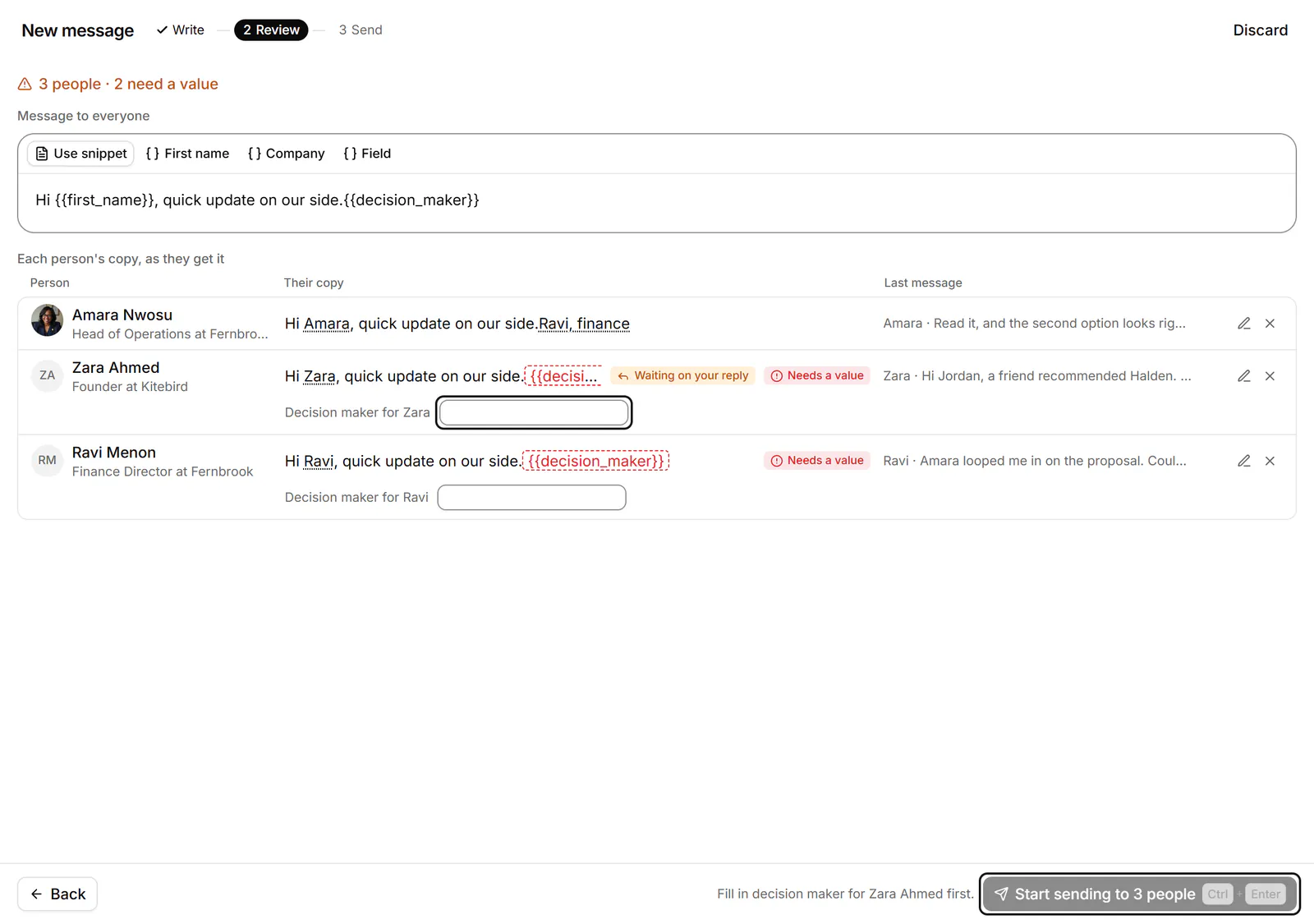
- One message, a few people. Message selected covers up to 10 conversations, with a card for each and one Enter per person.
Be clear about the limits. Reminders bring a conversation back to you, and nothing goes out later. There's no native HubSpot or Salesforce sync: on Pro you can send conversations to Notion, Google Sheets or a webhook. Team seats and per-member analytics are on the Team plan, which is coming soon. If you need a sequencer, Waalaxy says it automates follow-ups (Waalaxy's home page, retrieved October 30, 2026), and Bokka vs Waalaxy sets the two side by side. Read why Bokka doesn't automate LinkedIn first.
For consultants: keeping up with clients and referrals
Consultants usually live on relationships that go quiet for months, then matter a lot. Bokka keeps that history and the context around it in one place.
- Labels by client or type. Client, Referral, Past client. Each is a list you can work through.
- Notes on the person. Why you met, what they care about, who introduced you.
- Long reminders. Snooze a conversation until a date, typed as "3rd" or picked from a calendar, and it comes back then.
- A simple pipeline. Start from Blank with stages like Conversation, Proposal, Signed.
This works for your own account. An agency running several clients' accounts is a poor fit: Bokka works with one LinkedIn account per browser profile, and a plan syncs one account at a time. Each account needs its own browser profile, and switching takes sync away from the other browser.
Who Bokka doesn't suit, whatever your role
- Anyone who wants messages sent for them. No sequences, auto-replies, scheduled messages or bulk campaigns.
- Phone-first workers. It runs on a computer, in Chrome, Edge, Brave or Arc, and only while it's open in a tab.
- Teams needing shared inboxes today. Team, at $50, is coming soon.
- Anyone unwilling to accept LinkedIn's rules on third-party tools. LinkedIn can restrict accounts that use them, and we can't promise it won't. See why use Bokka for what LinkedIn says.
Still weighing it up? How to search LinkedIn messages and LinkedIn inbox zero show what daily use looks like.
Frequently asked questions
Is Bokka good for recruiters?
For recruiters whose candidates answer in regular LinkedIn messages, yes: it has a Recruiting pipeline, reminders and snippets. It doesn't source candidates, sync to an ATS or bring in LinkedIn Recruiter's inbox.
Can founders use Bokka for fundraising?
Yes, for the part that happens on LinkedIn. Start a pipeline from Blank, name your stages, and keep notes and reminders on each investor. It doesn't cover email.
Can SDRs run sequences in Bokka?
No. There are no sequences, and every message is sent by hand. Waiting on them, reminders and snippets help you follow up yourself.
Can an agency manage several LinkedIn accounts with Bokka?
It isn't built for that. It works with one LinkedIn account per browser profile, and a plan syncs one account at a time.
Which Bokka plan do I need?
Starter covers labels, snippets, reminders and pipelines. Choose Pro for AI, analytics, your Sales Navigator inbox and integrations.
Sources
Other products' prices and features were read on their own pages on October 30, 2026. They change; check each page before you buy.
Join the waitlist for early access to Bokka. Your first 14 days are free, AI included, with no credit card. It runs in Chrome, Edge, Brave and Arc on a desktop or laptop.
Join the waitlistAbout the author
Amardeep Anand founded Bokka, the AI-first CRM for your LinkedIn inbox, and runs it from Deoghar, India. Questions or corrections: support@gobokka.com.
Related

Why use Bokka for your LinkedIn inbox, and who it's not for
4 min read

How to track deals from LinkedIn messages in a pipeline
2 min read

Why Bokka doesn't automate LinkedIn, and what it does instead
2 min read

A LinkedIn inbox playbook for agencies and consultants
2 min read