Why use Bokka for your LinkedIn inbox, and who it's not for
Bokka adds AI drafts, summaries, reminders, labels and pipelines to your LinkedIn messages. What it does that LinkedIn doesn't, and who should skip it.
By Amardeep Anand, founder of Bokka · Published
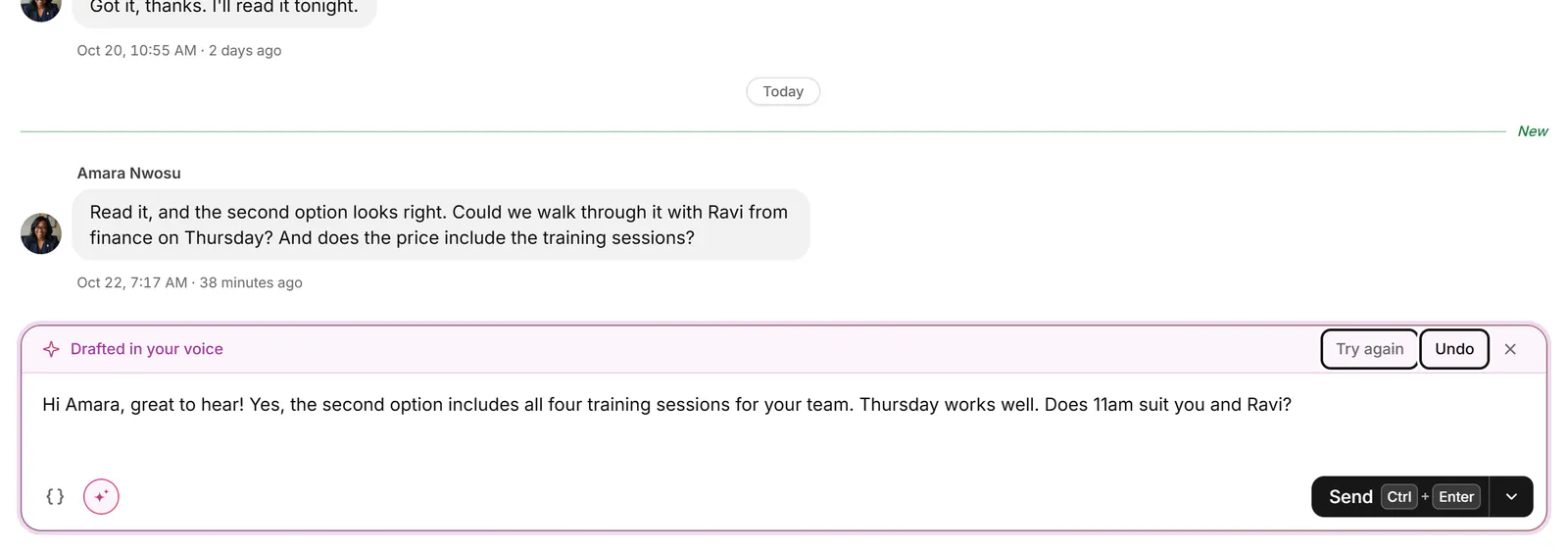
Use Bokka if LinkedIn messages are where your deals, hires or fundraising happen and a plain list has stopped working. It's an AI-first CRM for your LinkedIn inbox: AI drafts replies in your voice, summarises long threads and suggests how to sort them, while reminders, labels and pipelines sit beside every conversation. If you get a few messages a week, or you want software to send for you, it isn't for you.
A CRM is a record of the people you deal with and where each deal stands. Bokka builds that record into your LinkedIn messages, through a small browser extension and your own LinkedIn session.
What does Bokka do that LinkedIn doesn't?
LinkedIn messaging gives you four categories (Focused, Other, Archived and Spam), a star, and filters such as Unread and InMail (LinkedIn Help: filters and search in Messaging, retrieved 30 October 2026). It's free and it's on your phone. For many people that's enough. Bokka adds a working layer on top:
| What you need | LinkedIn messaging | Bokka |
|---|---|---|
| A reply drafted in your voice | Not compared here | Yes, for you to edit and send |
| A summary of a long conversation | Not compared here | Yes, with what you owe them |
| Suggested labels and reminders | No | Yes, and nothing changes until you say yes |
| Labels | No, only a star | Yes, each one its own list |
| Reminders | No | Yes, including if they don't reply |
| Whose turn it is | No | Waiting on you and Waiting on them |
| Pipeline stages and fields | No | Yes, with a board |
| Sales Navigator in the same app | No | Yes, on Pro |
| A phone app | Yes | No, computers only |
| Price | Free | From $25 per user a month |
LinkedIn has AI drafting of its own in some products, such as AI Messages in Recruiter (LinkedIn Help: AI Messages in Recruiter, retrieved 30 October 2026). What's on offer depends on the product, so we haven't compared it line by line.
AI that drafts, and stops there
Bokka's AI works on the conversation in front of you, and your own hands finish the job.
- Drafts in your voice. Press D in a conversation and choose Draft a reply, or Draft a follow-up if you wrote last. Type a few rough notes first and it writes them up. The draft lands in the box for you to edit. See Draft a reply with AI.
- Rework your own text. Make it shorter (Shift+D), longer, friendlier or more formal, fix the spelling, or translate it.
- Summaries. Press Shift+Y for the main points and Up next, which says what you owe them. You can also have conversations of 8 messages or more summarised as you open them. See Catch up on a long conversation.
- Sorting. Choose up to 20 conversations and AI suggests labels, reply statuses, reminders and snippets. Each suggestion gets your yes or no. See Sort my inbox with AI.
- Voice messages. Transcribe writes out what was said.
- Your own assistant. On Pro, connect any AI assistant over MCP, like Claude, ChatGPT or Cursor, to read, organise and draft, never send. See Connect an AI assistant.
AI never sends a message, never changes anything without your yes, and never drafts just because you opened a conversation. Text goes to our AI provider only when you use an AI feature or turn one on, and our AI provider doesn't keep it or train on it. AI is part of the free trial, with daily limits, and of Pro. It isn't on Starter.
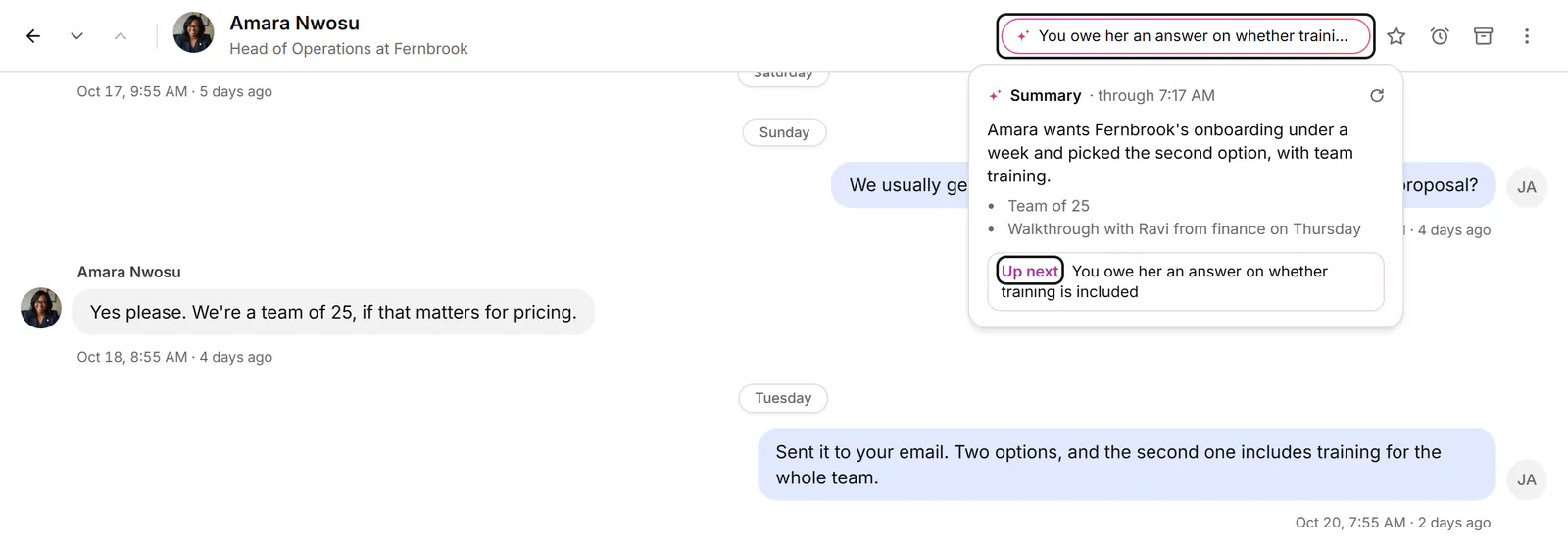
Keep track of every conversation
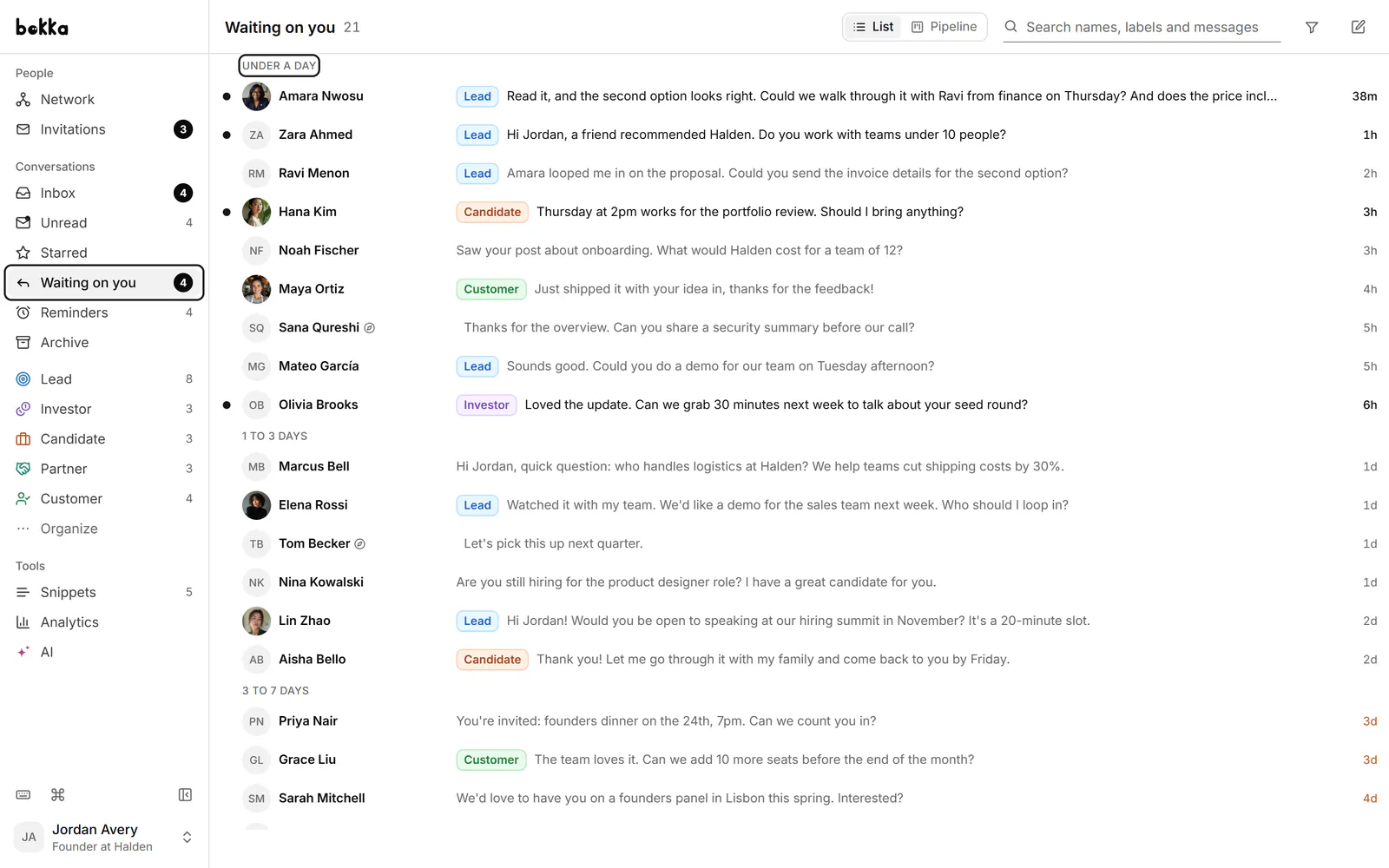
- Whose turn it is. Waiting on you and Waiting on them list one-to-one conversations by how long they've waited. See the inbox views.
- Reminders. Press H to snooze a conversation, or to be reminded if they haven't replied. A new message from them cancels it. See how to set a reminder on a LinkedIn message.
- Labels. Tag conversations Lead, Investor or Candidate and work each label as a list. See how to label LinkedIn conversations.
- Pipelines. Move conversations through stages on a board, with fields such as deal value. See track deals from LinkedIn messages.
- Notes. Keep private notes on a person, shown in the inbox, in People and on the board. See private notes on LinkedIn contacts.
- Snippets. Save a message you send often, with gaps for each person's name or company. Press ; in the box to insert one.
Run it from the keyboard
The keyboard is what makes the rest quick. J and K move through conversations, E archives and moves to the next one, Ctrl+K finds any action by name, and ? lists every key. Everything has a button too, so you can start with the mouse. See Keyboard shortcuts.
Where your messages live
- Your messages are loaded into your browser and stay there, on your device. Bokka's servers keep how you organise them (labels, stages, fields, notes, reminders, snippets) and a list of your conversations without their messages.
- Bokka never sees your LinkedIn password. A small browser extension works inside the LinkedIn session you already have, and Bokka's servers never connect to LinkedIn.
- Requests go from your own browser at a measured pace, only while Bokka is open in a tab. There is no background syncing while you're away.
- No automation: no sequences, auto-replies, scheduled or bulk campaigns, and nothing is sent unless you send it. AI, and any assistant you connect over MCP, drafts only.
The full account is in where your LinkedIn messages are stored.
Who Bokka is not for
- People with a few messages a week. If you reply the same day and nothing slips, LinkedIn's free inbox is enough.
- Anyone who wants software to send for them. Bokka has no sequences, auto-replies, scheduled messages or bulk campaigns. Message selected reaches up to 10 conversations, and you press Enter for each one. Waalaxy says it builds prospect lists, sends connection requests and messages, and automates follow-ups (Waalaxy's home page, retrieved 30 October 2026); that's a different kind of tool, and see the section below before you use one.
- People who work from a phone. Bokka runs in Chrome, Edge, Brave and Arc on a computer. It doesn't work on phones.
- Anyone away from their computer who needs alerts. Bokka works only while it's open in a tab, and reminders show in the app only: no email or browser notification.
- People who live in other channels. Bokka is for LinkedIn. Kondo includes WhatsApp on every plan (Kondo's pricing page, retrieved 30 October 2026) and its home page also lists iMessage and Telegram (Kondo's home page, retrieved 30 October 2026).
- Teams whose records live in HubSpot or Salesforce. Bokka sends conversations to Notion, Google Sheets or a webhook on Pro, with no native sync to either. Kondo lists both (Kondo's home page, retrieved 30 October 2026).
- Teams who need shared inboxes today. Bokka's Team plan, at $50, is coming soon, so for now each person works alone.
- People hoping to replace Sales Navigator. Bokka doesn't find leads or give you InMail. Sales Navigator offers 50+ search filters and 50 InMails a month (LinkedIn's Sales Navigator compare-plans page, retrieved 30 October 2026). On Pro, Bokka brings its inbox in beside your other messages. See Bokka vs LinkedIn messaging.
What LinkedIn says about third-party tools
LinkedIn's help page on prohibited software says it doesn't permit third-party software that scrapes, changes how the site looks or automates activity, and that members who use such tools risk having their accounts restricted or shut down (LinkedIn Help: prohibited software and extensions, retrieved 30 October 2026). Bokka is a third-party tool, so LinkedIn can restrict an account that uses it, and we can't promise it won't.
What we can tell you is how Bokka behaves. It reads your own inbox from your own browser, at a measured pace, only while Bokka is open in a tab. It adds nothing to LinkedIn's pages, and it sends only when you press send. The reasons are in why Bokka doesn't automate LinkedIn.
What it costs
Bokka starts with a free 14-day trial, AI included and no credit card. After it, Starter is $25 and Pro is $35 per user a month ($19 and $30 for your first month). Team, at $50, is coming soon. Starter has labels, snippets, reminders, pipelines and your whole history. Pro adds AI, analytics, your Sales Navigator inbox, screen recording, integrations and MCP.
Bokka is opening in small groups, so new accounts start from the waitlist below. Comparing other inbox tools first? See the best LinkedIn inbox tools and Bokka vs Kondo.
Frequently asked questions
What does Bokka do that LinkedIn doesn't?
Bokka adds AI drafts in your voice, summaries, AI suggestions for sorting, reminders, labels, pipelines with a board, and views of whose turn it is. AI needs the trial or Pro.
Does Bokka send LinkedIn messages for me?
No. Every send is your own key or click. There are no sequences, auto-replies, scheduled messages or bulk campaigns, and AI only drafts.
Can LinkedIn restrict my account for using Bokka?
It can. LinkedIn's help centre says it doesn't permit third-party software of certain kinds and that accounts using such tools risk restriction. We can't promise it won't happen.
Is Bokka worth it if I only get a few messages a week?
Probably not. LinkedIn's own inbox is free and fine at that volume. Bokka earns its price when LinkedIn messages are where your deals, hires or fundraising happen.
Does Bokka work on a phone?
No. It runs in Chrome, Edge, Brave and Arc on a desktop or laptop.
Sources
Other products' prices and features were read on their own pages on 30 October 2026. They change; check each page before you buy.
Join the waitlist for early access to Bokka. Your first 14 days are free, AI included, with no credit card. It runs in Chrome, Edge, Brave and Arc on a desktop or laptop.
Join the waitlistAbout the author
Amardeep Anand founded Bokka, the AI-first CRM for your LinkedIn inbox, and runs it from Deoghar, India. Questions or corrections: support@gobokka.com.
Related
- Bokka vs LinkedIn messaging and the Sales Navigator inboxWhy use Bokka instead of LinkedIn messaging or the Sales Navigator inbox? Labels, reminders, pipelines, AI drafts and search, compared honestly.
- Bokka vs Kondo: AI, pipelines and price compared (2026)Bokka vs Kondo, two keyboard-first LinkedIn inboxes, compared on AI, pipelines, Sales Navigator, integrations, privacy and price in 2026.
- Why Bokka doesn't automate LinkedIn, and what it does insteadBokka sends nothing on its own: no sequences, auto-replies, scheduled or bulk messages. What that means, why we chose it, and how you still move fast.