Bokka vs LinkedIn messaging and the Sales Navigator inbox
Why use Bokka instead of LinkedIn messaging or the Sales Navigator inbox? Labels, reminders, pipelines, AI drafts and search, compared honestly.
By Amardeep Anand, founder of Bokka · Published
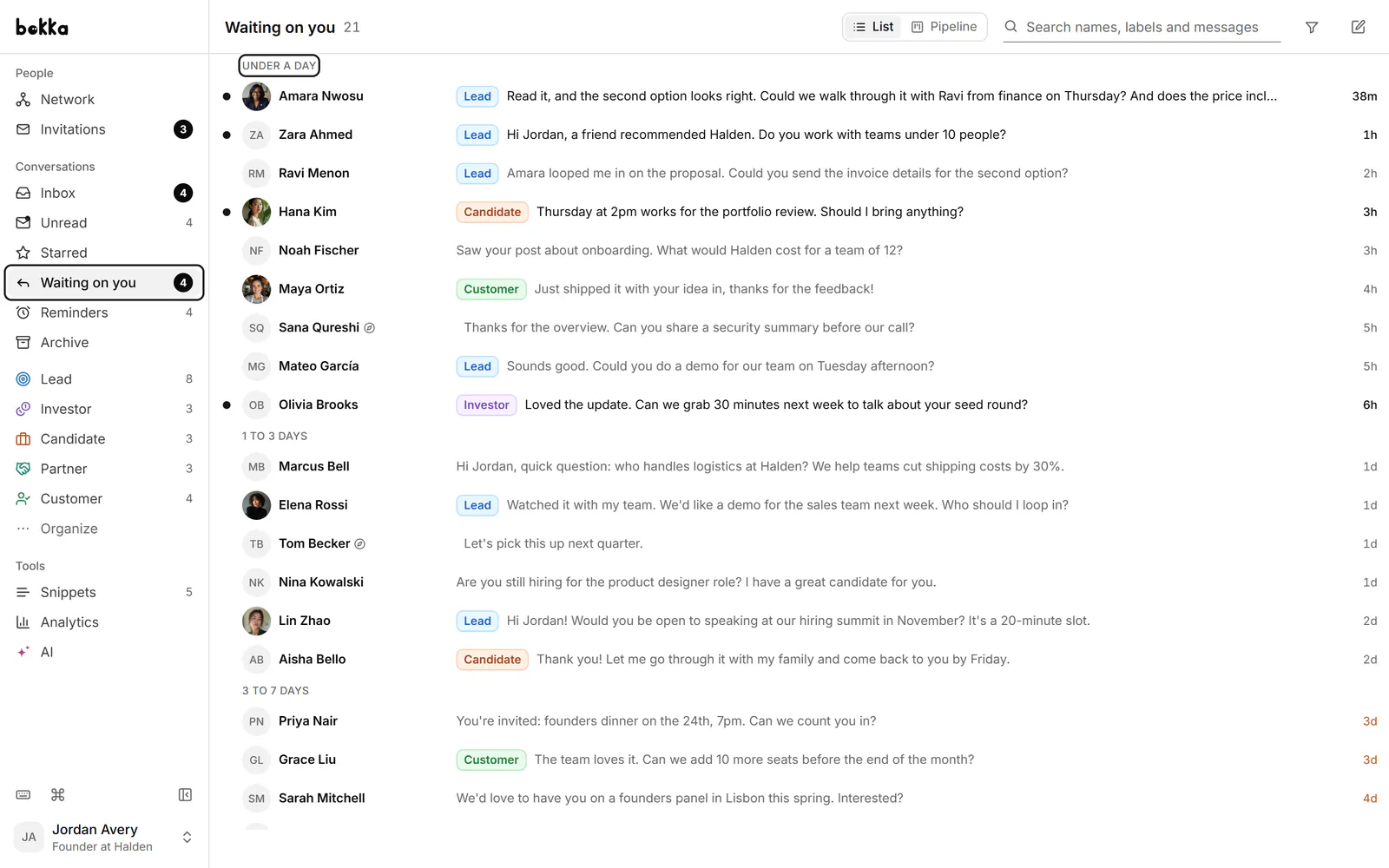
LinkedIn messaging was built for keeping in touch, not for running deals, hires or a fundraise out of it. Once you have dozens of live conversations, the limits show: no way to file a conversation, no reminder when it's time to follow up, and Sales Navigator messages in a separate inbox. Bokka is built on top of your own LinkedIn session to fill those gaps.
Bokka is an AI-first CRM for your LinkedIn inbox. Sales Navigator is LinkedIn's paid tool for finding leads and sending InMail. InMail is a LinkedIn message to someone you aren't connected to.
LinkedIn, Sales Navigator and Bokka at a glance
| LinkedIn messaging | Sales Navigator inbox | Bokka | |
|---|---|---|---|
| Price | Free | Core $119.99 a month, or $1,079.88 a year | Starter $25, Pro $35 per user a month |
| Labels as their own lists | No | Tags on leads | Yes |
| Reminders and follow-ups | No | No | Yes, including when someone doesn't reply |
| Whose turn it is | No | No | Waiting on you and Waiting on them views |
| Pipeline stages and board | No | Lead lists | Yes, with CRM fields |
| Snippets with fill-in gaps | No | Saved messages | Yes |
| AI reply drafts in your voice | Suggested replies | Not covered here | Yes (Pro) |
| Keyboard shortcuts | A few | A few | Every action, with ⌘K or Ctrl+K |
| Both inboxes in one place | No | No | Yes (Pro) |
| InMail to people you're not connected to | Premium | Yes | Uses your own Sales Navigator InMail |
Sales Navigator prices are from LinkedIn's compare-plans page, retrieved 24 October 2026.
What does LinkedIn's inbox leave to you?
- Remembering to follow up. There are no reminders, so a promising thread slips the moment it scrolls out of view.
- Sorting people. Leads, candidates, investors and friends share one list. Focused and Other split by sender, not by what the conversation is about.
- Tracking deals. There's no stage for a conversation, so pipelines end up in a spreadsheet you update by hand.
- Two inboxes. Sales Navigator messages live apart from your regular ones.
What does Bokka add?
- Labels as lists. Tag a conversation Lead or Candidate and work that label as its own inbox. See labels.
- Reminders. Press H to bring a conversation back later, or be reminded if they don't reply.
- Whose turn it is. The Waiting on you and Waiting on them views group conversations by how long they've waited.
- Pipelines. Move conversations through stages on a board, with CRM fields such as deal value.
- AI drafts. On Pro, AI writes replies in your voice and sorts conversations into labels and reminders for you to approve.
- Instant search across every message, because your messages are already in your browser. See search.
Should you keep Sales Navigator?
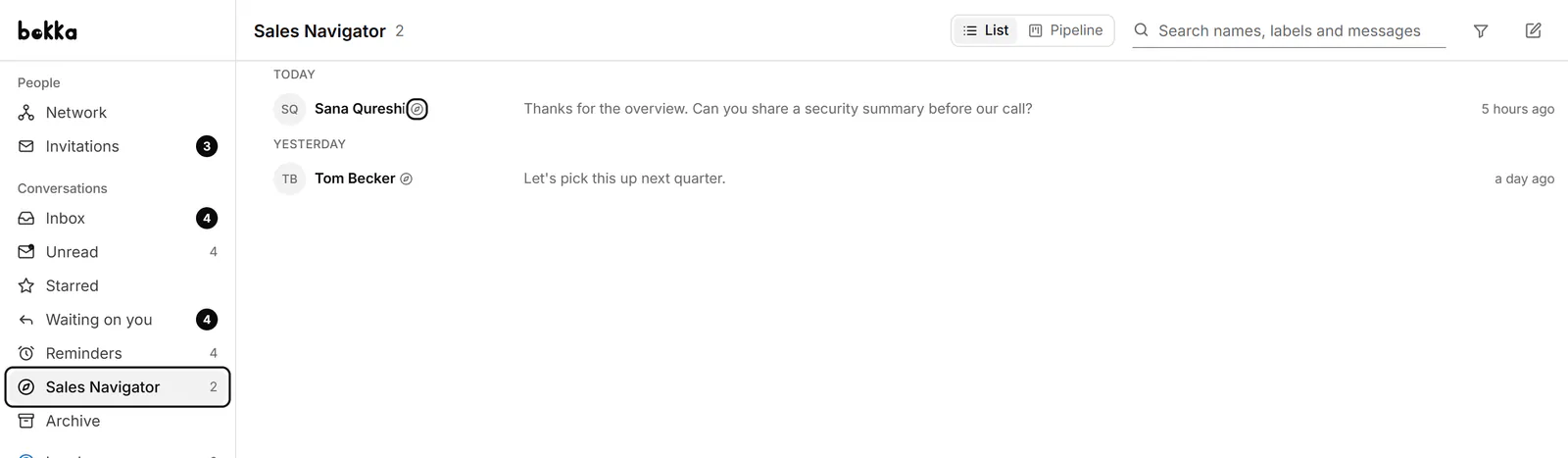
Yes, if you use its lead search and InMail. Bokka doesn't replace Sales Navigator. On Pro it brings your Sales Navigator inbox in next to your regular messages, with the same labels and stages, and you can reply, archive and mark read from Bokka. See Sales Navigator in Bokka.
When is LinkedIn alone enough?
If you get a few messages a week and reply the same day, LinkedIn's own inbox is fine and costs nothing. Bokka earns its place when LinkedIn messages are where your deals, hires or fundraising actually happen.
How Bokka works with your LinkedIn account
- Your messages are loaded into your browser and stay there, on your device. Bokka's servers keep how you organise them (labels, stages, fields, notes, reminders, snippets) and a list of your conversations without their messages.
- Bokka never sees your LinkedIn password. A small browser extension works inside the LinkedIn session you already have, and Bokka's servers never connect to LinkedIn.
- Requests go from your own browser at a measured pace, only while Bokka is open in a tab. There is no background syncing while you're away.
- No automation: no sequences, auto-replies, scheduled or bulk campaigns, and nothing is sent unless you send it. AI, and any assistant you connect over MCP, drafts only.
Pricing
Bokka starts with a free 14-day trial, AI included and no credit card. After it, Starter is $25 and Pro is $35 per user a month ($19 and $30 for your first month). Team, at $50, is coming soon.
Comparing dedicated inbox tools? See Bokka vs Kondo and the best LinkedIn inbox tools.
Frequently asked questions
Does Bokka replace LinkedIn?
No. Bokka works alongside LinkedIn: it reads and sends your own messages through your own LinkedIn session. What you do in Bokka shows on LinkedIn, and the other way round.
Can I see Sales Navigator messages in Bokka?
Yes, on Pro. Your Sales Navigator inbox appears next to your LinkedIn messages, with the same labels and stages.
Can I set reminders on LinkedIn messages?
Not in LinkedIn itself. In Bokka, press H on any conversation to bring it back later, or ask to be reminded if the other person doesn't reply.
Is Bokka made by LinkedIn?
No. Bokka is an independent product, not affiliated with or endorsed by LinkedIn.
Sources
Other products' prices and features were read on their own pages on 24 October 2026. They change; check each page before you buy.
Try Bokka free for 14 days, AI included, with no credit card. It runs in Chrome, Edge, Brave and Arc on a desktop or laptop.
Start your free trialAbout the author
Amardeep Anand founded Bokka, the AI-first CRM for your LinkedIn inbox, and runs it from Deoghar, India. Questions or corrections: support@gobokka.com.
Related
- 7 best LinkedIn inbox and CRM tools in 2026, comparedThe best tools for managing LinkedIn messages in 2026: Bokka, Kondo, Narrow, Breakcold, Dex, LeadDelta and Waalaxy, plus Sales Navigator, by job.
- Bokka vs Kondo: AI, pipelines and price compared (2026)Bokka vs Kondo, two keyboard-first LinkedIn inboxes, compared on AI, pipelines, Sales Navigator, integrations, privacy and price in 2026.
- Where your LinkedIn messages go when you use BokkaBokka's privacy and security in plain words: what stays on your device, what our servers keep, what the extension can do, and what AI sees.