How to withdraw a LinkedIn invitation, and when to re-invite
Go to My Network, Manage invitations, the Sent tab, and click Withdraw. They aren't told, and you can't invite the same person again for up to three weeks.
By Amardeep Anand, founder of Bokka · Published · 2 min read
On this page
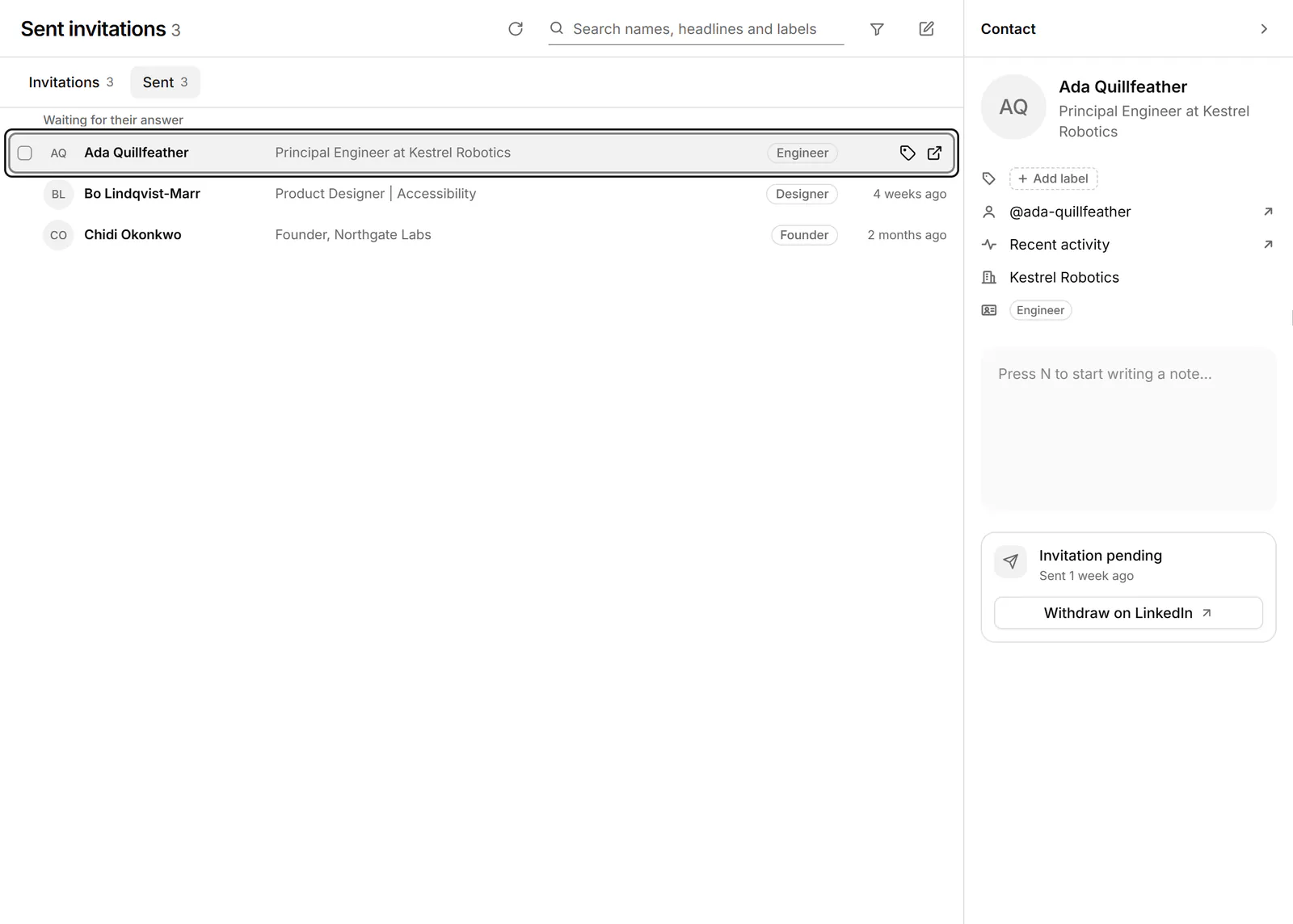
To withdraw a LinkedIn invitation, click My Network, open Manage invitations, choose the Sent tab and click Withdraw next to the person, then Withdraw again to confirm. They aren't notified, but you can't invite the same person again for up to three weeks.
A sent invitation is a connection request you've sent that the other person hasn't accepted or ignored yet. Bokka is an AI-first CRM for your LinkedIn inbox.
See your sent invitations and withdraw one
On a computer
- Click the My Network icon at the top of your homepage.
- In the Invitations section, click Show all. If you have no invitations waiting for you, click Manage next to "No pending invitations".
- Click the Sent tab under Manage invitations.
- Click Withdraw next to the invitation.
- Click Withdraw again in the pop-up to confirm.
In the mobile app
- Tap My Network in the navigation bar.
- Tap Invitations, then the Sent tab.
- Tap Withdraw next to the invitation, then Withdraw again to confirm.
Source: LinkedIn Help: withdraw an invitation, retrieved November 10, 2026. The same steps withdraw an invitation to follow a LinkedIn Page or attend an Event, any time before it's accepted.
What happens when you withdraw
| Question | What LinkedIn says |
|---|---|
| Is the person told? | No. The recipient isn't notified, and the reminder emails stop. |
| Can I invite them again? | Not for up to three weeks. |
| Can I undo it? | No. Withdrawn invitations can't be restored. |
| Can I withdraw them all at once? | No. There's no bulk withdraw; one at a time. |
| They already accepted? | Then it's a connection, and you'd remove the connection instead. |
Source: LinkedIn Help: withdraw an invitation, retrieved November 10, 2026.
Re-inviting after you withdraw
Plan on a wait. LinkedIn says you won't be able to send a new invitation to the same member for up to three weeks (LinkedIn Help: withdraw an invitation, retrieved November 10, 2026). If you want to try again, send it with a note that gives them a reason to accept. LinkedIn's pages differ on how many notes you get: one says you can add a note to up to three connection requests a month (LinkedIn Help: personalize invitations to connect, retrieved November 10, 2026), another says Basic (free) members can add one to five (LinkedIn Help: invitation limit reached, retrieved November 10, 2026). Both say Premium members can add one to every request.
Withdrawing isn't a way out of an invitation limit. If you've reached it, LinkedIn says withdrawing pending invitations won't remove the restriction, which typically lasts one week (LinkedIn Help: invitation limit reached, retrieved November 10, 2026).
When to withdraw an invitation
- You sent it to the wrong person, such as someone with the same name.
- It's been weeks with no answer and you'd rather reach them another way, such as a message request in a group you share (LinkedIn message requests).
- You want to send it again with a note, accepting the wait of up to three weeks.
If they accepted already, you can message them as a 1st-degree connection. If they didn't, why you can't message someone on LinkedIn covers the other ways in.
Sent invitations in Bokka
In Bokka, People, Invitations, the Sent tab lists the people you invited who haven't answered yet, each marked Invitation pending. It's read-only: Bokka can't withdraw an invitation, and its help article says to do that on LinkedIn (Where are your invitations?).
You can label people and keep notes on them in Bokka, so a pending invitation can carry a note on why you sent it. Bokka never sends invitations for you; see what Bokka won't automate.
About Bokka
Bokka starts with a free 14-day trial, AI included and no credit card. After it, Starter is $25 and Pro is $35 per user a month ($19 and $30 for your first month). Team, at $50, is coming soon.
Frequently asked questions
How do I see my sent invitations on LinkedIn?
Click My Network, then Show all in the Invitations section (or Manage if none are waiting for you), and choose the Sent tab under Manage invitations.
Does the person know if I withdraw a LinkedIn invitation?
No. LinkedIn says the recipient isn't notified when you withdraw, and its reminder emails to them stop.
How long until I can re-send a LinkedIn invitation after withdrawing?
Up to three weeks. LinkedIn says you won't be able to send a new invitation to the same member for up to three weeks.
Can I withdraw all my LinkedIn invitations at once?
No. LinkedIn has no bulk withdraw, so you withdraw invitations one at a time.
Does withdrawing invitations lift a LinkedIn invitation limit?
No. LinkedIn says withdrawing pending invitations won't remove the restriction, which typically lasts one week.
Sources
Other products' prices and features were read on their own pages on November 10, 2026. They change; check each page before you buy.
Join the waitlist for early access to Bokka. Your first 14 days are free, AI included, with no credit card. It runs in Chrome, Edge, Brave and Arc on a desktop or laptop.
Join the waitlistAbout the author
Amardeep Anand founded Bokka, the AI-first CRM for your LinkedIn inbox, and runs it from Deoghar, India. Questions or corrections: support@gobokka.com.
Related
What 1st, 2nd and 3rd mean on LinkedIn, and who you can message
2 min read
LinkedIn message requests: what they are and how to answer
2 min read

Why Bokka doesn't automate LinkedIn, and what it does instead
2 min read

Why can't I message someone on LinkedIn? 7 reasons
2 min read