What 1st, 2nd and 3rd mean on LinkedIn, and who you can message
1st means you're connected, 2nd means you share a connection, 3rd is one step further. What each degree lets you do, and how to reach someone in each.
By Amardeep Anand, founder of Bokka · Published · Updated · 2 min read
On this page
On LinkedIn, 1st means you're directly connected to someone, 2nd means you share a connection, and 3rd means they're connected to one of your 2nd-degree connections. The degree decides how you can reach them: you can message a 1st-degree connection for free, invite a 2nd, and usually need InMail for anyone further out.
A degree of connection is how many steps separate you from another member through people you're connected to. Out of network means a member outside your 1st, 2nd and 3rd degrees and your groups. Bokka is an AI-first CRM for your LinkedIn inbox.
What each degree means
| Label | Who they are | How to reach them |
|---|---|---|
| 1st | People you're directly connected to, because one of you accepted the other's invitation | Send a message |
| 2nd | People connected to your 1st-degree connections | Click Connect on their profile to invite them |
| 3rd | People connected to your 2nd-degree connections | InMail, or an invitation if LinkedIn offers it |
| Group members | People in a LinkedIn group with you | A message, or directly through the group |
| Out of network | Members outside all of the above | InMail, if it's available |
Source: LinkedIn Help: degrees of connection, retrieved November 1, 2026. The same page says members can have at most 30,000 1st-degree connections, and that your followers, the people who follow your public updates, are part of your network too.
Who you can message
You can message your 1st-degree connections for free, and fellow group members within group pages (LinkedIn Help: messaging overview, retrieved November 1, 2026). For anyone else, you have three routes:
- Invite them. You can add a note of up to 200 characters to up to three connection requests a month; Premium members can add one to all of theirs (LinkedIn Help: personalize invitations to connect, retrieved November 10, 2026). An older LinkedIn Help page gives Premium members 300 characters (LinkedIn Help: InMail vs personalized invitations, retrieved November 1, 2026).
- Send a message request. You can send one to coworkers or group members you aren't connected with. They can accept it or privately decline, and you won't be told if they decline (LinkedIn Help: message requests, retrieved November 1, 2026).
- Send an InMail. It needs Premium and uses a credit (LinkedIn Help: send an InMail, retrieved November 1, 2026). See InMail vs message.
Why the degree matters for your inbox
For example, a recruiter who connects with 40 candidates a week ends up with a large, mixed 1st-degree network: candidates, clients, old colleagues and people met once at an event. Every one of them can message you for free, and they all land in the same inbox. The degree tells you who can reach you; it doesn't tell you who matters. That's the job of labels, notes and stages.
Your 1st-degree connections in Bokka
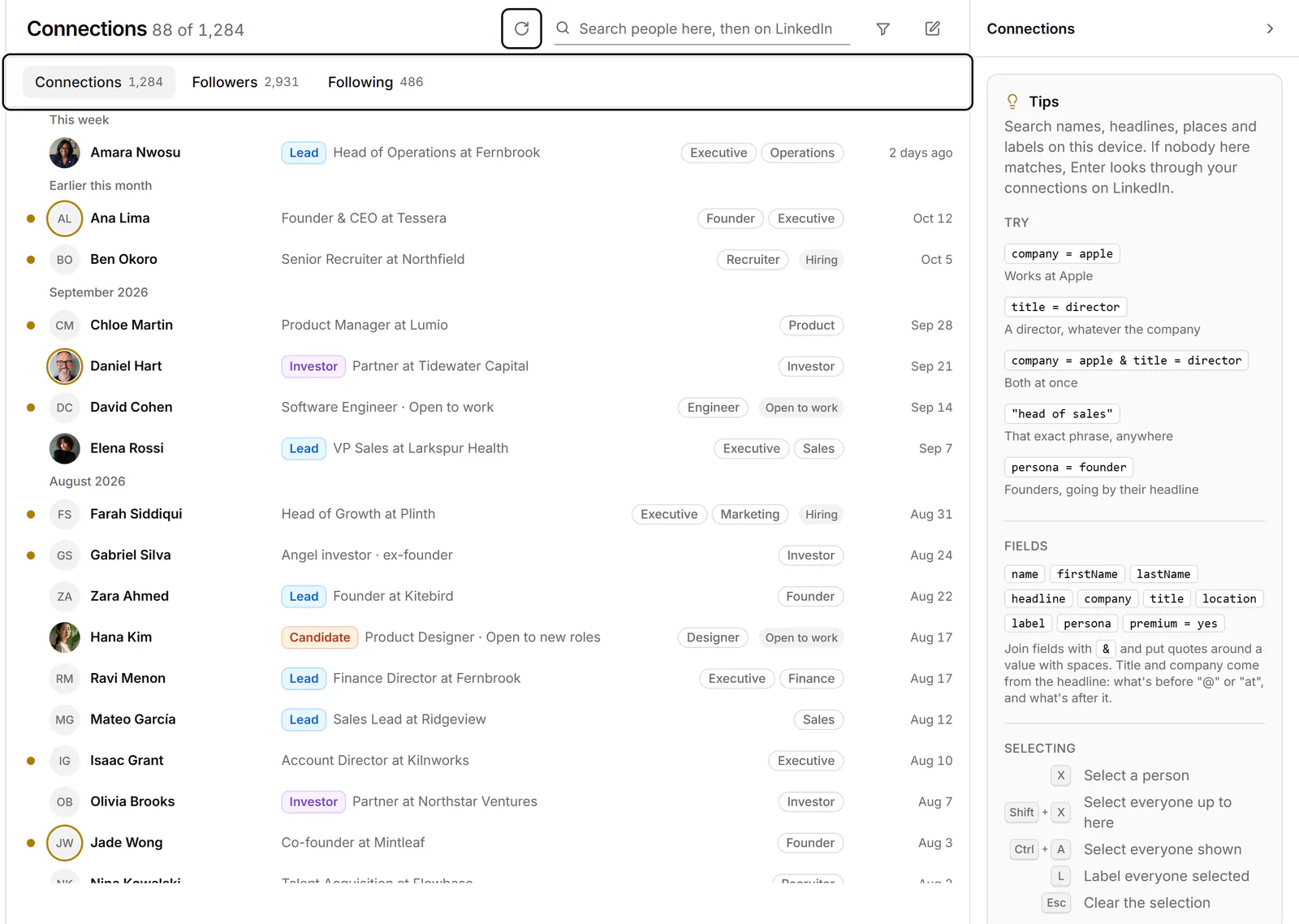
- Browse them. Press G then C for People, Network. The Connections tab lists your 1st-degree connections, with Followers and Following beside it.
- Find the right ones. Search a field, such as
company = appleortitle = director, or filter by persona, company or when you connected. If nobody matches, press Enter to search your connections on LinkedIn as well. - Label and note them. Press L to label a person and N to write a note. A person carries the same labels and notes in People, in the inbox and on the pipeline board.
- Message them. Press Enter on a connection to open your conversation, or to start one.
The contact panel beside each conversation also shows how you're connected on LinkedIn. Full details: Work through connections, followers and following and Find the right people.
About Bokka
Bokka starts with a free 14-day trial, AI included and no credit card. After it, Starter is $25 and Pro is $35 per user a month ($19 and $30 for your first month). Team, at $50, is coming soon.
Frequently asked questions
What does 2nd mean on LinkedIn?
A 2nd-degree connection is someone connected to one of your 1st-degree connections. You can invite them by clicking Connect on their profile.
Can I message a 3rd-degree connection on LinkedIn?
Not with a free message, unless you share a group. You can send an InMail with Premium, or connect with them first.
Is there a limit to how many connections I can have?
Yes. LinkedIn Help says members can have at most 30,000 1st-degree connections.
Are followers the same as connections?
No. Followers see your public updates in their feed. A connection is a two-way link that lets you message each other for free.
Sources
Other products' prices and features were read on their own pages on November 1, 2026. They change; check each page before you buy.
Join the waitlist for early access to Bokka. Your first 14 days are free, AI included, with no credit card. It runs in Chrome, Edge, Brave and Arc on a desktop or laptop.
Join the waitlistAbout the author
Amardeep Anand founded Bokka, the AI-first CRM for your LinkedIn inbox, and runs it from Deoghar, India. Questions or corrections: support@gobokka.com.