Sales Navigator vs Premium for messaging: InMail and inbox
Sales Navigator Core gets 50 InMail credits a month and its own inbox; Premium Business gets 15 in your LinkedIn inbox. Price, reach and AI, from LinkedIn.
By Amardeep Anand, founder of Bokka · Published · 3 min read
On this page
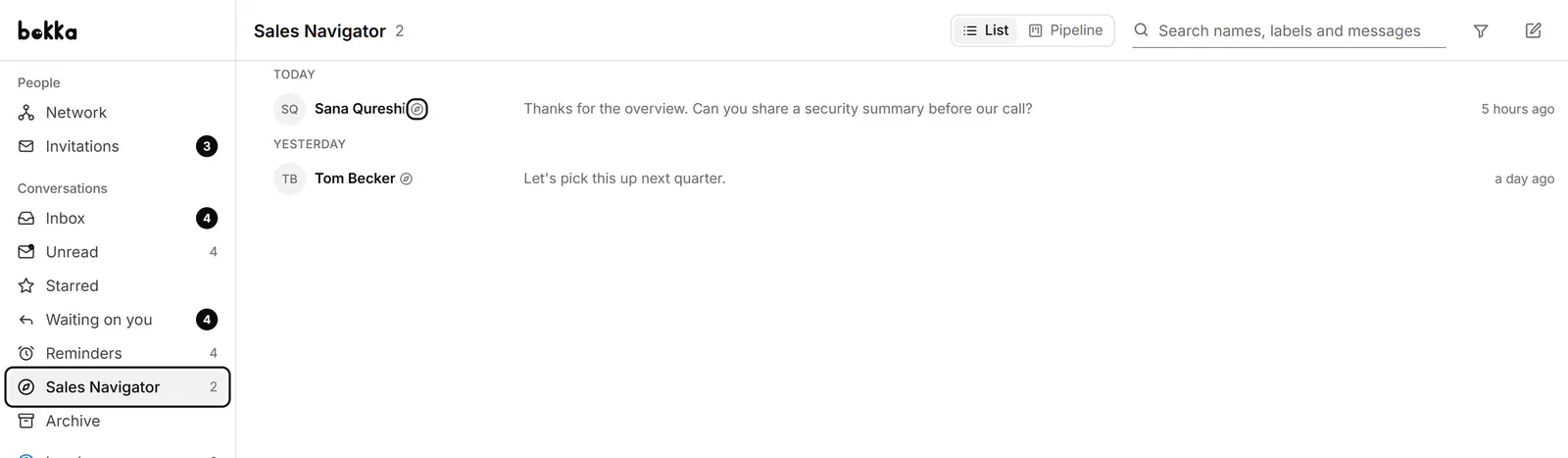
For messaging, Sales Navigator gives you more InMail and its own inbox, and Premium keeps everything in your LinkedIn inbox for less. Sales Navigator Core has 50 InMail credits a month for $119.99; Premium Business has 15 for $69.99, and Premium Career 5. Replies to Sales Navigator InMail land in a separate Sales Navigator inbox.
InMail is a LinkedIn message to someone you aren't connected to, paid for with a credit. Sales Navigator is LinkedIn's paid tool for sellers. Premium is LinkedIn's paid membership, in Career and Business plans among others. Bokka is an AI-first CRM for your LinkedIn inbox.
Sales Navigator vs Premium for messaging at a glance
| Premium Career | Premium Business | Sales Navigator Core | |
|---|---|---|---|
| InMail credits a month | 5 | 15 | 50 |
| Most credits you can hold | 15 | 45 | 150 |
| Credits renew | On your sign-up date each cycle | On your sign-up date each cycle | On the 1st of every month |
| Where InMail replies land | Your LinkedIn inbox | Your LinkedIn inbox | Your Sales Navigator inbox |
| InMail length | 2,000 characters | 2,000 characters | 1,900 characters |
| AI writing help | A message proofreader | Not listed on its page | Message Assist, in public beta |
| Price | Not shown on its page | $69.99 a month, or $539.88 a year | $119.99 a month, or $1,079.88 a year |
Sources: LinkedIn Help: InMail credits, retrieved November 10, 2026, LinkedIn Help: send an InMail, retrieved November 10, 2026, Sales Navigator Help: send an InMail, retrieved November 10, 2026, LinkedIn's Sales Navigator plans, retrieved November 10, 2026, LinkedIn's Premium Business page, retrieved November 10, 2026 and LinkedIn's Premium Career plans, retrieved November 10, 2026. Sales Navigator Advanced is $159.99 a month or $1,799.88 a year, also with 50 InMail credits. How credits renew and come back is covered in how many InMail credits you get a month.
How many InMails do you get?
Premium Career gets 5 InMail credits a month, Premium Business 15 and Sales Navigator Core 50; Recruiter Lite, for hiring, gets 30 (LinkedIn Help: InMail credits, retrieved November 10, 2026). LinkedIn's compare-plans page lists 50 a month on all three Sales Navigator plans (LinkedIn's Sales Navigator plans, retrieved November 10, 2026). Either way, every InMail that's accepted, declined or answered within 90 days is credited back, and you can't buy credits beyond your monthly allowance (LinkedIn Help: InMail credits, retrieved November 10, 2026, LinkedIn Help: send an InMail, retrieved November 10, 2026).
Which inbox do the messages land in?
This is the biggest practical difference. With Premium, InMail is sent from your LinkedIn account and the replies arrive in your LinkedIn inbox with everything else. With Sales Navigator, "If you send an InMail message in Sales Navigator, the response to that message will appear in your Sales Navigator Inbox", while a message you send a connection from Sales Navigator lands in their LinkedIn inbox (Sales Navigator Help: which inbox, retrieved November 10, 2026).
The two inboxes are separate: the Sales Navigator inbox has a Go to LinkedIn Messaging link in its upper right to switch (Sales Navigator Help: Sales Navigator Inbox, retrieved November 10, 2026). And once you have Sales Navigator, "InMails can only be sent from Sales Navigator, not LinkedIn.com" (Sales Navigator Help: send an InMail, retrieved November 10, 2026). So a seller on Sales Navigator ends up with two inboxes to check. Ways to read both in one place are in Sales Navigator and LinkedIn messages in one place.
Who can you message?
- Your 1st-degree connections: free on any account, Premium or not. See InMail vs message.
- Anyone else, with Premium: an InMail, unless they've turned off InMail in their message preferences. A free account has to upgrade to send InMail (LinkedIn Help: send an InMail, retrieved November 10, 2026).
- Anyone else, with Sales Navigator: InMail lets you message "any LinkedIn user without requiring an introduction or contact details". Sending one InMail to many leads at once isn't allowed (Sales Navigator Help: send an InMail, retrieved November 10, 2026).
- Open Profile members: if a member has Open Profile on, you can message them for free, without a credit (LinkedIn Help: send an InMail, retrieved November 10, 2026).
Can you use Premium InMail credits in Sales Navigator?
No. LinkedIn says "Premium InMail message credits can't be used to send InMail messages on Sales Navigator or LinkedIn Recruiter" (LinkedIn Help: InMail credits, retrieved November 10, 2026). The two allowances are separate, so moving from Premium to Sales Navigator doesn't carry your Premium balance across.
What about AI help with messages?
LinkedIn's Premium Career page lists a message proofreader to "Proofread and refine messages to new connections or recruiters" (LinkedIn's Premium Career plans, retrieved November 10, 2026); the Premium Business page doesn't list AI help with messages (LinkedIn's Premium Business page, retrieved November 10, 2026). Sales Navigator has Message Assist, in public beta, which can "Generate tailored first-touch InMail" from account and lead insights and polish messages you've drafted (LinkedIn's AI for sales page, retrieved November 10, 2026). More in LinkedIn's smart replies and AI writing help.
Which should you choose?
- A handful of InMails a month, one inbox: Premium Business, at 15 credits and $69.99 a month.
- Job search or career moves: Premium Career, at 5 credits a month.
- InMail as a daily sales channel: Sales Navigator, at 50 credits a month and up to 150 held, with replies in their own inbox.
- Mostly writing to people you're already connected to: neither. Messages to connections are free.
Both have free trials for eligible members. Sales Navigator's is for members who aren't on a paid LinkedIn plan and haven't had a free trial in the past 365 days (LinkedIn's Sales Navigator plans, retrieved November 10, 2026); Premium's isn't available if you redeemed a trial in the last 12 months (LinkedIn Premium, retrieved November 10, 2026).
Reading both inboxes in Bokka
If you choose Sales Navigator, the second inbox is the cost you pay in attention. On Pro, Bokka shows your Sales Navigator conversations in a view of their own beside your LinkedIn inbox, with the same labels, notes and About on each person. Press G then S to open it. Your LinkedIn account needs its own Sales Navigator subscription, and some actions stay LinkedIn's: you can't star or mute Sales Navigator conversations, or edit, delete or forward their messages. See Use your Sales Navigator inbox.
Bokka doesn't send InMail or change your LinkedIn plan, and every reply goes out on your own click. It doesn't replace Sales Navigator's lead search either. For the wider comparison, see Bokka vs LinkedIn messaging and the Sales Navigator inbox.
About Bokka
Bokka starts with a free 14-day trial, AI included and no credit card. After it, Starter is $25 and Pro is $35 per user a month ($19 and $30 for your first month). Team, at $50, is coming soon.
Frequently asked questions
Is Sales Navigator better than Premium for messaging?
For volume, yes: Sales Navigator Core has 50 InMail credits a month against 15 on Premium Business. But its InMail replies land in a separate Sales Navigator inbox, and it costs $119.99 a month against $69.99.
How many InMails do you get with Sales Navigator vs Premium?
Premium Career gets 5 a month and Premium Business 15. LinkedIn's compare-plans page lists 50 a month on Sales Navigator Core, Advanced and Advanced Plus.
Do Sales Navigator messages show in my LinkedIn inbox?
Replies to InMail you send from Sales Navigator appear in your Sales Navigator inbox, not your LinkedIn inbox. A message you send a connection from Sales Navigator lands in their LinkedIn inbox.
Can I use my Premium InMail credits in Sales Navigator?
No. LinkedIn says Premium InMail credits can't be used to send InMail on Sales Navigator or LinkedIn Recruiter.
Can I send InMail from LinkedIn.com if I have Sales Navigator?
No. Sales Navigator Help says that with a Sales Navigator subscription, InMails can only be sent from Sales Navigator, not LinkedIn.com.
Sources
Other products' prices and features were read on their own pages on November 10, 2026. They change; check each page before you buy.
- LinkedIn Help: InMail credits and renewal
- LinkedIn Help: send an InMail
- LinkedIn Sales Navigator: compare plans
- Sales Navigator Help: send an InMail in Sales Navigator
- Sales Navigator Help: messages in Sales Navigator or LinkedIn inbox
- Sales Navigator Help: Sales Navigator Inbox
- LinkedIn Premium Business
- LinkedIn Premium Career plans
- LinkedIn Premium
- LinkedIn: AI for sales in Sales Navigator
- Bokka docs: use your Sales Navigator inbox
Join the waitlist for early access to Bokka. Your first 14 days are free, AI included, with no credit card. It runs in Chrome, Edge, Brave and Arc on a desktop or laptop.
Join the waitlistAbout the author
Amardeep Anand founded Bokka, the AI-first CRM for your LinkedIn inbox, and runs it from Deoghar, India. Questions or corrections: support@gobokka.com.