SDR follow-up on LinkedIn without automation: a playbook
A daily and weekly routine for SDRs who follow up on LinkedIn by hand: who to chase, when, with what, and how to keep it from slipping, with no sequences.
By Amardeep Anand, founder of Bokka · Published · 2 min read
On this page
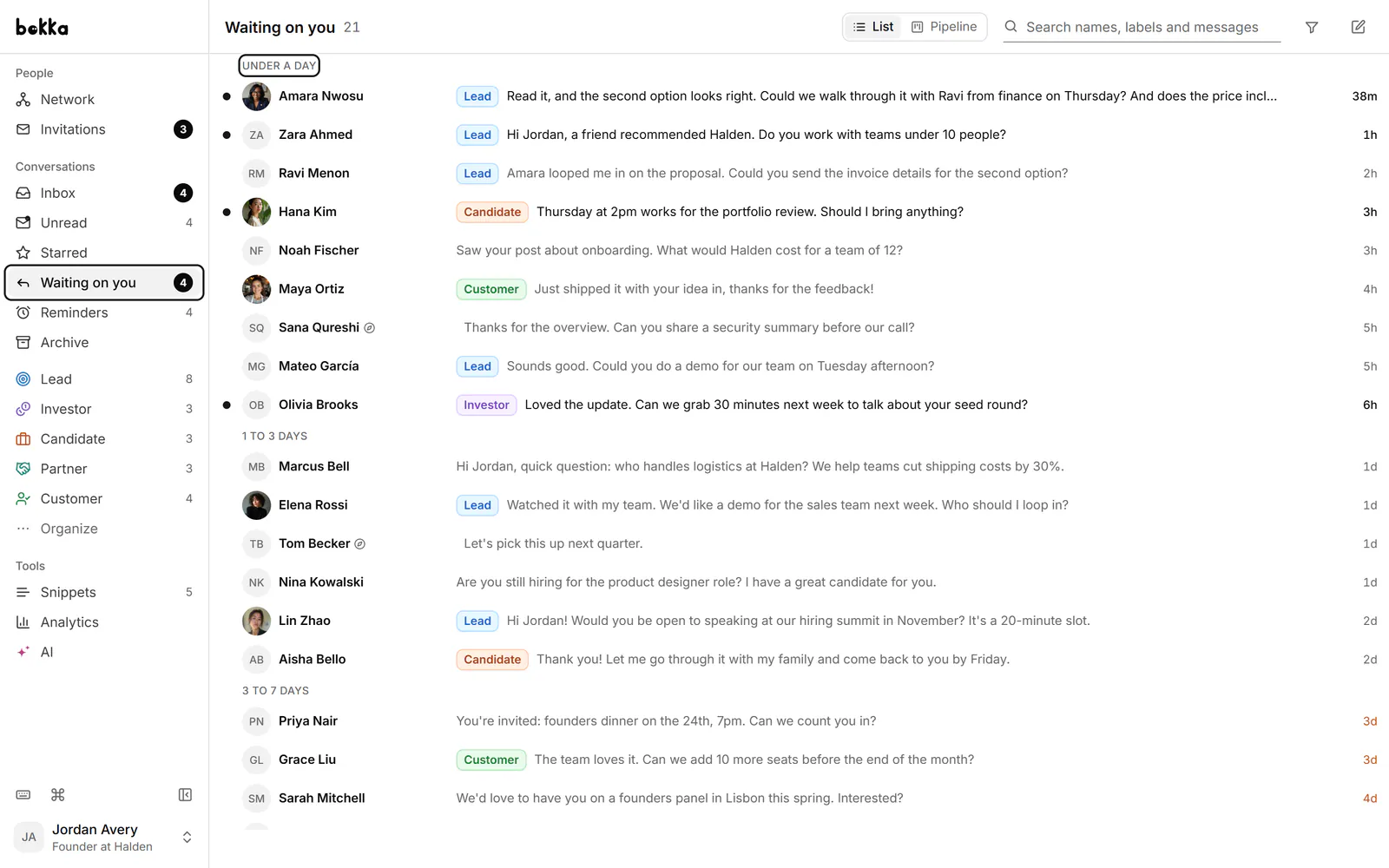
To follow up on LinkedIn without automation, run one short routine every day: answer everyone waiting on you, then chase the people who've gone quiet, oldest first, each with a reminder for the next step. The work that sequences do for you (remembering who's due and when) moves into views and reminders, and you still write and send every message.
Follow-up without automation means every message is written and sent by a person, with software only remembering who's due. A sequence is a set of messages a tool sends on a schedule. Bokka is an AI-first CRM for your LinkedIn inbox.
Why follow up by hand
LinkedIn says it doesn't permit third-party software or browser extensions that scrape, modify the appearance of, or automate activity on its website. Members who use them risk having their accounts restricted or shut down (LinkedIn Help: prohibited software and extensions, retrieved November 1, 2026). Bokka sends nothing on its own; it reminds you. See why Bokka doesn't automate LinkedIn.
- Your messages are loaded into your browser and stay there, on your device. Bokka's servers keep how you organise them (labels, stages, fields, notes, reminders, snippets) and a list of your conversations without their messages.
- Bokka never sees your LinkedIn password. A small browser extension works inside the LinkedIn session you already have, and Bokka's servers never connect to LinkedIn.
- Requests go from your own browser at a measured pace, only while Bokka is open in a tab. There is no background syncing while you're away.
- No automation: no sequences, auto-replies, scheduled or bulk campaigns, and nothing is sent unless you send it. AI, and any assistant you connect over MCP, drafts only.
The daily routine: 20 minutes
- Answer first. Open Waiting on you (Shift+W) and reply from the oldest group up. A prospect who wrote back is worth more than ten who haven't. Archive each with E when it's done, or press Alt+Enter to send and archive at once.
- Then chase. Open Waiting on them (Shift+S), press F and choose Waited 3+ days. These are the conversations where you wrote last and heard nothing.
- Write the follow-up. Type ; to insert a snippet and fill its gaps, or, on the trial and Pro, press D and choose Draft a follow-up for text to edit.
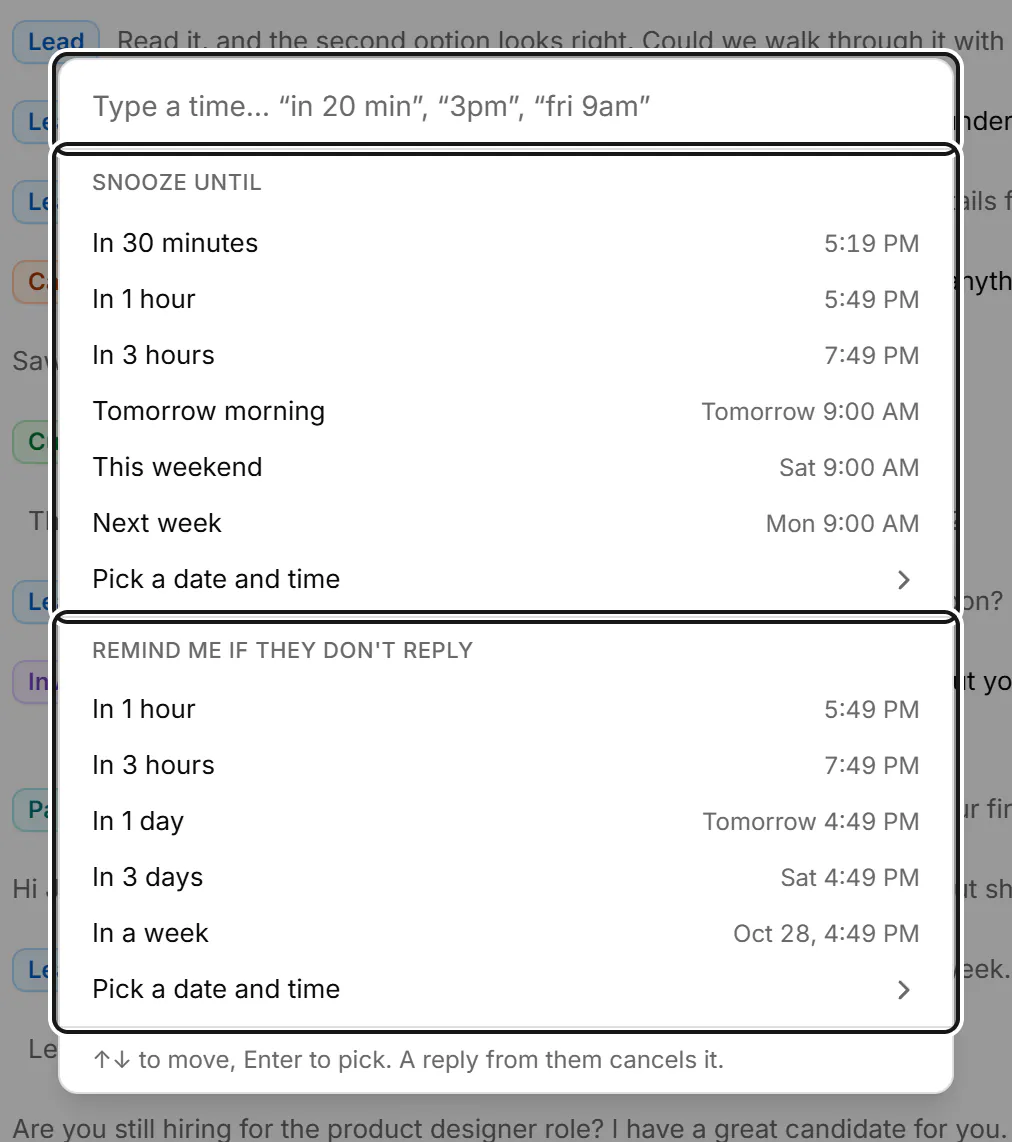
- Send and schedule the next look. Press Ctrl+Shift+Enter to send and open the reminder picker, then choose Remind me if they don't reply and a time.
- Clear what's done. For anyone who said no, or a polite "not now", press Shift+N (No reply needed) so they leave both views.
A follow-up cadence to start from
| Day | What you send | In Bokka |
|---|---|---|
| 0 | First message: why them, one question | Send with Ctrl+Shift+Enter, remind in 3 days |
| 3 | Follow-up 1: refer to your first note, add one useful line | A snippet with {{first_name}}, remind in a week |
| 10 | Follow-up 2: a different angle, or an easy no | Draft a follow-up, remind in 2 weeks |
| 24 | Close the loop: "I won't keep chasing" | Mark No reply needed, or snooze until next quarter |
This is our suggestion, not a rule; slow it down for senior people and speed it up when they've shown interest. Templates for each step are in LinkedIn follow-up templates with first-name fill-ins.
InMail and Sales Navigator
- You can't chase an InMail with another InMail. LinkedIn won't let you send someone a second InMail until they respond to the first. It sends them a reminder within three days itself (LinkedIn Help: InMail credits and renewal, retrieved November 1, 2026). Your follow-up there is noticing the answer.
- Replies split across two inboxes. An InMail sent from Sales Navigator gets its reply in your Sales Navigator inbox (LinkedIn Help: Sales Navigator and LinkedIn inboxes, retrieved November 1, 2026). On Pro, Bokka shows that inbox beside your LinkedIn one, with the same labels and notes. It needs your own Sales Navigator subscription.
- Credits come back when they answer. An InMail accepted, declined or answered within 90 days is credited back, so an easy-to-decline ask costs you less.
After an event: a handful at once
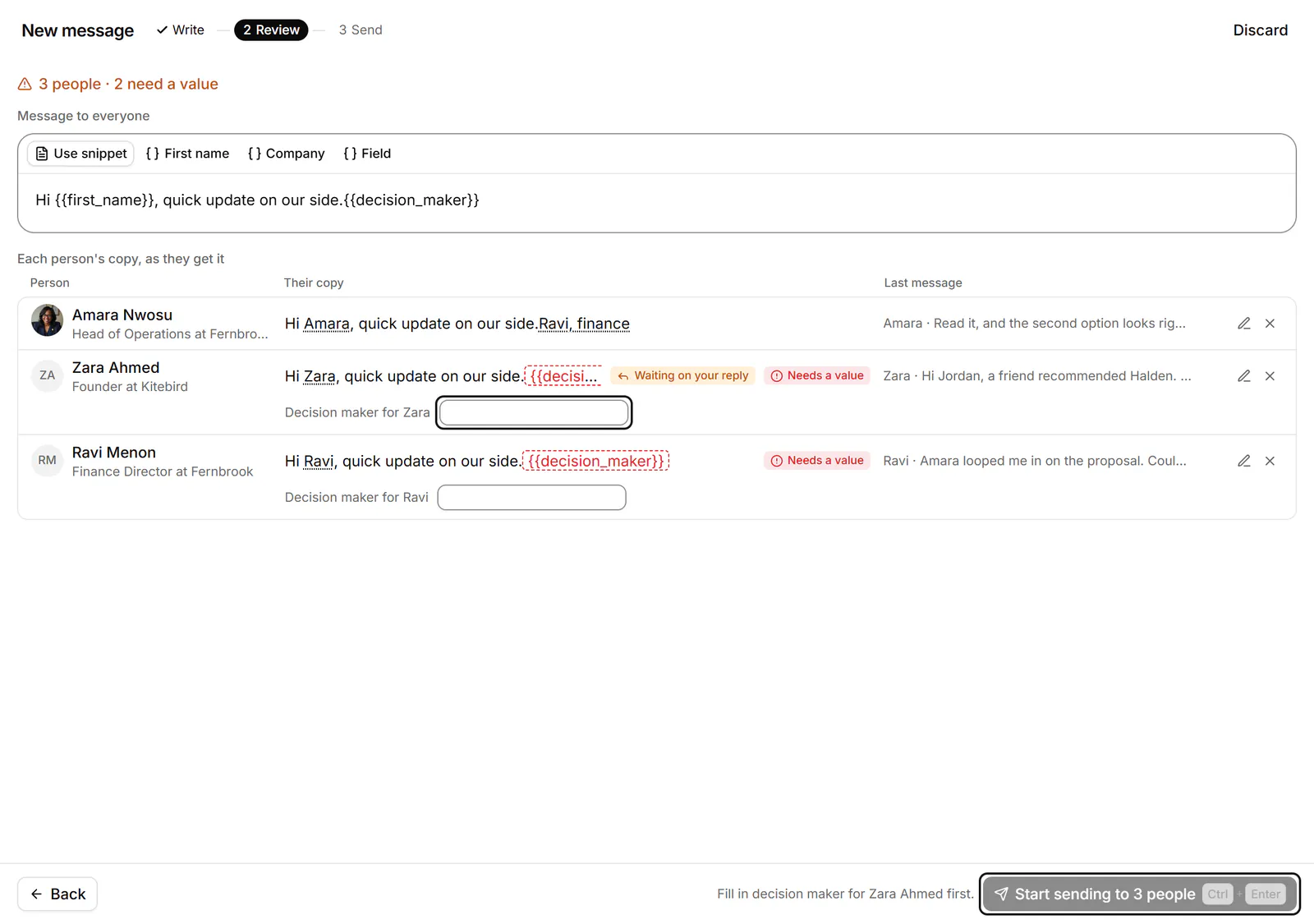
For example, you met nine people at a meetup and connected with each. Select their conversations with X and press C for Message selected: write one note with First name and Company, check each person's copy, and press Enter on each card to send it. It covers up to 10 conversations, and each person gets their own copy.
The weekly review: 15 minutes
- Board. Open your Sales pipeline (G then P) and use the Waiting on you and Follow-up due quick filters. Move cards that changed with Shift+1 to Shift+9.
- Stalled stages. Set Follow up after on each stage, such as 7 days in Qualified, so quiet deals get flagged without you checking.
- Numbers. On Pro, Analytics shows reply rate, reply speed and follow-ups waiting. See whose turn it is in your LinkedIn inbox.
What this routine won't do
It won't send while you're away: Bokka works only while it's open in a tab, and reminders show in the app, with no email or browser notification. There's no native HubSpot or Salesforce sync; on Pro you can send conversations to Notion, Google Sheets or a webhook. Team seats are on Team, at $50, which is coming soon. If your quota depends on automated volume, this isn't the tool for that.
About Bokka
Bokka starts with a free 14-day trial, AI included and no credit card. After it, Starter is $25 and Pro is $35 per user a month ($19 and $30 for your first month). Team, at $50, is coming soon. AI is part of the free trial, with daily limits, and of Pro. It isn't on Starter.
Frequently asked questions
How do SDRs follow up on LinkedIn without automation tools?
With a daily routine: answer the people waiting on you, then chase the ones who went quiet, each with a reminder for the next step. In Bokka, Waiting on them and Remind me if they don't reply do the remembering.
Does LinkedIn allow automation tools?
LinkedIn Help says it doesn't permit third-party software or browser extensions that automate activity on its website, and that accounts using them risk restriction.
Can I send a follow-up InMail?
Not until they respond. LinkedIn won't let you send another InMail to the same member until they reply to the last one.
How many times should I follow up on LinkedIn?
Two or three times, spaced out, is a sensible limit for most outreach. Then close the loop politely and stop.
Sources
Other products' prices and features were read on their own pages on November 1, 2026. They change; check each page before you buy.
Join the waitlist for early access to Bokka. Your first 14 days are free, AI included, with no credit card. It runs in Chrome, Edge, Brave and Arc on a desktop or laptop.
Join the waitlistAbout the author
Amardeep Anand founded Bokka, the AI-first CRM for your LinkedIn inbox, and runs it from Deoghar, India. Questions or corrections: support@gobokka.com.
Related

Why Bokka doesn't automate LinkedIn, and what it does instead
2 min read
How to set a reminder to follow up on a LinkedIn message
2 min read

LinkedIn follow-up templates with first-name fill-ins
2 min read
Can you schedule a LinkedIn message? Not in regular messaging
2 min read