How to save a draft of a LinkedIn message
LinkedIn's phone app has a Drafts filter, but LinkedIn Help lists none on a computer. How to keep a draft, even to someone you haven't messaged yet.
By Amardeep Anand, founder of Bokka · Published · 2 min read
On this page
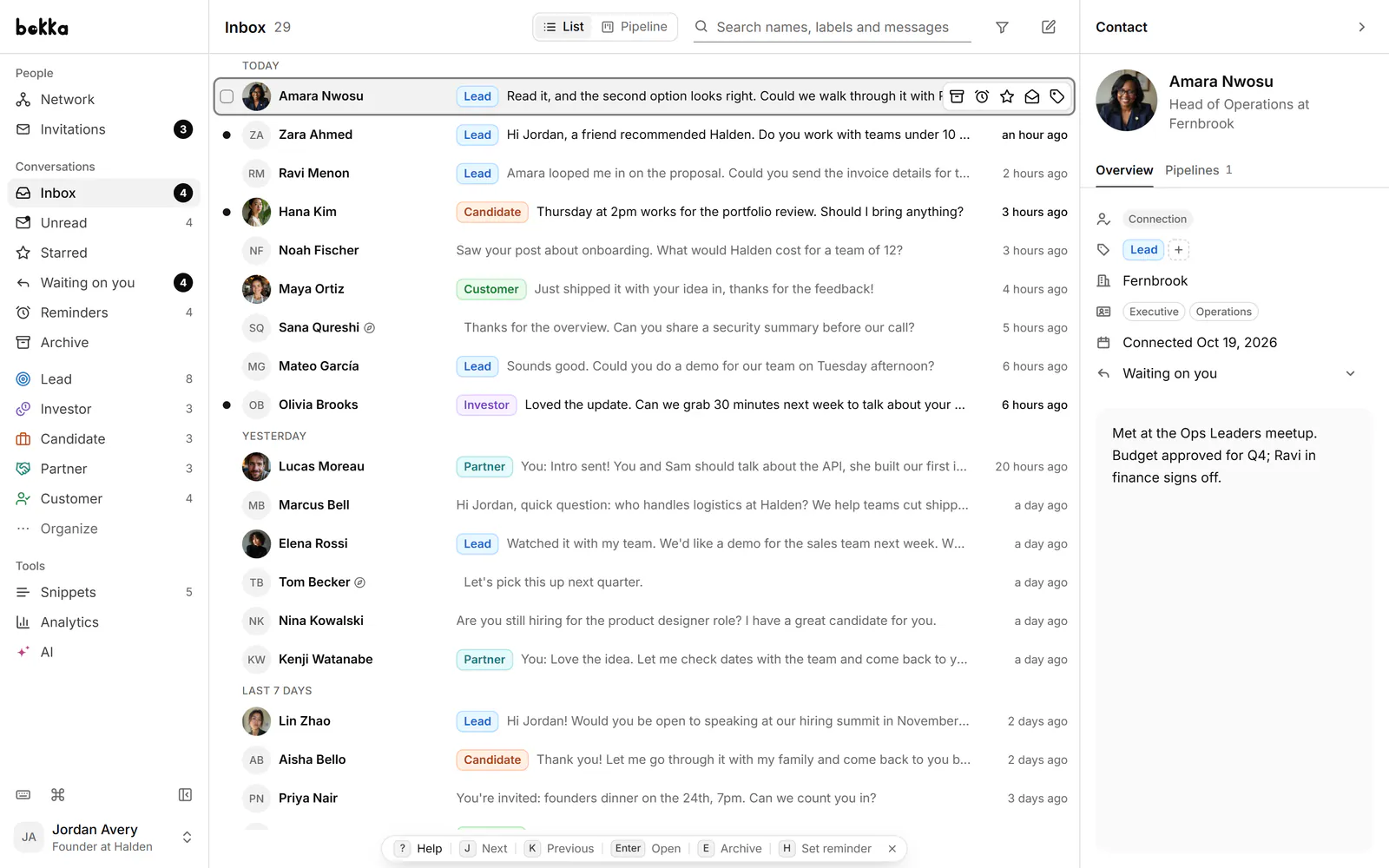
LinkedIn's phone app keeps unsent messages under a Drafts filter, which LinkedIn describes as "messages you started but haven't sent yet". On a computer, LinkedIn Help lists no Drafts filter, and it describes no save button in either place. To be sure of keeping a message on a computer, hold on to a copy yourself, or write it somewhere that keeps drafts.
A draft here means a message you've started and not sent. Bokka is an AI-first CRM for your LinkedIn inbox, and it keeps a draft for every conversation in one list.
What LinkedIn offers for message drafts
| Where | What LinkedIn Help describes |
|---|---|
| Phone app | A Drafts filter beside Jobs, Unread, Starred, InMail and My Connections |
| Computer | Filters for Jobs, Unread, My Connections, Starred and InMail, with no Drafts |
| Recruiter and Recruiter Lite | No InMail drafts; save the message as a template instead |
The filters come from LinkedIn Help: filter and search messages, retrieved October 30, 2026. On the phone, choose a category such as Focused, then tap Drafts. If you don't see it, swipe right and tap All filters. The Recruiter advice comes from LinkedIn Help: save a draft of an InMail, retrieved October 30, 2026.
LinkedIn Help doesn't say how long a draft lasts, or whether one started on your phone shows on your computer. Treat a long message as something that can be lost until it's sent.
How to keep a draft on a computer in LinkedIn
With no Drafts filter listed on a computer, the plain way is to keep your own copy:
- Write the message in a notes app or a document, not in the LinkedIn box.
- Add the person's name at the top, so you can find it again.
- When it's ready, paste it into the conversation and send it.
Can you save a draft to someone you haven't messaged yet?
LinkedIn Help doesn't say whether unsent text to a new person is kept. It does say who you can write to: your connections, or people you aren't connected to through a message request or an InMail (LinkedIn Help: send messages, retrieved October 30, 2026).
In Bokka you can, for a connection. Press C, or click Compose above the list, and pick the person in To. Write as much as you like and leave. The draft is kept for that person, with no conversation needed yet.
How drafts work in Bokka
- Write in any message box. There's no save button: your words are kept as you type.
- Press Esc to leave the box. What you wrote stays, and the conversation's row shows Draft: with the start of it.
- Press G, then E, to open Drafts. Every unsent message is there, latest first, whichever view its conversation is in.
- Press Enter or click a draft to go back to its message box.
Drafts to people with no conversation yet sit at the top of the view under New messages, and each opens New message to that person. If a conversation with them has started since, opening the draft moves it into that conversation. See Views and Start a new conversation.
Show Drafts in the sidebar
The Drafts view starts hidden in the sidebar. It still opens with G then E, from Filter and from the command palette. To keep it in view:
- Click Organize in the sidebar, below your labels.
- Click the eye next to Drafts.
What a Bokka draft keeps, and what it doesn't
- Your words last through a reload. Files you attached and a message you quoted last only while the tab stays open.
- The list needs words. A draft with a file and no text isn't listed.
- One browser only. Drafts stay in the browser you wrote them in. They aren't saved to LinkedIn or to our servers, so your phone and other browsers won't show them.
- Signing out removes them, and so does Clear data on this device in Settings.
- A draft leaves the list when you send or empty it.
- Message selected isn't listed. A message to several people at once stays in its own box.
Nothing is sent for you. A draft goes only when you press Send. If you connect an AI assistant on Pro, it can save a draft in a conversation's box, and it never sends a message.
About Bokka
Bokka starts with a free 14-day trial, AI included and no credit card. After it, Starter is $25 and Pro is $35 per user a month ($19 and $30 for your first month). Team, at $50, is coming soon.
Frequently asked questions
Does LinkedIn save message drafts?
LinkedIn's phone app has a Drafts filter for messages you started but haven't sent. LinkedIn Help lists no Drafts filter on a computer, and it doesn't say how long a draft lasts.
Where do I find my LinkedIn message drafts?
On the phone app, open Messaging, choose a category, then tap the Drafts filter. If it isn't showing, swipe right and tap All filters.
Can I save a LinkedIn draft to someone I haven't messaged yet?
LinkedIn Help doesn't say. In Bokka you can write to a connection from New message and leave. The draft is kept in that browser and shows under New messages in the Drafts view.
Do Bokka drafts show up on LinkedIn?
No. Bokka drafts stay in the browser you wrote them in, and signing out removes them. They reach LinkedIn only when you send the message.
Sources
Other products' prices and features were read on their own pages on October 30, 2026. They change; check each page before you buy.
Join the waitlist for early access to Bokka. Your first 14 days are free, AI included, with no credit card. It runs in Chrome, Edge, Brave and Arc on a desktop or laptop.
Join the waitlistAbout the author
Amardeep Anand founded Bokka, the AI-first CRM for your LinkedIn inbox, and runs it from Deoghar, India. Questions or corrections: support@gobokka.com.
Related
How to set a reminder to follow up on a LinkedIn message
2 min read

Does LinkedIn have message folders? What to use instead
2 min read
Bokka vs LinkedIn messaging and the Sales Navigator inbox
2 min read
Can you schedule a LinkedIn message? Not in regular messaging
2 min read